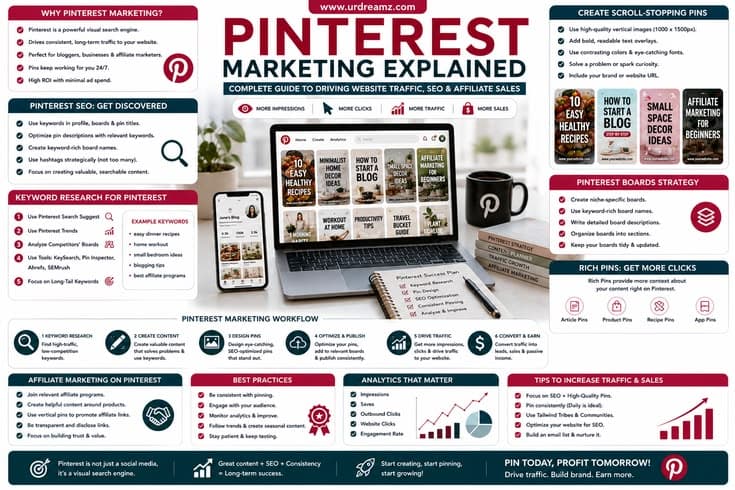
Pinterest Marketing Explained: Complete Guide to Driving Website Traffic, SEO and Affiliate Sales
Pinterest is unlike any other platform covered so far in this Digital Marketing Learning Center, and understanding why is the key to using it well. It isn't really social media in the traditional sense - it behaves far more like a visual search engine, where people actively search for ideas, inspiration, and solutions rather than simply scrolling to see what friends are doing. That single difference is why Pinterest remains one of the best sources of long-term, evergreen website traffic available to bloggers, affiliate marketers, and ecommerce brands in 2026. This guide covers the entire system: how Pinterest actually works, how to set up and optimize a business account, Pinterest SEO and keyword research, pin design, board strategy, Rich Pins, affiliate marketing, analytics, and a complete traffic growth roadmap, all explained in plain, practical terms rather than vague generalities.
This guide continues the Digital Marketing Learning Center and builds on everything covered so far: Blogger vs WordPress, Amazon Associates: Complete Guide to Affiliate Marketing, SEO for Beginners, Digital Marketing Explained, Content Marketing Complete Guide, Email Marketing Explained, Social Media Marketing Explained, Facebook Marketing Explained, and Instagram Marketing Explained. If you're building a blog or affiliate site, the SEO and content marketing guides pair especially well with everything below, since Pinterest's entire value depends on having genuinely good content to send traffic to.
1. What Is Pinterest Marketing? Is Pinterest a Search Engine or Social Media?
Pinterest marketing is the practice of using pins, boards, and a Pinterest business profile to drive traffic, build brand visibility, and generate sales - either directly through Pinterest Shopping or indirectly by sending clicks to a blog, website, or affiliate offer. While it looks like a social platform on the surface, with profiles, follows, and a feed, the way people actually use Pinterest is fundamentally different from how they use Instagram or Facebook, and understanding that difference is the single most important idea in this entire guide.
On Instagram or Facebook, people check in to see what their friends and the accounts they follow are doing right now. On Pinterest, people type a specific query into the search bar - "minimalist living room ideas," "keto dinner recipes," "how to start a blog" - the exact same way they'd search Google. This is why marketers increasingly describe Pinterest as a visual search engine rather than traditional social media, and it's also why Pinterest content behaves so differently: a pin published today can continue generating clicks and impressions for months or even years, long after a Facebook post or Instagram Reel from the same day has completely disappeared from anyone's feed.
This distinction is exactly why businesses use Pinterest and why bloggers in particular love it. A blogger publishing a recipe, a travel guide, or a personal finance article can create pins pointing back to that article, and those pins keep working quietly in the background, discovered by new searchers every single day, without requiring constant new content the way Instagram or TikTok often demands.
It's worth being honest about what Pinterest is not, as well. It won't replace the community-style engagement of Instagram, the real-time conversation of X, or the professional networking of LinkedIn - and trying to use it that way usually leads to disappointment. Where Pinterest genuinely excels is as a discovery and traffic engine sitting quietly upstream of your actual content, patiently sending a steady trickle of new visitors to a blog, store, or offer, month after month, long after the original pin was published.
2. How Pinterest Works: The Core Ecosystem
Before diving into strategy, it helps to understand the basic building blocks Pinterest is built from.
| Element | What It Is |
|---|---|
| Pins | The individual pieces of visual content - an image or short video linked to a destination URL |
| Boards | Collections that organize pins by topic, similar to folders |
| Profile | Your business or personal account, including your bio, boards, and pin history |
| Search | The core discovery mechanism, where users type queries the same way they would on Google |
| Home feed | A personalized stream of recommended pins based on a user's past activity and interests |
| Related pins | Additional recommendations shown after a user clicks into a specific pin |
| Saves | When a user bookmarks a pin to one of their own boards for later - a strong engagement signal |
| Outbound clicks | When a user clicks through a pin to the actual destination website - the metric that matters most for traffic-driven businesses |
Put simply, the typical journey looks like this: a user opens Pinterest, types a keyword into the search bar, Pinterest displays a set of relevant pins based on that keyword and its own ranking signals, the user opens a pin that catches their attention, and if the pin and its description promise something worth clicking for, the user visits the linked website - at which point that visitor becomes a real, measurable source of traffic for the business or blog behind that pin.
What makes this loop so valuable compared to most social platforms is that it doesn't require the original creator to be present at all. A Facebook post depends on the algorithm showing it in a fairly narrow window right after publishing; a Pinterest pin, by contrast, can be discovered by someone searching that exact keyword six months from now with essentially the same chance of earning a click as it had in its first week. This is the mechanical reason behind Pinterest's reputation for "evergreen" traffic - the search-based discovery model simply doesn't have the same short shelf life that a chronological or engagement-weighted social feed does.
3. Why Pinterest Is Worth the Effort
Beyond the search-engine framing, there are several concrete reasons Pinterest consistently earns a place in a serious digital marketing strategy.
- Pinterest traffic is high-volume and highly targeted, since users arrive already searching for something specific
- Pins have long-lasting reach - a single well-optimized pin can keep generating clicks for months or years, unlike most social content
- Pinterest is inherently commercial - a large share of users are actively planning a purchase or project, not just browsing for entertainment
- The platform reaches a genuinely international audience across many countries and languages
- It rewards consistency and quality more than constant real-time engagement, making it a good fit for people who can't be online all day replying to comments
- It's mobile-friendly and quick to use, which keeps engagement high across a huge, active user base
Taken together, these traits make Pinterest especially well suited to blogging, affiliate marketing, ecommerce, and digital product businesses - anywhere the goal is to convert a search-driven visitor into a website visitor, subscriber, or customer.
It's also worth noting who actually uses Pinterest, since the platform's audience skews meaningfully toward people in an active planning or purchasing mindset - researching a home renovation, planning a wedding, picking a recipe for the week, or looking for a gift idea. This "high commercial intent" audience is a large part of why Pinterest traffic tends to convert at a noticeably higher rate than traffic from platforms built primarily around entertainment and passive scrolling.
4. Setting Up a Pinterest Business Account
Before any content or SEO strategy matters, your account needs to be set up correctly on a business (not personal) profile, since only business accounts unlock analytics, Rich Pins, and advertising tools.
| Setup Step | What to Do |
|---|---|
| Create a business account | Sign up directly as a business, or convert an existing personal account through account settings |
| Choose a clear, searchable profile name | Include your brand name plus a relevant keyword where natural |
| Write a keyword-rich, benefit-driven bio | Clearly state who you help and how, using the language your audience actually searches |
| Add a professional profile photo | A clean logo or clear headshot that stays recognizable at a small size |
| Claim your website | Verifying your domain adds your profile photo to every pin linking back to your site and unlocks analytics for that domain |
| Enable Rich Pins | Connect your website's metadata so pins automatically display extra details like article titles or pricing |
| Set up Pinterest Analytics | Confirm your business account and claimed website are properly linked so performance data starts tracking |
Claiming your website deserves particular attention, since it's one of the most commonly skipped steps by beginners. Once claimed, every pin created from your website automatically carries your branding, and you gain access to detailed analytics specifically for your domain's performance on Pinterest - data that's essential for the SEO and content decisions covered later in this guide.
It's also worth deciding upfront whether a business account or a creator account better fits your situation, since Pinterest, much like Instagram, offers both. A straightforward business account is usually the right choice for a blog, ecommerce store, or brand account focused primarily on driving website traffic and sales. A creator-style presence, built more around a personal brand and audience relationship, can still access the same business tools underneath - so the decision is less about which features you unlock and more about how you want to present yourself to the people discovering your pins.
5. Pinterest SEO Explained: How Ranking Actually Works
Pinterest SEO is the process of optimizing your profile, boards, and pins so they appear when someone searches for a relevant term - functioning almost identically in spirit to traditional Google SEO, just within Pinterest's own search index and visual ranking system.
| Ranking Factor | Why It Matters |
|---|---|
| Keyword relevance | Pinterest matches search queries against the text in your titles, descriptions, and board names |
| Fresh pins | New, unique images tend to get an initial visibility boost compared to repeatedly reused graphics |
| Image quality and clarity | Pinterest's visual recognition systems can actually "read" what's inside an image, not just the surrounding text |
| Engagement (saves, clicks, close-ups) | Strong early engagement signals to Pinterest that a pin deserves wider distribution |
| Click-through rate | Pins that reliably earn clicks when shown are treated as more relevant and useful |
| Website quality and load speed | Pinterest favors sending traffic to sites that provide a genuinely good landing experience |
| Account and pin consistency | Regularly active, consistently niche-focused accounts tend to build more search authority over time |
A crucial and often-missed detail is that Pinterest's algorithm doesn't just read your pin title and description - its visual AI actually analyzes what's inside the image itself. This means a pin titled "minimalist travel packing" should visually show a suitcase or organized packing cubes, not an unrelated stock photo, since a mismatch between the visual content and the stated topic can quietly hurt how well that pin ranks.
Another important parallel to draw from traditional SEO is the idea of search intent. Just as a Google searcher typing "best running shoes" wants something different from one typing "how running shoes are made," a Pinterest searcher's intent shifts depending on the specificity and phrasing of their query. Someone searching a broad term like "healthy recipes" is often still browsing broadly, while someone searching "high protein meal prep for weight loss" has a much clearer, more specific need - and content built specifically around that narrower intent tends to convert at a noticeably higher rate, even with a smaller total search volume behind it.
Where exactly should keywords go?
| Location | Keyword Placement |
|---|---|
| Profile name | Include one core, high-value keyword alongside your brand name |
| Bio | Naturally describe what you help with, using real search terms |
| Board titles | Use the exact phrase your audience would search for that topic |
| Board descriptions | Expand naturally on the board's topic with related keywords |
| Pin titles | Lead with the primary keyword, kept clear and specific |
| Pin descriptions | Explain the value of the content while including secondary keywords naturally |
| Image text overlay | Reinforce the topic visually, since Pinterest's AI reads on-image text too |
| Alt text | Add a clear, descriptive alt text for both SEO and accessibility |
| Landing page | Make sure the linked page actually delivers on what the pin promises |
6. Pinterest Keyword Research: A Complete Process
Keyword research on Pinterest works differently from Google keyword research in a few important ways, but the underlying goal is identical: find the exact phrases real people are typing in, then build content and pins around those specific phrases.
| Research Method | How to Use It |
|---|---|
| Pinterest search bar autosuggest | Type a broad topic and note the auto-suggested phrases Pinterest recommends |
| Pinterest Trends tool | Identify rising, seasonal search demand so you can create content ahead of the trend |
| Google and Google Trends | Cross-check demand for a topic outside Pinterest to confirm broader search interest |
| Competitor research | See which keywords and pin styles are already working well for similar accounts in your niche |
| Pinterest Analytics | Review which of your own existing pins and keywords are already driving impressions and clicks |
| AI tools | Use an AI assistant to brainstorm keyword variations and long-tail phrasing quickly |
It's worth understanding the different categories of keywords you'll encounter, since each plays a different role in a content strategy: long-tail keywords are specific, lower-competition phrases (such as "cinema-style home theater ideas" rather than just "home decor"); seasonal keywords spike around specific times of year and should be created and pinned weeks in advance; evergreen keywords maintain steady, year-round search demand; and buyer or commercial keywords signal someone close to a purchase decision, which matters enormously for affiliate marketing and ecommerce content specifically. Informational keywords, by contrast, signal someone still in the research or learning phase - valuable for building authority and trust even if they don't convert immediately.
A consistent theme across nearly every up-to-date Pinterest strategy is favoring specific, long-tail keywords over broad, generic ones. Targeting "home decor" broadly means competing against enormous, well-established accounts and content; targeting "cinema interior design ideas" or "minimalist Scandinavian living room decor" gives your content a realistic chance to actually rank and get discovered by the exact audience searching for that specific idea.
A simple but effective keyword research routine is to keep a running spreadsheet organized by content category, listing the primary keyword, a handful of related long-tail variations, and rough notes on whether that term feels seasonal, evergreen, or commercially intent-driven. Referring back to this list before designing every new pin - rather than improvising titles and descriptions on the fly - keeps your SEO effort consistent instead of accidentally becoming an afterthought once the design work starts.
7. How the Pinterest Algorithm Works
Pinterest's algorithm exists to match each individual searcher with the pins most likely to be genuinely useful to them, based on a combination of the factors below.
- Freshness - newly created, unique pins generally get an initial test push to a small audience
- Click-through rate - pins that earn clicks when shown are pushed to a wider audience
- Keyword relevance across your title, description, board, and even the image itself
- Image quality - clear, well-composed, high-resolution visuals consistently outperform blurry or cluttered ones
- User engagement - saves, close-ups, and clicks all factor into ongoing distribution
- Board relevance - a pin saved into a well-organized, topically focused board tends to perform better than one dropped into a mismatched board
- Website quality - Pinterest has an incentive to avoid sending users to low-quality, slow, or spammy sites, so landing page experience matters
- Account authority - consistently active, niche-focused accounts build up trust and reach over time
- Pin consistency - accounts that publish fresh pins regularly tend to maintain stronger ongoing visibility than accounts that post in occasional bursts
A practical implication of this system is the idea of a "warm-up phase" for new accounts. Rather than immediately publishing dozens of pins per day, new or newly reactivated accounts generally benefit from starting slower - one or two fresh pins daily - and gradually increasing volume as the account builds a track record. Flooding a brand-new account with a huge volume of pins all at once, especially reused or near-identical images, can trigger spam-detection systems rather than accelerating growth.
It's worth remembering that Pinterest, like every platform covered in this series, periodically adjusts exactly how heavily it weighs these factors. A shift toward favoring video pins, a change in how aggressively fresh pins are prioritized over older ones, or a new emphasis on landing page quality can all happen without a formal announcement. Building a habit of checking your own Analytics every few weeks - watching for unexplained shifts in impressions or click-through rate - remains the most reliable early warning system for exactly this kind of change.
8. Pinterest Profile Optimization
Your profile is the first impression for anyone who clicks through from a pin to see who created it, and a well-optimized profile builds enough trust to earn a follow, not just a single click.
| Element | Best Practice |
|---|---|
| Profile photo | Clear, simple, and recognizable even at a small size |
| Username | Short, brand-consistent, and easy to search for |
| Business name | Include a relevant keyword alongside your actual brand name |
| Bio | Keyword-rich and benefit-driven, clearly stating who you help and how |
| Website link | Point to your claimed, verified domain |
| Location | Include if relevant to a local business audience |
| Contact details | Make it easy for potential collaborators or customers to reach you |
| Branding consistency | Match colors and style across your profile, boards, and pins |
A strong example bio structure looks like this: state who you help, state what you help them do, then briefly list a few core topics or categories, similar to "Helping beginners grow on Pinterest, build passive income, and create faceless online businesses - Pinterest tips, affiliate marketing, Canva design, and AI tools." This kind of bio does double duty: it reads naturally to a human visitor while still packing in several genuinely searchable keywords.
9. Pinterest Board SEO and Organization
Boards are far more than simple folders - each one is its own searchable, indexable page on Pinterest, which means board SEO deserves the same care as pin SEO.
- Use specific, keyword-rich board titles rather than vague, one-word labels
- Write a genuine, detailed board description that naturally includes related keywords
- Choose an accurate board category so Pinterest can classify it correctly
- Keep each board focused on a single clear topic rather than mixing unrelated content
- Fill boards consistently with a healthy mix of your own and relevant third-party content
- Feature your most important, best-performing boards near the top of your profile
- Use secret boards for personal or unrelated content you don't want publicly associated with your brand
A useful starting structure for a new account is building around five to ten core boards that map directly to your main content categories - for a Pinterest and blogging-focused account, for example, boards like "Pinterest Marketing Tips," "Blogging for Beginners," "Affiliate Marketing Ideas," "Canva Design Tips," and "Passive Income Ideas" each give Pinterest a clear, specific topic to associate with your account, which strengthens your overall topical authority in the same way a well-organized blog category structure helps with Google SEO.
10. Pin Design Best Practices
Great pin design is the difference between a piece of content that gets scrolled past and one that earns a click, a save, and eventually a loyal follower.
| Design Element | Best Practice |
|---|---|
| Dimensions | Vertical format, roughly a 2:3 ratio, commonly 1000 x 1500 pixels |
| Title length | Clear and specific, generally in the 40-60 character range |
| Description length | Detailed but scannable, typically 100-180 characters |
| Colors | High contrast, on-brand, and consistent across your pins for recognizability |
| Fonts | Bold, easily readable even at a small thumbnail size |
| Call to action | Clear text like "Get the Recipe" or "Read the Full Guide" |
| Branding | A small, consistent logo placement that doesn't overwhelm the image |
| Whitespace | Enough breathing room that the design doesn't feel cluttered or hard to read at a glance |
Beyond the technical specs, the psychological hook matters just as much as the visual polish. A strong pin title creates an "open loop" that makes the viewer want to know more - something like "I tried selling digital products for four months, here's what happened" pulls a click far more effectively than a flat, generic label like "digital products guide." Popular pin formats worth rotating through include how-to pins that teach something step by step, list pins that promise a specific number of ideas or tips, checklist pins offering clearly actionable steps, and before-and-after pins that visually demonstrate a transformation.
A smart efficiency habit is designing multiple pin variations from a single piece of content rather than creating one pin per idea. From one blog post, you can realistically produce one original pin design, a few alternate headline variations, and a few alternate image or color variations - turning a single idea into five to seven distinct pins that Pinterest can test independently to see which resonates best with searchers.
A useful title formula worth keeping on hand for how-to and problem-solving content follows a simple "How to [achieve result] without [common obstacle]" structure - for example, "How to Grow on Pinterest Without an Existing Following." This formula works because it simultaneously states the benefit and pre-emptively removes the most common objection a searcher might have, which tends to earn stronger clicks than a flatter, more generic title covering the same underlying topic.
11. Using Canva for Pinterest Design
Canva has become the default design tool for most Pinterest marketers, largely because it removes the need for professional design skills while still producing polished, on-brand graphics.
- Use Canva's built-in Pinterest pin templates as a fast starting point, then adjust colors and fonts to match your brand
- Set up a Brand Kit with your exact brand colors, fonts, and logo so every new pin stays visually consistent
- Use Magic Resize to quickly adapt one design into multiple sizes for different platforms
- Take advantage of Canva's AI image tools when you need a custom visual and don't have an existing photo
- Batch-design a full month of pins in one sitting using duplicated templates, rather than starting from scratch every time
For creators without access to a laptop, Canva's mobile app is fully capable of producing professional pin designs directly from a phone - select a Pinterest pin template, swap in a high-resolution image, add your text overlay, and export directly to the correct dimensions, all without ever needing a desktop computer.
12. Pinterest Content Strategy and Content Mix
A sustainable Pinterest strategy needs a healthy mix of content types rather than pinning the same style of content endlessly. A commonly recommended starting mix looks roughly like this: about forty percent educational content that teaches something useful, twenty-five percent how-to or step-by-step content, fifteen percent inspirational content, ten percent promotional content, and the remaining ten percent case studies or results-driven proof.
On posting frequency, a gradual ramp-up tends to work best: roughly three to five pins a day in the first month while the account is still establishing trust, five to ten a day in the second month, and ten to fifteen a day by the third month and beyond, once the account has an established, healthy track record. Spacing pins throughout the day, rather than uploading everything in one single batch, also tends to perform better than a single daily dump.
Repurposing existing content is one of the most efficient habits a Pinterest marketer can build. Every blog post, product, or piece of content can realistically generate multiple pins over its lifetime - refreshing the design periodically and testing new titles keeps a single piece of content contributing new traffic long after its original publish date, without requiring any new writing or product development at all.
A content calendar, even a simple one, makes this entire system far easier to sustain. Rather than deciding what to design each morning, block out a recurring weekly session - even just an hour - dedicated purely to batch-creating the next week or two of pins from your existing content library. This single habit is often the difference between an account that pins consistently for years and one that starts strong for a month before quietly fizzling out once the initial motivation fades.
13. Rich Pins Explained
Rich Pins automatically sync extra information from your website directly onto your pins, making them more informative and often more clickable than a standard image pin.
| Rich Pin Type | What It Displays |
|---|---|
| Article Rich Pins | Headline, author, and a short description pulled directly from your blog post |
| Product Rich Pins | Real-time pricing, availability, and product details pulled from your store |
| Recipe Rich Pins | Ingredients, cook time, and serving size pulled directly from a recipe page |
Setting up Rich Pins involves adding specific metadata tags to your website (often handled automatically by common blogging and ecommerce platforms) and then validating that setup through Pinterest's own Rich Pin validator tool. Once approved, every future pin created from your site automatically inherits this extra detail, which tends to build more trust and context for a searcher deciding whether to click through.
14. Pinterest for Bloggers: Turning Pins Into Website Traffic
Bloggers are, in many ways, the ideal Pinterest users, since the platform was practically built for exactly this use case: publish helpful content, then use visually compelling pins to send a steady, compounding stream of visitors back to that content. Recipe blogs, health and wellness blogs, personal finance blogs, parenting blogs, travel blogs, and DIY or home decor blogs all consistently perform well on Pinterest, largely because these topics naturally lend themselves to strong, benefit-driven visuals and clear, specific searches.
The core traffic loop for a blogger looks like this: publish a genuinely useful article, design several pin variations for that article, optimize each pin's title and description with real keywords, save those pins to the most relevant boards, and then let Pinterest's search and recommendation systems do the ongoing work of surfacing that content to new searchers over time. Unlike a blog post shared once on Facebook or Twitter, a single well-optimized pin can realistically keep generating clicks for years, which is exactly why so many established bloggers describe Pinterest as their single largest traffic source.
15. Pinterest Affiliate Marketing: A Complete Framework
Pinterest affiliate marketing turns Pinterest's search-driven traffic into a genuine monetization channel by placing affiliate links either directly on pins or, more commonly, by routing traffic through a blog post or simple landing page first.
| Monetization Path | How It Works |
|---|---|
| Direct-to-link | The affiliate link is placed directly as the pin's destination URL |
| Bridge page or content funnel (recommended) | The pin links to a blog post or simple landing page first, which then links to the affiliate offer |
Most experienced Pinterest affiliate marketers recommend the bridge page approach over direct linking. Routing traffic through your own blog post or landing page first keeps your account safer from spam-detection systems (since some networks and shortened links are restricted on Pinterest), and just as importantly, it gives you the chance to capture an email address before sending the visitor onward - turning a one-time click into a long-term, ownable audience relationship rather than a single anonymous visit.
Popular, well-established affiliate networks that pair naturally with Pinterest traffic include Amazon Associates for everyday physical products, LTK or ShopStyle for fashion, beauty, and lifestyle content specifically, and broader networks like ShareASale or Rakuten Advertising for a wider range of brand partnerships across different niches.
Choosing a niche with genuinely strong affiliate potential matters just as much as the tactics used to promote it. Niches like personal finance, home organization, beauty and skincare, fitness, and digital products tend to perform especially well on Pinterest specifically, because they combine high search volume with a naturally visual presentation and a searcher audience already primed to consider a purchase. Rather than picking a niche purely based on potential earnings, most successful Pinterest affiliate marketers recommend choosing something you can realistically sustain content for over many months, since the compounding nature of Pinterest traffic rewards patience far more than short bursts of enthusiasm.
Applying core Pinterest optimization principles to affiliate content
- Pin high-quality, on-topic graphics consistently rather than bulk-uploading in irregular bursts
- Use a scheduling tool to queue pins during your audience's peak activity windows
- Enable Rich Pins so your blog's metadata updates automatically across your pins
- Use bold, specific text overlays that state exactly what problem the linked product solves
- Pack pin descriptions, board titles, and your profile with genuinely relevant, high-volume keywords
- Double-check that every pin's destination link is active, correct, and properly tracked
- Use clear, specific calls to action such as "Click to Shop the Kitchen Organizer" rather than a generic "Learn More"
- Review your Pinterest Analytics regularly to see which pins and formats drive the most outbound clicks
- Collaborate with complementary creators through guest or group boards to reach a wider audience
- Tag relevant partner brands where appropriate to unlock additional visibility
Disclosure and Compliance Matter
Pinterest, like most major platforms and most countries' advertising regulations, requires clear and honest disclosure whenever a pin or its linked content involves a paid or commission-based relationship. In practice, this means clearly stating that you earn a commission - a simple, visible line such as "As an Amazon Associate I earn from qualifying purchases," or including a clear "#affiliate" tag early in your pin description, is both good practice and typically a legal requirement in many regions. Treat disclosure as a non-negotiable part of any affiliate strategy, not an optional formality, since it protects both your audience's trust and your own account standing.
16. Pinterest for Ecommerce
Ecommerce brands can extend far beyond simple affiliate-style linking by using Pinterest's native shopping features. Platforms like Shopify, WooCommerce, and Etsy all support integrations that sync a full product catalog directly with Pinterest, enabling Product Rich Pins that display live pricing and availability, dedicated shopping ads, and organized product collections that function like a mini storefront directly inside Pinterest, all without requiring a shopper to leave the app before discovering exactly what a product costs and whether it's in stock.
For product-based businesses, treating Pinterest boards like a visual catalog - organized by product category, use case, or customer persona - tends to perform far better than a single generic "our products" board. Pairing organic product pins with a modest, well-targeted Pinterest Ads budget for your best-selling or most visually striking items is often the fastest way to convert Pinterest's naturally shopping-oriented audience into paying customers.
Seasonal planning deserves special emphasis for ecommerce specifically, since Pinterest users often begin searching for holiday, gift, and seasonal content months earlier than shoppers on other platforms - a searcher looking for Christmas gift ideas, for example, is frequently active on Pinterest as early as late summer. Ecommerce sellers who plan and publish seasonal pins well ahead of the actual season, rather than waiting until the peak shopping weeks, consistently capture far more of this early-planning traffic than those who only promote a sale once it's already live.
17. Pinterest Analytics: Metrics That Actually Matter
Pinterest Analytics, available directly through your business account dashboard, is where you move from guessing what's working to actually knowing.
| Metric | What It Tells You |
|---|---|
| Impressions | How many times your pins were shown in feeds or search results |
| Monthly views | The total reach of your content across a rolling monthly window |
| Saves | How many people bookmarked your pin - a strong signal of perceived value |
| Outbound clicks | How many people actually clicked through to your website - the metric most directly tied to business results |
| Click-through rate (CTR) | What percentage of people who saw a pin actually clicked it |
| Top pins | Which specific pins are driving the most engagement and traffic |
| Audience insights | Demographic and interest data about the people engaging with your content |
A common early question is whether a given number of monthly views is "good" - and the honest answer is that it depends heavily on niche, account age, and most importantly, what proportion of those views are actually converting into outbound clicks. A smaller account with fewer views but a strong click-through rate is often more valuable commercially than a much larger account with impressive view counts but very few people actually clicking through to the website. Rather than chasing an arbitrary views milestone, track your own outbound clicks and saves trend over time, and treat consistent month-over-month growth in those two numbers as the real sign of progress.
It's also worth understanding that Pinterest Analytics generally excludes your own views of your own pins from these counts, so the numbers you see genuinely reflect outside interest rather than your own activity while managing the account. Reviewing analytics on a fixed weekly schedule - rather than sporadically checking in whenever curiosity strikes - builds the same kind of disciplined feedback loop recommended throughout every other channel in this Digital Marketing Learning Center: identify your top-performing pin from the period, understand what made it work, and deliberately create more content following that same successful pattern.
18. A Complete Pinterest Traffic Growth Roadmap
Bringing everything together, here is a realistic, phased approach to building Pinterest traffic from a brand-new account.
| Phase | Focus |
|---|---|
| Phase 1: Build the foundation | Create your business account, choose a niche, and set a keyword-rich profile name and bio |
| Phase 2: Master Pinterest SEO | Research keywords and apply them across your pin titles, descriptions, boards, and bio |
| Phase 3: Create high-click pins | Design bold, benefit-driven pins in the correct dimensions with a clear call to action |
| Phase 4: Build a daily pinning system | Gradually scale from a few pins a day to ten-plus, spacing them throughout the day |
| Phase 5: Create a full traffic system | Connect Pinterest to a landing page and email list rather than pinning without any destination strategy |
| Phase 6: Build an email list | Offer a relevant freebie to convert Pinterest clicks into an owned, long-term audience |
| Phase 7: Add monetization | Layer in affiliate marketing and digital products once consistent traffic is flowing |
| Phase 8: Analyze and scale | Track impressions, saves, and outbound clicks weekly, then double down on your top performers |
Setting realistic expectations matters enormously here, since Pinterest is a long-term, compounding channel rather than a source of instant results. Month one is typically spent purely on learning and setup; month two is when early traffic growth usually becomes visible; month three often brings the first real clicks and, for monetized accounts, the first commissions; and by month six and beyond, established accounts frequently see genuinely compounding traffic and income that requires comparatively little new effort to maintain. The single biggest reason accounts abandon Pinterest is expecting month-one results, when the platform is specifically designed to reward patient, consistent effort over a much longer horizon.
It can help to reframe this timeline the same way you'd think about planting a tree rather than lighting a fire: a fire (like a viral social post) burns bright and fast but burns out just as quickly, while a tree takes real time to establish roots before it grows into something that keeps producing value on its own, year after year, with only modest ongoing care. Pinterest strategy, structured properly, behaves far more like the tree - unglamorous in the early months, but genuinely durable once established.
19. Pinterest Ads: A Brief Overview
Once organic pinning is established, Promoted Pins (Pinterest's advertising product) can accelerate reach for your best-performing content or a specific commercial offer. Because Pinterest's ad system builds directly on the same search and interest data used for organic ranking, ads tend to perform best when they target the same specific, long-tail keywords and clearly defined audiences already proven to work organically, rather than broad, generic targeting. As with any paid channel, starting with a modest budget on your single best-proven pin or offer, then scaling only once a clear, positive return is confirmed, is a safer approach than committing a large budget to untested creative.
20. Essential Pinterest Marketing Tools
| Tool | Main Use Case |
|---|---|
| Canva | Designing pins, boards covers, and branded templates |
| Adobe Express | An alternative design tool with quick templated graphics |
| Tailwind | Scheduling pins in advance and analyzing performance over time |
| Pinterest Trends | Identifying rising and seasonal search demand directly from Pinterest's own data |
| Pin Generator and similar AI tools | Batch-creating multiple pin design variations from a single blog post or product link |
| ChatGPT | Brainstorming pin titles, descriptions, and keyword variations quickly |
| Google Analytics | Confirming how much real website traffic and conversions are coming specifically from Pinterest |
| Google Search Console | Understanding how Pinterest-driven pages are also performing in regular Google search |
A sensible starter stack for a brand-new account is simply Canva for design and Pinterest's own native scheduling and analytics tools - a paid scheduler like Tailwind and AI batch-design tools become genuinely valuable once you're consistently producing enough content to justify the extra time savings.
21. Common Pinterest Marketing Mistakes to Avoid
| Mistake | Why It Hurts You |
|---|---|
| Keyword stuffing | Repeating the same keyword unnaturally can look spammy and hurt readability without actually improving ranking |
| Poor pin design | Tiny, unreadable text or cluttered layouts get scrolled past instantly |
| Inconsistent posting | Sporadic bursts of activity build far less account authority than steady, gradual consistency |
| Skipping Pinterest SEO entirely | Without keywords in the right places, even great content is nearly impossible to discover |
| Low-quality or mismatched images | Visuals that don't clearly represent the topic can hurt both engagement and algorithmic ranking |
| Duplicate pins | Repeatedly reusing the exact same image can trigger spam-detection systems |
| Choosing too many unrelated niches | Diluted, unfocused accounts build authority far more slowly than a clearly defined niche |
| Ignoring analytics | Without reviewing performance data, you keep repeating whatever isn't working |
| Weak or generic descriptions | Vague descriptions miss the chance to add keywords and a genuine reason to click |
| Posting without a strategy or destination | Pinning randomly, with no landing page or funnel behind it, wastes the platform's real commercial potential |
22. Pinterest Marketing Checklist
| Category | Checklist Items |
|---|---|
| Account setup | Business account created, website claimed, logo added, SEO bio written, Rich Pins enabled |
| SEO | Keyword-rich profile, optimized boards, keyword-focused pin titles, strong descriptions, relevant landing pages |
| Content | Fresh pins created regularly, vertical designs used, clear CTAs added, consistent branding maintained |
| Analytics | Top pins reviewed regularly, CTR monitored, outbound clicks tracked, low-performing pins refreshed |
Running through this checklist monthly - or quarterly once an account is well-established - keeps a Pinterest strategy from quietly drifting away from the fundamentals that actually drive results.
23. Final Roadmap: Where Pinterest Fits in Your Marketing Stack
Pinterest rewards exactly the same qualities as every other channel covered in this Digital Marketing Learning Center: genuine value, real SEO fundamentals, and patient, sustained consistency over months rather than days. Unlike Facebook or Instagram, where a strong content calendar needs to be refreshed constantly to stay visible, Pinterest content compounds - meaning the effort you put in this month keeps paying off for months or years afterward, provided the underlying SEO and design fundamentals are solid from the start.
Start with a properly claimed and optimized business account, build a handful of focused, keyword-rich boards, and commit to a consistent (even if modest) daily pinning habit rather than sporadic bursts. Layer in genuine keyword research before design, and design before promotion. This guide sits inside a larger Digital Marketing Learning Center that will continue expanding into LinkedIn Marketing, YouTube Marketing, X (Twitter) Marketing, TikTok Marketing, Reddit Marketing, Quora Marketing, Influencer Marketing, and AI Marketing - each one building on the SEO, content, and social foundations covered across this entire series.
If there's one single takeaway worth carrying forward from this entire guide, it's that Pinterest success is built, not guessed. Every account that has genuinely grown a large, converting audience got there through the same unglamorous combination covered above: real keyword research, consistent design and posting, honest analytics review, and enough patience to let the platform's naturally compounding nature actually do its work. There is no shortcut around those fundamentals, but there also isn't any mystery to them - anyone willing to follow this roadmap has a realistic path to building genuine, long-term traffic through Pinterest.
Frequently Asked Questions
Is Pinterest free to use for marketing?
Yes. A Pinterest business account, along with pinning, boards, and analytics, is completely free - Promoted Pins are the only paid feature, and they're entirely optional.
Is Pinterest good for blogging?
Yes, particularly for niches like recipes, home decor, personal finance, travel, and parenting, where visual, benefit-driven pins naturally attract searchers looking for exactly that kind of content.
How many pins should I publish daily?
A gradual ramp-up works best: a few pins daily for a brand-new account, scaling toward ten or more per day over the following months as the account builds a consistent track record.
Can Pinterest replace Google SEO?
No - Pinterest and Google SEO work best together rather than as replacements for each other. Pinterest tends to drive a different kind of visually motivated, search-intent traffic that complements rather than substitutes for organic Google rankings.
How long does Pinterest SEO take to show results?
Most accounts see early traffic growth within the second month and more meaningful, compounding results by month three to six, assuming consistent pinning and genuine keyword optimization throughout.
Does Pinterest work for affiliate marketing?
Yes, especially when affiliate links are routed through a blog post or landing page rather than linked directly, since this approach both protects your account from spam filters and lets you capture email subscribers along the way.
Is 200,000 monthly views on Pinterest good?
It depends heavily on niche and, more importantly, on how many of those views translate into actual outbound clicks - a smaller account with a strong click-through rate is often commercially more valuable than a larger one with weak conversion.
Why are my pins not getting impressions?
Common causes include weak or missing keywords, inconsistent posting, low-quality or mismatched images, and a brand-new account still in its early trust-building phase - most of which improve with consistent, SEO-focused pinning over time.