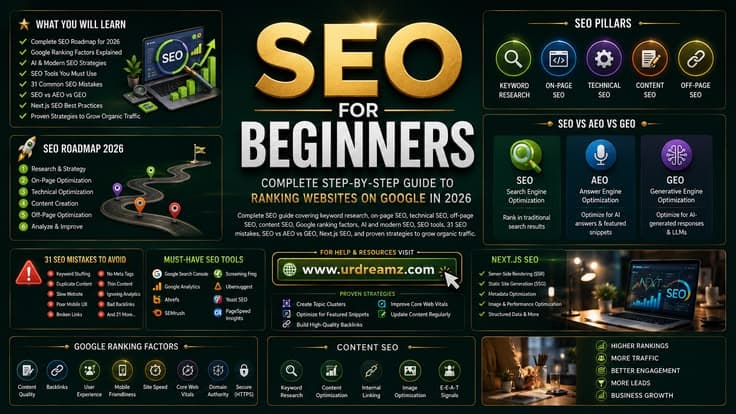
SEO for Beginners: Complete Step-by-Step Guide to Ranking Websites on Google in 2026
Search Engine Optimization is the most powerful long-term strategy available to anyone who wants to build a sustainable online presence without paying for every single visitor. Unlike paid advertising where your traffic stops the moment your budget runs out, organic traffic from SEO compounds over time, building authority and visibility that grows month after month. Yet despite being one of the most discussed topics in digital marketing, SEO remains widely misunderstood, poorly implemented, and unnecessarily intimidating to beginners. This complete guide changes that. Whether you are launching your first website, trying to grow an existing blog, building an affiliate site, or managing digital marketing for a business, this guide gives you a comprehensive, step-by-step understanding of every dimension of modern SEO, from foundational basics through to the cutting-edge developments in AI-powered search that are reshaping the industry in 2026.
1. What Is SEO and How Does It Work
Search Engine Optimization is the practice of improving a website's visibility in organic (non-paid) search engine results pages, primarily Google which processes approximately 8.5 billion searches every single day. When someone types a query into Google, the search engine uses a complex algorithm with hundreds of signals to determine which pages from its index best answer that query, and then presents them in ranked order from most to least relevant and authoritative.
SEO is the process of aligning your website, content, and online presence with what Google's algorithm considers valuable so that your pages appear higher in those rankings, attracting more organic visitors without paying for each click. Unlike paid search advertising (Google Ads), where you bid on keywords and pay per click, organic SEO traffic is free in the sense that you do not pay Google directly for each visitor. The investment is in content creation, technical optimization, and authority building.
Google's process for deciding what to show for any search works in three stages. First, crawling: Google's automated bots called Googlebot continuously browse the web, following links from page to page and discovering new content. Second, indexing: discovered pages are analyzed and stored in Google's massive database called the index. Third, ranking: when a user performs a search, Google's algorithm evaluates all indexed pages relevant to that query and ranks them based on hundreds of factors to deliver the most relevant and trustworthy results.
| Stage | What Happens | Your SEO Role |
|---|---|---|
| Crawling | Googlebot discovers pages by following links across the web and revisiting known pages | Ensure your site is crawlable with proper robots.txt, no crawl blocks on important pages, and a clear internal linking structure so Googlebot can find all your content |
| Indexing | Discovered pages are analyzed for content, quality, and context and added to Google's index database | Ensure pages load correctly, have unique and valuable content, and are not blocked from indexing. Submit XML sitemap to accelerate indexing |
| Ranking | When a search is performed, Google's algorithm evaluates indexed pages and ranks them by relevance and authority | Optimize for ranking factors including content quality, keyword relevance, page experience, backlinks, and E-E-A-T signals |
2. Types of SEO: On-Page, Off-Page, Technical and Content
| SEO Type | What It Covers | Key Focus Areas | Impact Level |
|---|---|---|---|
| On-Page SEO | Optimization of elements directly on your website pages including content, HTML tags, URL structure, and internal linking | Title tags, meta descriptions, heading structure, keyword placement, internal links, URL optimization, image alt text, content quality | Very High. Directly controls how Google understands your page |
| Off-Page SEO | Activities outside your website that influence how Google perceives your authority and trustworthiness | Backlink acquisition, guest posting, digital PR, brand mentions, social signals, influencer partnerships | Very High. Backlinks remain one of the most powerful ranking factors |
| Technical SEO | Optimization of your website's infrastructure to ensure Google can efficiently crawl, index, and understand your site | Page speed, Core Web Vitals, mobile friendliness, XML sitemap, robots.txt, canonical tags, schema markup, HTTPS, crawl budget | Very High. Without technical foundation, all other SEO efforts are limited |
| Content SEO | Creating, optimizing, and structuring content that satisfies both user intent and search engine requirements | Search intent matching, topical authority, pillar and cluster content, E-E-A-T, content freshness, semantic optimization | Very High. Content quality is the foundation that all other SEO builds upon |
3. How Google Ranks Websites: The Core Algorithm
Google's ranking algorithm considers over 200 known factors, but understanding the most important ones gives you an 80-20 framework where focusing on the top factors delivers the majority of results. Google has never published a complete list of ranking factors, but years of research, official documentation, SEO testing, and court documents from antitrust proceedings have revealed the core elements of how the algorithm works.
Relevance is the first principle. Google must believe your page actually answers the user's query. This involves matching the semantic content of your page to the intent and language of the search. It is not just about having the exact keyword present but about comprehensively covering the topic in the way that best serves the searcher's underlying need.
Authority is the second principle. Even perfectly relevant content will not rank highly if Google does not trust your website. Authority is built primarily through backlinks from other trusted websites, which function as votes of confidence. A link from a highly authoritative, relevant website carries far more weight than dozens of links from low-quality sources. Authority is also built through E-E-A-T signals, demonstrating that the people behind the content have real experience, expertise, authority, and trustworthiness in the subject matter.
Experience is the third principle. Google evaluates how users interact with search results. Pages that satisfy users with relevant content and a good experience are rewarded over time. Pages that users immediately leave (high bounce rate from a poor page experience) signal to Google that the page did not serve the need well.
4. Google Ranking Factors Explained
| Ranking Factor | Category | Importance | How to Optimize |
|---|---|---|---|
| Content Quality and Relevance | Content | Highest | Write comprehensive, original, accurate content that thoroughly satisfies the searcher's intent. Cover topics more completely than competing pages |
| Backlinks from Authoritative Sites | Off-Page | Very High | Earn links from relevant, trusted websites through great content, digital PR, guest posting, and relationship building |
| E-E-A-T Signals | Trust | Very High | Demonstrate real experience, expertise, and authority through author credentials, citations, reviews, and comprehensive topic coverage |
| Page Experience and Core Web Vitals | Technical | High | Achieve LCP under 2.5 seconds, CLS under 0.1, and good INP scores. Optimize images, server response, and layout stability |
| Mobile Friendliness | Technical | High | Ensure your site renders perfectly on mobile devices. Google uses mobile-first indexing meaning the mobile version is primary |
| Search Intent Match | Content | Very High | Align content format, depth, and angle precisely with what users expect when searching that keyword |
| Keyword Relevance | On-Page | High | Include target keywords naturally in title, H1, body content, and meta description. Use related and semantic keywords throughout |
| Internal Linking | On-Page | Moderate to High | Link related content together systematically. Pass authority from strong pages to newer content through strategic internal links |
| HTTPS Security | Technical | Moderate | Use SSL certificate. All pages should be served over HTTPS not HTTP |
| Page Speed | Technical | High | Minimize load time through image compression, caching, CDN, and efficient code |
| Schema Markup | Technical | Moderate to High | Implement structured data for rich results in search including FAQ, review, article, and product schemas |
| Content Freshness | Content | Moderate | Update time-sensitive content regularly. Display last updated dates on articles |
5. SEO vs AEO vs GEO vs AIO vs SXO: The 2026 Search Landscape
One of the most significant shifts in search marketing in recent years is the emergence of multiple distinct optimization disciplines alongside traditional SEO. Understanding how they differ and how they work together is essential for building a comprehensive search presence in 2026 when AI is fundamentally changing how people find information.
| Layer | Full Name | Purpose | Core Focus | Optimized For | Quick Takeaway |
|---|---|---|---|---|---|
| SEO | Search Engine Optimization | Help search engines discover, index, and rank your content so it appears in traditional search results | Keywords and intent, on-page and technical factors, backlinks | Google and Bing search results pages | SEO helps you get found |
| AEO | Answer Engine Optimization | Optimize content to be selected as the direct answer in featured snippets, voice search, and AI-generated answer boxes | Question-based content structure, FAQ sections, schema markup, clear and concise answers | Voice assistants, featured snippets, AI answer boxes, People Also Ask sections | AEO helps you become the answer |
| GEO | Generative Engine Optimization | Build brand and content authority so generative AI models cite, mention, or recommend your website in their responses | Topical authority, brand mentions across the web, consistency and credibility signals, being referenced by authoritative sources | ChatGPT, Google Gemini, Perplexity, Claude, and other AI chatbots | GEO helps AI remember you |
| AIO | AI Optimization | Structure content so AI systems can clearly understand context, entities, and meaning to improve how they interpret and recommend your content | Structured data, entity clarity, context-rich content that explicitly states who, what, when, where, and why | AI parsing engines, knowledge graphs, entity understanding | AIO helps machines understand you |
| SXO | Search Experience Optimization | Convert search visibility into engagement, trust, and business outcomes by optimizing the entire experience from search to conversion | Page speed, UX and UI design, clear calls to action, trust signals, content that converts | Human users who arrive from any search channel | SXO turns traffic into outcomes |
These five layers work as an interconnected system. Removing any one of them weakens the others. A website that ranks well in Google (SEO) but does not appear in AI answers (GEO) or does not convert visitors (SXO) is leaving significant value on the table. The most successful digital presences in 2026 optimize across all five layers simultaneously.
6. Keyword Research: Complete Beginner Guide
Keyword research is the process of identifying the specific words and phrases that your target audience types into search engines when looking for content, products, or services related to your niche. It is the foundation upon which all other SEO work is built because if you target the wrong keywords, no amount of technical optimization or content quality will deliver meaningful traffic from the right audience.
Effective keyword research begins with understanding your audience and their problems, not with typing words into a keyword tool. Before opening any tool, think about who your ideal reader or customer is, what problems they are trying to solve, what questions they have at different stages of their awareness journey, and what language they use when searching for information in your niche. This audience-first thinking shapes more effective keyword lists than starting with a tool.
Once you have a clear picture of your audience's needs, keyword tools help you quantify those needs in terms of search volume (how many people search monthly), keyword difficulty (how competitive the ranking is), and related terms you may not have considered. The goal is to find keywords with enough search volume to be worth pursuing, a realistic difficulty level given your website's current authority, and clear commercial or informational intent that matches what you can deliver.
| Step | Action | Tools to Use | Output |
|---|---|---|---|
| 1 | Brainstorm your niche topics and your audience's core questions and problems | Pen and paper, Google's People Also Ask section, Reddit, Quora | A list of 20 to 50 seed topic ideas |
| 2 | Expand seed topics into keyword lists using research tools | Google Keyword Planner, Ahrefs, Semrush, Ubersuggest, AnswerThePublic | Hundreds of potential keyword variations with volume and difficulty data |
| 3 | Evaluate keywords for search volume, difficulty, and intent | Ahrefs Keywords Explorer, Semrush Keyword Magic Tool | Filtered list of viable target keywords |
| 4 | Classify keywords by search intent (informational, commercial, transactional, navigational) | Manual SERP analysis. Look at what types of pages currently rank for each keyword | Keywords organized by intent type |
| 5 | Prioritize keywords based on your site's current authority and business goals | Your judgment plus competitor analysis | Final prioritized keyword list for content planning |
| 6 | Map keywords to specific pages or content pieces. One primary keyword per page | Spreadsheet or content calendar tool | Content plan with keyword assignments |
7. Search Intent: The Foundation of All SEO
Search intent, also called user intent or query intent, is the underlying goal or reason behind a search query. It is arguably the single most important concept in modern SEO because Google's algorithm has become extremely sophisticated at understanding what searchers actually want and rewarding pages that best satisfy that want, regardless of how perfectly they optimize other factors.
There are four primary types of search intent. Informational intent covers searches where the user wants to learn something. Queries like "how does SEO work" or "what causes hair loss" are informational. The user wants to understand a topic, not necessarily buy anything. Navigational intent covers searches where the user wants to find a specific website, brand, or page, such as "YouTube login" or "Amazon customer service." Commercial investigation intent covers searches where the user is researching before making a purchase decision, such as "best laptops for students" or "Ahrefs review." Transactional intent covers searches where the user is ready to take an action, often a purchase, such as "buy Ahrefs" or "download Rank Math plugin."
Mismatching your content format to search intent is one of the most common SEO mistakes. If someone searches "best SEO tools" with commercial investigation intent, they expect a roundup comparison article, not a definition of what SEO tools are. If your page provides the wrong format for the intent, Google will rank pages that match the format better regardless of your content quality on other dimensions.
| Intent Type | What the User Wants | Example Queries | Best Content Format |
|---|---|---|---|
| Informational | To learn, understand, or find information | "what is SEO", "how do backlinks work", "causes of diabetes" | Educational guides, how-to articles, definition pages, explainer content |
| Navigational | To find a specific website, brand, or page | "Ahrefs login", "Google Search Console", "YouTube homepage" | Usually brand or homepage. Cannot generally rank for competitor navigational queries |
| Commercial Investigation | To research options before making a decision | "best SEO tools", "Ahrefs vs Semrush", "top affiliate programs" | Comparison articles, reviews, best-of lists, buying guides |
| Transactional | To complete an action such as purchase, download, or sign up | "buy Ahrefs subscription", "download Yoast SEO", "sign up Semrush free trial" | Product pages, landing pages, download pages with clear CTAs |
8. Long-Tail Keywords vs Short-Tail Keywords
| Characteristic | Short-Tail (Head) Keywords | Long-Tail Keywords |
|---|---|---|
| Length | 1 to 2 words. Example: "SEO", "backlinks", "keyword research" | 3 or more words. Example: "how to do keyword research for a new website", "best long-tail keyword research tools for beginners" |
| Monthly Search Volume | Very high. Thousands to millions of searches monthly | Lower individually. Often 100 to 1,000 monthly searches each but enormous total volume across many terms |
| Competition Level | Extremely high. Dominated by established large authority sites | Low to moderate. Often possible for new sites to rank |
| Search Intent | Often vague and broad. Unclear what the searcher actually wants | Specific and clear. Easier to match content precisely to intent |
| Conversion Rate | Generally lower. Broad searches are early in the awareness journey | Generally higher. Specific searches indicate a more defined need or purchase readiness |
| Best For | Large established authority sites. Worth pursuing after significant authority is built | New and mid-authority sites. Early traffic and conversion wins |
| Strategy | Target as your site grows. Not a starting point for most sites | Foundation of early SEO strategy. Build topic clusters around long-tail terms to eventually rank for head terms too |
9. Keyword Clustering and Topical Authority
Keyword clustering is the practice of grouping related keywords together so they can be targeted by a single piece of content or by a coordinated group of content pieces. Instead of writing one article per keyword, you identify groups of semantically related keywords that collectively address a topic and create content that covers all of them simultaneously or through an interconnected content cluster.
Topical authority is the depth of coverage and perceived expertise your website demonstrates on a specific subject area. Google's algorithm increasingly rewards websites that comprehensively cover a topic area over those that publish isolated individual pieces. A website that has one hundred articles comprehensively covering every aspect of SEO from basics through advanced technical topics will be seen as significantly more authoritative on SEO than a website with five excellent individual SEO articles, even if those five articles are individually higher quality.
Building topical authority requires a pillar and cluster content strategy. A pillar article is a comprehensive guide covering a broad topic at an overview level, like this complete SEO guide. Cluster articles are individual focused pieces covering specific sub-topics in depth, like a dedicated article just on XML sitemaps, another just on Core Web Vitals, another just on keyword research. The pillar links to all cluster articles and all cluster articles link back to the pillar, creating a content hub that signals deep topical expertise to Google.
10. Ten Best Keyword Research Tools in 2026
| # | Tool | Best Feature | Cost | Best For |
|---|---|---|---|---|
| 1 | Ahrefs (ahrefs.com) | Keywords Explorer provides keyword opportunities, traffic potential, and SERP analysis with extremely comprehensive data. Also shows what keywords competitors rank for | Paid from 99 dollars monthly. Limited free tier | Professional SEOs, established sites with budget |
| 2 | Semrush (semrush.com) | Keyword Magic Tool discovers keyword ideas, search volume, difficulty, and related terms across multiple countries and languages | Paid from 119 dollars monthly. Limited free plan | Agencies and professional digital marketers |
| 3 | AnswerThePublic (answerthepublic.com) | Visualizes questions, comparisons, and preposition-based keyword variations that people actually type around any seed topic | Free limited daily searches. Paid from 5 dollars monthly | Content ideation and finding question-based keywords |
| 4 | Google Trends (trends.google.com) | Shows keyword popularity over time, seasonal trends, and geographic interest patterns. Essential for understanding trending topics | Free | Understanding keyword trends and seasonality |
| 5 | KWFinder by Mangools (mangools.com) | Find long-tail keywords with low SEO difficulty. Very beginner-friendly interface with clear difficulty scores | Paid from 29 dollars monthly. Limited free trial | Beginners and small site owners who need affordable tool |
| 6 | Google Keyword Planner (ads.google.com) | Google's own tool providing search volume and competition data directly from the source. Also shows seasonal trends | Free with Google Ads account (free to create) | Beginners and anyone wanting free data directly from Google |
| 7 | Ubersuggest (app.neilpatel.com) | Keyword Ideas section provides keyword suggestions, search volume, and SEO difficulty with a generous free tier | Free limited searches. Paid from 29 dollars monthly | Beginners and bloggers on limited budgets |
| 8 | WordStream (wordstream.com) | Keyword Generator discovers keywords along with search volume, competition data, and CPC estimates | Free tool available | Quick keyword discovery especially for paid and organic combined |
| 9 | KeywordTool.io (keywordtool.io) | Generates hundreds of long-tail keyword suggestions from Google Autocomplete, YouTube, Amazon, and other platforms | Free limited results. Paid from 89 dollars monthly for full data | Finding autocomplete-based long-tail keywords across platforms |
| 10 | ChatGPT (chatgpt.com) | Use AI prompts to discover and organize keyword ideas, build topical clusters, identify long-tail search queries, and brainstorm content angles from a user's perspective | Free tier available. Paid plans with advanced models from 20 dollars monthly | Brainstorming and organizing keyword clusters. Best combined with data from other tools |
11. On-Page SEO Complete Checklist
On-page SEO refers to all the optimization you can do directly within your webpage to improve its ranking potential. Every element you control on the page itself is an on-page SEO factor. Getting these elements right is foundational because they directly communicate to Google what your page is about, how relevant it is to a query, and how good an experience it provides to users.
| On-Page Element | Best Practice | Why It Matters |
|---|---|---|
| Title Tag | Include primary keyword near the beginning. Keep under 60 characters. Make it compelling and click-worthy | Title tags appear in search results and are one of the strongest on-page ranking signals |
| Meta Description | Write 150 to 160 characters including primary keyword and a clear value proposition. Should compel clicks | Directly influences click-through rate from search results even though it is not a direct ranking factor |
| H1 Tag | One H1 per page. Include primary keyword. Should align with but not necessarily be identical to title tag | Tells Google and users what the page is primarily about. Most important heading on the page |
| H2 and H3 Tags | Use H2 for major sections and H3 for subsections. Include secondary and related keywords naturally | Structure helps both users and Google navigate and understand content organization |
| Keyword in First 100 Words | Include your primary keyword or a close variation within the first paragraph of the article | Early keyword presence confirms topical relevance to Google immediately |
| Keyword Density | Use keyword naturally throughout. No specific target percentage. Avoid stuffing | Natural keyword use signals relevance without triggering over-optimization penalties |
| LSI and Semantic Keywords | Include related terms, synonyms, and topically associated words throughout content | Helps Google understand the full context and depth of your coverage |
| URL Structure | Short, descriptive, hyphen-separated, keyword-included URLs. No numbers or dates that require future updates | Clear URLs help Google understand page topic and improve user experience |
| Image Alt Text | Write descriptive alt text including relevant keywords where natural. Every image should have alt text | Helps Google index images for image search and improves accessibility for visually impaired users |
| Internal Links | Link to related pages within your site using descriptive anchor text. Minimum 2 to 5 internal links per article | Distributes page authority throughout your site and helps Google discover related content |
| External Links | Link to authoritative external sources where relevant to build trust and provide additional value | Outbound links to quality sources are a trust signal and help Google understand your content context |
| Content Length | Match length to what the query requires. Comprehensive content for competitive topics. Concise for simple queries | Content depth signals expertise. But longer is not always better. Length should serve the user's need |
| Affiliate Disclosure | Include clear affiliate disclosures on any content with affiliate links | Required by FTC. Also a trust signal to both Google and users |
12. Title Tags: How to Write Them Correctly
The title tag is the clickable headline shown in search results and is one of the most important on-page SEO factors. It is the first signal Google uses to understand what your page is about and the primary factor users evaluate when deciding whether to click your result or a competitor's.
Effective title tags follow a clear formula: primary keyword placed near the beginning, a compelling value proposition or qualifier that makes the title more specific and click-worthy, and the brand name at the end separated by a pipe or dash. Keep the total character count under 60 characters (approximately 580 pixels in display width) to prevent Google from truncating your title in search results.
Avoid common title tag mistakes including making them too generic, keyword stuffing multiple keywords into one title, making them identical to your H1 in every case, or writing them to sound natural in conversation rather than for search result scannability. Your title tag and H1 can be different. The title tag is optimized for the search result click while the H1 is optimized for the reader who has already clicked through to your page.
13. Meta Descriptions: Best Practices
Meta descriptions are the short text snippets that appear below the title in search results. Google does not use them as a direct ranking factor, but they profoundly affect click-through rates, and higher click-through rates signal to Google that your result is satisfying searchers, which indirectly contributes to rankings over time.
A great meta description is 150 to 160 characters long, includes the primary keyword (which Google bolds it in search results when it matches the search query, making it visually prominent), clearly states what value the reader will get from clicking, and includes a subtle call to action. Write your meta descriptions as advertising copy for your page, competing for the click against every other result on the page. Ask yourself what about this page most appeals to someone who has searched this query and lead with that.
Note that Google frequently rewrites meta descriptions when it determines its own version better matches the search query. You can see in Google Search Console when Google uses your description versus its own rewrite. Consistently writing high-quality, relevant descriptions that closely match search intent reduces the likelihood of Google overriding your description.
14. Heading Tags H1 to H6 Structure
| Tag | Usage | SEO Importance | Best Practice |
|---|---|---|---|
| H1 | The main page title or headline. Used exactly once per page | Highest. Primary signal of page topic to both Google and users | Include primary keyword. Make it compelling. One per page only |
| H2 | Major section headings that divide the main content into primary sections | High. Strong signals for secondary keyword targeting and content structure | Include secondary keywords naturally. Each H2 should introduce a distinct major section |
| H3 | Sub-section headings within an H2 section | Moderate. Useful for long-form content navigation and tertiary keyword coverage | Break long H2 sections into digestible subsections. Include related terms naturally |
| H4, H5, H6 | Further sub-sections within H3 sections. Rarely needed for most content | Low for SEO. Primarily serve content organization and readability | Only use when genuinely needed for deep content structure. Avoid for decoration |
15. Internal Linking Strategy for Better Rankings
Internal linking is one of the most powerful and most underutilized SEO tactics available. Every link you place from one page on your site to another transfers a portion of that page's authority (often called PageRank or link equity) to the linked page. This means that your most authoritative pages (those with the most external backlinks) can be used to boost the ranking power of your newer or weaker pages through strategic internal links.
An effective internal linking strategy follows a hierarchical hub-and-spoke model. Your pillar content pages are the hubs with the most internal links pointing to them because they are your most important ranking targets. Individual cluster articles link back to the pillar and to each other where naturally relevant. This creates a clear content architecture that Google can follow and understand, identifying your most important pages by how many internal links point to them.
Use descriptive anchor text for internal links. Rather than linking with generic phrases like "click here" or "read more," use anchor text that describes what the linked page is about such as "complete guide to technical SEO" or "how to build backlinks." This descriptive anchor text helps Google understand the topic of the destination page even before crawling it. Avoid orphan pages, which are pages on your site with no internal links pointing to them. Googlebot must discover pages through links, and pages with no internal links receive no authority from the rest of your site.
16. Image SEO Optimization
| Element | Best Practice | Why It Matters |
|---|---|---|
| File Name | Name image files descriptively using keywords and hyphens. Example: keyword-research-tools-comparison.jpg not IMG_23847.jpg | File names are read by Google as context signals for image content |
| Alt Text | Write descriptive alt text for every image explaining what it shows. Include relevant keywords where natural but prioritize accurate description | Primary way Google understands image content. Also essential for screen reader accessibility |
| File Size and Compression | Compress all images before uploading. Target under 100KB for most web images. Use tools like TinyPNG or ShortPixel | Large images are one of the most common causes of slow page load speeds which negatively impact rankings |
| File Format | Use WebP format for the best combination of quality and file size on the web. Use JPEG for photographs and PNG for images requiring transparency | Modern formats like WebP deliver 25 to 35 percent smaller file sizes than JPEG and PNG at equivalent quality |
| Dimensions | Size images at the actual display dimensions. Do not upload a 4000 pixel wide image that displays at 800 pixels | Oversized images waste bandwidth and slow page loading even if file size appears small |
| Lazy Loading | Implement lazy loading so images below the fold only load when the user scrolls to them | Dramatically improves initial page load speed and LCP score which is a Core Web Vitals metric |
| Image Sitemap | Include images in your XML sitemap or create a dedicated image sitemap | Helps Google discover and index images that may not be found through standard crawling |
17. URL Structure and Optimization
URL structure is both an on-page SEO factor and a usability consideration. A well-structured URL communicates the page topic to both Google and users at a glance, while a poorly structured URL creates confusion and missed ranking opportunities.
The principles of good URL structure are simplicity, keyword inclusion, and permanence. Keep URLs as short as possible while still being descriptive. Include your primary keyword in the URL but avoid keyword stuffing multiple keywords into one URL. Use hyphens to separate words, never underscores. Underscores are read by Google as joining words together while hyphens separate them correctly. Keep URLs lowercase because servers treat uppercase and lowercase differently and mixed-case URLs can create duplicate content issues.
Avoid including dates in your URLs if the content will be periodically updated. A URL like yoursite.com/blog/2024/keyword-research will need to either have outdated information in the URL when updated or redirect, while yoursite.com/keyword-research-guide remains permanently clean regardless of when you update the content. Avoid unnecessary stop words in URLs (a, an, the, is, are) unless they are genuinely part of a meaningful keyword phrase.
18. Technical SEO Complete Guide
Technical SEO encompasses all the behind-the-scenes work that makes your website accessible, understandable, and efficiently processable by search engines. While content quality drives what you rank for, technical SEO determines whether Google can even find, access, and properly evaluate your content in the first place. Technical problems that prevent Googlebot from crawling or indexing your pages can undermine all other SEO efforts.
| Technical Element | What to Do | Priority |
|---|---|---|
| HTTPS Security | Install SSL certificate. Ensure all pages are served over HTTPS. Implement HSTS for enforced secure connections | Critical. Google uses HTTPS as a ranking signal and Chrome marks HTTP sites as not secure |
| XML Sitemap | Create and submit an XML sitemap listing all indexable pages to Google Search Console. Update automatically when new content is published | High. Accelerates discovery and indexing of new content |
| Robots.txt | Configure robots.txt to guide crawlers, block irrelevant sections like admin areas and search result pages, and specify sitemap location | High. Incorrect robots.txt can accidentally block important pages from being indexed |
| Core Web Vitals | Achieve LCP under 2.5 seconds, CLS under 0.1, and good INP score. Use PageSpeed Insights to measure and identify improvements | High. Direct Google ranking factor as part of Page Experience signal |
| Mobile Friendliness | Ensure responsive design that works perfectly on all screen sizes. Test with Google's Mobile-Friendly Test tool | Critical. Google uses mobile-first indexing so mobile version is what Google primarily evaluates |
| Canonical Tags | Implement self-referencing canonical tags on all pages. Use canonical tags to consolidate duplicate content variations | High. Prevents duplicate content issues that can dilute ranking signals across similar pages |
| Schema Markup | Implement JSON-LD structured data for relevant schema types including Article, FAQ, Product, Organization, and BreadcrumbList | Moderate to High. Enables rich results in search and helps Google understand page content |
| Page Speed | Optimize images, minimize CSS and JavaScript, implement browser caching, use a CDN, optimize server response time | High. Page speed affects both Core Web Vitals scores and user experience |
| Crawl Errors | Regularly check Google Search Console Coverage report for crawl errors, fix 404s and redirect broken URLs | High. Crawl errors waste crawl budget and can prevent important pages from being indexed |
| Duplicate Content | Identify and resolve pages with substantially similar content. Use canonical tags or 301 redirects to consolidate duplicates | High. Duplicate content dilutes ranking signals and confuses Google about which version to rank |
| Security Headers | Implement security headers including Content Security Policy, X-Content-Type-Options, and X-Frame-Options | Moderate. Improves site security which is a trust signal |
| Pagination | Handle paginated content correctly using rel=next and rel=prev or through proper canonical tag implementation | Moderate. Incorrect pagination creates duplicate content and dilutes authority across page variants |
19. Core Web Vitals Explained
Core Web Vitals are a set of specific page experience metrics that Google uses as ranking factors. They measure real-world user experience on your pages across three dimensions of loading performance, visual stability, and interactivity. Understanding what each metric measures and how to improve it is essential for competitive SEO in 2026.
| Metric | Full Name | What It Measures | Good Target | How to Improve |
|---|---|---|---|---|
| LCP | Largest Contentful Paint | How long it takes for the largest visible content element (usually a hero image, video thumbnail, or large text block) to load and appear on screen | Under 2.5 seconds | Optimize images with compression and WebP format. Preload hero images. Use fast hosting and CDN. Eliminate render-blocking resources. Implement next/image in Next.js for automatic optimization |
| CLS | Cumulative Layout Shift | How much the visible content unexpectedly shifts around while the page loads, measured as a cumulative score where lower is better | Under 0.1 | Always specify width and height attributes on images and videos. Reserve space for ads and embeds before they load. Avoid inserting content above existing content dynamically without user interaction |
| INP | Interaction to Next Paint | Measures the responsiveness of the page to user interactions by tracking the delay between any click, tap, or keystroke and the visual response on screen. Replaced FID in March 2024 | Under 200 milliseconds | Minimize JavaScript execution time. Break up long tasks into smaller chunks. Optimize event handlers. Remove or defer unused JavaScript |
20. XML Sitemap and Robots.txt
An XML sitemap is a file that lists all the important pages on your website, providing metadata about each URL including when it was last updated, how often it changes, and its priority relative to other pages. Submitting your sitemap to Google Search Console ensures Google discovers and re-crawls your content efficiently, particularly for new pages that might not yet have many internal or external links pointing to them.
Your XML sitemap should include all pages you want Google to index and exclude pages you do not want indexed (admin pages, search result pages, duplicate pages). For WordPress, plugins like Yoast SEO and Rank Math generate and update your sitemap automatically. For Next.js sites, the next-sitemap package or custom dynamic sitemap generation handles this. Submit your sitemap URL in Google Search Console under Sitemaps in the left sidebar.
The robots.txt file is a plain text file located at yourwebsite.com/robots.txt that instructs search engine crawlers which pages or sections of your site they are allowed or not allowed to crawl. This is crucial for protecting admin areas, blocking search result pages that would create duplicate content, and conserving crawl budget by directing Google away from low-value pages. A key warning: robots.txt blocks crawling but not indexing. A page can appear in search results even if it is blocked in robots.txt. To prevent indexing, use a noindex meta tag instead of or in addition to robots.txt.
21. Schema Markup and Rich Results
Schema markup is code (typically written in JSON-LD format and placed in the page's head section) that provides explicit, structured information to search engines about the content on your page. When search engines understand your content through schema, they can display enhanced rich results in search pages that go beyond the standard title, URL, and description.
Rich results include star rating displays for product and review pages, FAQ drop-downs that show answers directly in search results, event date and location information, recipe cooking times and ratings, video thumbnail carousels, and much more. Rich results dramatically increase the visual appeal and click-through rate of search results compared to standard listings. Pages with rich results consistently outperform equivalent pages without them on click-through rate metrics.
| Schema Type | Rich Result It Enables | Best Used On |
|---|---|---|
| Article | Enhanced article display with publication date and author in search results. May contribute to Top Stories carousel | News articles, blog posts, guides, how-to content |
| FAQPage | Expandable FAQ questions and answers directly visible in search results. Significantly increases SERP real estate | Any page with a FAQ section answering common user questions |
| HowTo | Step-by-step instructions displayed in search results with images for each step | Tutorial and instructional content with clear steps |
| Product | Price, availability, and rating stars visible in search results for product pages | E-commerce product pages |
| Review and AggregateRating | Star rating display in search results. One of the most impactful for click-through rate | Product reviews, service reviews, business listings |
| Organization | Knowledge panel information including logo, contact details, and social profiles | Homepage and About page of businesses and organizations |
| BreadcrumbList | Breadcrumb navigation visible in search results URL showing page hierarchy | All pages within a structured site hierarchy |
| LocalBusiness | Enhanced business information including hours, address, and phone number in local search results | Local business websites and location pages |
22. Mobile SEO and Mobile-First Indexing
Google officially moved to mobile-first indexing, meaning it primarily uses the mobile version of a website to determine how it should rank in search results for all users, whether on mobile or desktop. This means if your mobile site has less content than your desktop version, fewer internal links, or a degraded user experience, your rankings across all devices will suffer because Google's evaluation is based on the mobile version.
Essential mobile SEO requirements include a fully responsive design that adjusts correctly to any screen size, text that is readable without zooming on a mobile screen, tap targets (buttons, links) that are large enough and sufficiently spaced to be easily tapped on a touchscreen, no content that requires plugins like Flash which mobile browsers do not support, and equivalent content between your mobile and desktop versions with no mobile-only content hiding that would show more on desktop.
Test your mobile performance using Google's Mobile-Friendly Test tool and the Mobile Usability report in Google Search Console which identifies specific mobile issues on your site. Also test your Core Web Vitals specifically on mobile using the Google Search Console Core Web Vitals report which shows separate data for mobile and desktop performance.
23. Technical SEO Checklist for Next.js Websites
Next.js is an excellent choice for SEO-optimized websites because it supports server-side rendering (SSR), static site generation (SSG), and incremental static regeneration (ISR), all of which ensure that pages are pre-rendered with full HTML content that Google can read immediately without needing to execute JavaScript, which was historically an SEO challenge for purely client-side React applications.
| Category | Implementation | Priority |
|---|---|---|
| Image Optimization | Use next/image component for all images. It automatically provides WebP and AVIF format delivery, responsive sizing based on viewport, and lazy loading for below-fold images. Preconnect to image domains | Critical |
| Metadata API | Use Next.js 13 or later Metadata API to define title, description, canonical URL, Open Graph tags, and Twitter card metadata for every page using the generateMetadata function or static metadata objects | Critical |
| XML Sitemap | Implement automatic sitemap generation using next-sitemap package or create a dynamic sitemap at /sitemap.xml using a route handler. Include all indexable URLs with lastModified dates. Submit to Google Search Console | High |
| Robots.txt | Create a robots.txt file in the public directory or use next-sitemap to generate it. Configure to allow crawling of all important pages and block admin routes and API endpoints | High |
| Canonical Tags | Implement self-referencing canonical tags on all pages using the canonical field in metadata. Especially important for pages accessible via multiple URL variants (with and without trailing slashes, with and without query parameters) | High |
| Schema Markup | Inject JSON-LD structured data via script tags with type="application/ld+json" in the page component or layout. Implement Article, BreadcrumbList, FAQPage, and Organization schemas as appropriate | High |
| Static Generation (SSG) | Use getStaticProps and getStaticPaths (Pages Router) or generateStaticParams (App Router) for content that does not change frequently. Pre-rendered HTML is immediately readable by Google | High |
| Core Web Vitals LCP | Add priority prop to above-fold next/image components. Implement preconnect links for critical resources. Use Incremental Static Regeneration with appropriate revalidation intervals | High |
| Core Web Vitals CLS | Always provide width and height props to next/image to prevent layout shift. Reserve space for dynamically loaded content. Avoid injecting content above existing content | High |
| Server Response Time | Deploy on Vercel or equivalent edge network for fast TTFB. Implement ISR with stale-while-revalidate strategy. Target TTFB under 200 milliseconds | High |
| International SEO | Implement hreflang tags in the head for multi-language sites. Use subdirectories or subdomains for regional targeting. Configure geo-targeting in Google Search Console | Moderate (for multi-region sites) |
| Security Headers | Configure Content Security Policy, X-Frame-Options, X-Content-Type-Options, and Referrer-Policy in next.config.js headers configuration | Moderate |
| Structured Data Validation | Test all schema implementations using Google's Rich Results Test after deployment. Verify in Search Console Enhancement reports | Moderate |
24. Off-Page SEO: Backlinks and Link Building
Off-page SEO refers to actions taken outside your own website to improve its search engine rankings. The most impactful off-page SEO factor by a significant margin is backlinks, which are links from other websites pointing to pages on your site. Google has used backlinks as a core ranking signal since its founding, and despite significant algorithm evolution, high-quality backlinks remain among the most powerful ranking factors in 2026.
The logic behind backlinks as a ranking signal is that if trusted, relevant websites choose to link to your content, it implies they found your content valuable enough to reference or recommend to their own audience. This is similar to how academic papers that are frequently cited by other papers are considered more influential. Not all backlinks are equal. A link from a highly authoritative, topically relevant website carries dramatically more ranking power than dozens of links from low-authority, irrelevant sites.
| Factor | Why It Matters | What to Look For |
|---|---|---|
| Domain Authority of the Linking Site | Links from high-authority sites pass more link equity. A link from a major news site or educational institution is worth far more than hundreds of links from low-quality directories | Sites with strong backlink profiles of their own, significant organic traffic, and established presence |
| Topical Relevance | Links from sites in the same or closely related topic area are more valuable. A link from a health website to a health article carries more relevance signal than the same link from an unrelated technology blog | Sites covering topics related to your niche |
| Link Placement | Links embedded naturally within content (in-content links) carry more weight than links in footers, sidebars, or author bios | Editorial in-content links placed because the linking site genuinely found the content valuable |
| Anchor Text | The visible text of the link communicates to Google what the linked page is about. Exact match anchors can be powerful but over-optimization triggers penalties | Natural mix of branded, generic, and keyword-relevant anchor text |
| Dofollow vs Nofollow | Dofollow links pass link equity. Nofollow links (including sponsored and UGC attributes) technically do not pass equity but Google treats them as hints not absolute directives and they still have some value | Primarily dofollow links. Nofollow from high-authority sites still has value for brand visibility and referral traffic |
| Link Uniqueness | A link from a new unique referring domain carries more value than a tenth link from a domain that already links to you. Diversifying referring domains is more valuable than accumulating many links from the same sources | New referring domains rather than repeat links from the same sites |
25. Link Building Strategies That Work
| Strategy | How It Works | Difficulty | Link Quality |
|---|---|---|---|
| Linkable Asset Creation | Create original research, unique data studies, comprehensive guides, or free tools that other sites naturally want to cite and link to. The highest ROI link building strategy long-term | High (creation). Low (promotion once asset exists) | Very High. Editorial links from sites that choose to cite your data |
| Digital PR | Pitch newsworthy stories, original data, or expert commentary to journalists and bloggers. When covered, they link to your site as the source | Moderate to High | Very High. Major publication links |
| Guest Posting | Write high-quality articles for other relevant websites in your niche in exchange for an author link. Quality of the host site determines link value | Moderate | Moderate to High depending on host site |
| Broken Link Building | Find broken links on relevant websites pointing to non-existent pages. Create equivalent content and reach out to suggest your page as a replacement | Moderate to High (research intensive) | High. Contextual in-content links |
| HARO and Source Requests | Respond to journalist source requests on platforms like Help a Reporter Out (HARO) or Qwoted where reporters need expert quotes | Moderate (time investment) | Very High. Links from major media outlets |
| Resource Page Link Building | Find resource pages in your niche that curate helpful links and reach out requesting inclusion of your best comprehensive guides | Moderate | High |
| Skyscraper Technique | Find content that already has many backlinks. Create a significantly better, more comprehensive version. Reach out to sites linking to the original suggesting yours as an upgrade | High | High |
26. Content SEO: Writing Content That Ranks
Content is the foundation upon which all other SEO is built. Without genuinely valuable, well-structured, expertly written content, no amount of technical optimization or backlink building will produce sustainable rankings. Google's core mission is to return the most helpful, accurate, and trustworthy content for every search query, and its algorithm increasingly aligns rankings with this mission through updates like the Helpful Content Update, the EEAT guidelines, and the ongoing evolution toward semantic understanding over keyword matching.
The most important principle in content SEO is matching your content precisely to search intent. Before writing a single word, analyze the top-ranking pages for your target keyword and understand what format they use (list, guide, comparison, video), what angle they take (beginner-focused, expert, review), and what scope they cover (broad overview or narrow deep dive). Your content should align with what searchers clearly expect when they type that query, while also finding ways to be more comprehensive, accurate, and helpful than existing competing content.
Content depth and comprehensiveness matter significantly for competitive topics. A truly comprehensive guide that covers all aspects of a topic and anticipates the follow-up questions users have tends to outperform shorter, shallower content even if the shorter content is well optimized for specific keywords. However, comprehensiveness should serve the reader's actual needs. A simple question deserves a concise answer. Padding content with unnecessary words to reach an arbitrary word count hurts both user experience and rankings.
27. E-E-A-T Explained: Experience Expertise Authority Trust
E-E-A-T stands for Experience, Expertise, Authoritativeness, and Trustworthiness. It is a framework from Google's Search Quality Evaluator Guidelines, a document used to train human evaluators who assess search result quality. While E-E-A-T is not directly a ranking algorithm, it defines the qualities Google's algorithm is designed to reward, making it a critical framework for content strategy.
| Component | What It Means | How to Demonstrate It |
|---|---|---|
| Experience | The content creator has real, first-hand experience with the topic they are writing about. Added to the original EAT framework in December 2022 | Include personal experiences, original photos, first-person accounts, product testing results, and direct observations rather than purely secondary research |
| Expertise | The content creator has deep knowledge and skill in the subject matter | Demonstrate technical knowledge through accurate, detailed explanations. Include credentials, qualifications, or professional background where relevant. Cite primary sources and authoritative references |
| Authoritativeness | The website and content creator are recognized as credible authorities on the topic by others in their field | Earn backlinks from authoritative sources in your field. Get mentions, citations, and recommendations from recognized experts. Build a consistent publication track record on the topic |
| Trustworthiness | The website and content are honest, accurate, transparent, and safe | Include clear About page with real author information. Display contact information and physical address for businesses. Have accurate, verifiable information. Maintain a secure HTTPS site. Respond to and correct errors promptly. Display clear affiliate and advertising disclosures |
28. Pillar Pages and Topic Clusters
The pillar page and topic cluster model is one of the most effective content strategies for building topical authority and improving search rankings across an entire subject area simultaneously. Rather than publishing individual, disconnected articles, this model organizes content into a hub-and-spoke structure that signals deep expertise to Google.
A pillar page is a long-form, comprehensive piece of content that covers a broad topic at an overview level. It addresses the main aspects of the topic without going into extensive depth on any single sub-topic. This page serves as the hub of the cluster and typically targets a high-volume, competitive head keyword. This very article you are reading is a pillar page on the topic of SEO.
Cluster articles are individual, focused pieces that cover specific sub-topics from the pillar in much greater depth. For an SEO pillar page, cluster articles would include dedicated articles on keyword research, technical SEO, link building, local SEO, schema markup, and each other specific topic. The pillar links to all cluster articles and all cluster articles link back to the pillar and cross-link to each other where relevant. This dense web of related, topically aligned content signals to Google that your site has comprehensive expertise on the subject.
29. AI and Modern SEO: ChatGPT, GEO and AEO
Artificial intelligence is reshaping search in ways that have no historical precedent. Google's own AI developments including Search Generative Experience and AI Overviews mean that for an increasing percentage of queries, Google now provides AI-generated answer summaries at the top of search results that synthesize information from multiple sources rather than simply linking to individual pages. These AI Overviews reduce organic clicks for some query types while potentially increasing them for others, creating both challenges and opportunities for SEO.
Optimizing for AI Overviews (AEO) requires creating content that is clearly structured for direct answer extraction. This means leading with concise, direct answers to questions before elaborating with supporting detail. Using clear question-and-answer formats in your content. Implementing FAQ schema markup. Writing in plain, factual language that AI systems can extract and attribute accurately. Maintaining strong E-E-A-T signals since AI systems tend to source from authoritative, trusted websites.
Generative Engine Optimization (GEO) addresses the growing use of AI chatbots like ChatGPT, Perplexity, and Google Gemini as research and discovery tools. When users ask these systems about topics in your niche, you want your brand, website, or content to be cited and recommended. GEO involves building topical authority so comprehensively that AI models trained on internet content have encountered your site as a reliable source. It also involves brand consistency across all online platforms, being cited by authoritative sources in your field, and maintaining up-to-date, accurate content that AI models recognize as credible.
| Strategy | Purpose | Implementation |
|---|---|---|
| Optimize for AI Overviews | Appear in Google's AI-generated answer summaries at top of search results | Create concise, directly answering content. Structure with clear headings. Implement FAQ schema. Maintain E-E-A-T signals |
| GEO: Build AI Citation Authority | Be cited by ChatGPT, Perplexity, and Gemini when users ask questions in your niche | Build comprehensive topical authority. Get cited by authoritative publications. Maintain consistent accurate information across all platforms |
| Voice Search Optimization | Rank for conversational voice queries from smart speakers and phone assistants | Target natural language question formats. Create featured snippet-optimized content. Focus on local intent voice queries for businesses |
| AI Tools for Content Creation | Increase content production efficiency while maintaining quality | Use AI for outlines, research assistance, and draft creation. Always add genuine expertise, personal experience, and editorial review before publishing |
| Entity SEO | Help Google understand the real-world entities your content is about | Write explicitly about people, places, organizations, and concepts. Use structured data to define entity relationships. Build Knowledge Panel presence |
30. Google Search Console: Complete Guide
Google Search Console (GSC) is a free tool provided by Google that gives you direct insight into how Google sees your website. It is the most important SEO tool available and the one tool no website should operate without. Unlike third-party SEO tools that estimate data, GSC provides actual data directly from Google about your site's search performance.
| Feature | What It Shows | How to Use It for SEO |
|---|---|---|
| Performance Report | Total clicks, impressions, average CTR, and average position for your site's queries, pages, countries, and devices over selected time periods | Identify queries where you rank in positions 5 to 20 (impressions but few clicks). Optimize those pages for better CTR or to push to top 5. Find your best-performing pages to build more content around similar topics |
| URL Inspection Tool | Shows exactly how Google sees a specific URL including crawl date, indexing status, and any issues preventing indexing | Use after publishing new content to request indexing. Diagnose why specific pages are not appearing in search results |
| Coverage (Index) Report | Shows which pages are indexed, which are not indexed and why, and any crawl or indexing errors | Monitor for new indexing errors. Fix 404 errors by restoring pages or implementing redirects. Understand why some pages are not being indexed |
| Sitemaps | Submit your XML sitemap and see how many URLs Google has discovered and indexed from it | Submit your sitemap URL. Monitor whether Google is successfully indexing all your important content |
| Core Web Vitals Report | Shows LCP, CLS, and INP performance for your pages on both mobile and desktop with poor, needs improvement, and good categorizations | Identify pages with poor Core Web Vitals scores that need technical optimization. Track improvement over time after implementing fixes |
| Manual Actions | Shows any manual penalties Google has applied to your site for policy violations | Check immediately if you notice sudden significant ranking drops. Manual actions require submitting a reconsideration request after fixing the violation |
| Links Report | Shows your top externally linked pages, top linking sites, and internal linking structure | Understand which pages have the most external authority to guide internal linking strategy. Identify new referring domains |
| Enhancements | Reports on rich results eligibility for schema types including FAQ, HowTo, and Product | Validate that your schema implementations are recognized by Google and eligible for rich results |
31. SEO Mistakes to Avoid: The Complete List of 31
| # | Mistake | Why It Hurts SEO | How to Fix It |
|---|---|---|---|
| 1 | Using more than one H1 tag per page | Multiple H1 tags confuse Google about the primary topic of the page and dilute the SEO signal of the main heading | Use exactly one H1 per page for the main title. Use H2 for major sections and H3 for sub-sections |
| 2 | Meta title not matching H1 keyword or topic | Mismatched title and H1 create confusing signals about page topic to both search engines and users | Ensure title tag and H1 both address the same primary topic and keyword though they can be worded differently |
| 3 | Incorrect heading hierarchy (H2s and H3s in wrong order) | Skipping heading levels or reversing the hierarchy confuses the content structure that both users and Google use to understand the page | Always go H1 then H2 then H3. Never skip levels. Never place an H3 before an H2 |
| 4 | Non-descriptive or keyword-stuffed URLs | Non-descriptive URLs provide no context. Keyword-stuffed URLs look spammy and may trigger algorithmic penalties | Use short, descriptive, hyphen-separated URLs with the primary keyword and no unnecessary words |
| 5 | Keyword stuffing in content | Unnaturally repeating keywords makes content unreadable and triggers Google's over-optimization penalties | Write naturally for humans. Include keywords where they fit genuinely. Focus on topical relevance over keyword density |
| 6 | Ignoring user experience design | Poor UX increases bounce rates which signals to Google that your content did not satisfy searchers | Design for clarity and ease of use. Fast loading, easy navigation, clear typography, and relevant content above the fold |
| 7 | Never updating old content | Outdated information loses accuracy and relevance. Google's freshness signal rewards recently updated content for time-sensitive topics | Schedule quarterly reviews of important articles. Update statistics, add new information, and refresh examples regularly |
| 8 | Using duplicate content across pages | Duplicate content confuses Google about which version to rank and dilutes link equity across multiple equivalent pages | Use canonical tags to specify the preferred version. Combine thin similar pages. Ensure each page has genuinely unique content |
| 9 | Ignoring internal linking opportunities | Pages without internal links do not receive authority from the rest of your site and may not even be discovered by Googlebot | Establish a systematic internal linking practice. Every new article should link to and receive links from relevant existing content |
| 10 | Not submitting XML sitemap to Search Console | Without a sitemap, Google may not discover new content quickly, especially for newer sites with limited external links | Generate XML sitemap with a plugin or tool. Submit at Google Search Console under Sitemaps section |
| 11 | Overlooking broken links | Broken links harm user experience, waste crawl budget, and signal poor site maintenance to Google | Run regular broken link audits using Screaming Frog, Ahrefs, or Google Search Console. Fix or redirect all 404 errors |
| 12 | Not tracking SEO metrics | Without tracking, you cannot identify what is working, what is declining, or where to focus improvement efforts | Set up Google Search Console and Google Analytics. Review performance data at minimum monthly |
| 13 | Skipping keyword research before writing | Writing without keyword research means creating content for topics no one searches for or topics too competitive to rank for | Always perform keyword research before creating any content. Validate search demand before investing in creation |
| 14 | Focusing only on desktop SEO | Google uses mobile-first indexing so desktop-only optimization ignores how Google actually evaluates your site | Test all pages on mobile. Prioritize mobile experience. Check Mobile Usability report in Google Search Console |
| 15 | Not optimizing for search intent | Content that provides the wrong format or angle for a keyword's intent will not rank no matter how well optimized it is | Analyze the SERP for each target keyword. Match the content format, angle, and scope to what currently ranks |
| 16 | Ignoring page speed on mobile devices | Slow mobile pages fail Core Web Vitals, frustrate users, and rank lower in Google's page experience evaluation | Use Google's PageSpeed Insights specifically on mobile results. Fix LCP, CLS, and INP issues identified |
| 17 | Forgetting to use HTTPS | HTTP sites are flagged as not secure by Chrome, reducing user trust and click-through from search results | Install SSL certificate and ensure all pages redirect from HTTP to HTTPS |
| 18 | Ignoring social media for SEO signals | Social signals including shares, engagement, and brand mentions contribute to brand awareness that indirectly supports SEO through increased branded searches and link discovery | Share new content across relevant social platforms. Build social presence in your niche |
| 19 | Not analyzing competitor strategies | Ignoring competitors means missing insight into what content works, what keywords drive traffic, and what backlinks are achievable in your niche | Regularly analyze top-ranking competitors using Ahrefs or Semrush to identify content gaps and backlink opportunities |
| 20 | Failing to optimize for long-tail keywords | Targeting only high-competition head keywords leaves enormous amounts of more easily achievable traffic on the table | Build a content strategy around long-tail keywords that collectively create authority to eventually rank for more competitive terms |
| 21 | Using excessive pop-ups and interstitials | Intrusive pop-ups particularly on mobile are penalized by Google's Page Experience algorithm and increase bounce rates from frustrated users | Minimize or eliminate pop-ups on mobile. Any pop-up must be easily dismissible and must not cover the main content |
| 22 | Ignoring site architecture | Poor site architecture with too many clicks from homepage to important content reduces the authority those deep pages receive from internal links | Ensure important pages are accessible within 3 clicks from the homepage. Use clear category and tag structures |
| 23 | Not adding alt text to images | Missing alt text means Google cannot understand image content and you miss image search traffic. Also fails accessibility requirements | Write descriptive alt text for every image. Include relevant keywords where they genuinely describe the image content |
| 24 | Not checking the quality of backlinks you acquire | Links from spammy, low-quality, or penalized sites can be toxic and harm rather than help your rankings | Evaluate link sources before pursuing them. Regularly audit your backlink profile and disavow clearly toxic links if needed |
| 25 | Missing robots.txt to manage crawling | Without robots.txt, Google crawls all pages including admin areas and search result pages, wasting crawl budget and potentially indexing low-quality pages | Create a robots.txt file that blocks crawling of admin, search, and other non-content pages |
| 26 | Not implementing 301 redirects for moved or deleted content | Moving or deleting pages without redirects creates 404 errors that lose all the authority and traffic those pages had accumulated | Always set up 301 permanent redirects when moving or replacing content. Direct users and Google to the new equivalent page |
| 27 | Using too many outbound links on a page | Excessive external links can dilute the focus of your content, leak link equity unnecessarily, and make the page feel like a link farm rather than an authoritative resource | Link externally only when genuinely adding value for the reader. Prioritize a small number of highly relevant, authoritative sources |
| 28 | Thin or low-quality content | Pages with insufficient depth, value, or unique perspective do not satisfy searchers and are actively penalized by Google's Helpful Content Update | Create genuinely comprehensive, expert content that thoroughly addresses what the searcher needs. Every page should provide clear value over existing competing pages |
| 29 | Missing meta description tags | Without meta descriptions, Google generates its own from your page content, which may be less compelling and miss important keywords or value propositions | Write unique, compelling meta descriptions for every indexed page. Include primary keyword and clear value proposition |
| 30 | Applying for Google indexing before the site is ready | Requesting indexing of incomplete, low-quality, or thin content trains Google that your site publishes poor content, which can make future indexing slower | Only publish and request indexing for genuinely complete, high-quality content that represents your best work |
| 31 | Not having an SEO content strategy | Publishing random content without strategic keyword targeting, topical authority building, or content cluster planning produces scattered results with no compounding effect | Develop a content strategy mapping topical authority clusters, keyword priorities, content formats, and publishing cadence before writing begins |
32. Local SEO for Small Businesses
Local SEO is the practice of optimizing your online presence to attract customers searching for products or services in your geographic area. When someone searches for "dentist near me" or "best pizza in Lahore," Google returns local results based on the searcher's location, combining organic ranking factors with local relevance signals. For any business with a physical location or serving a specific geographic area, local SEO is the most direct path to connecting with nearby customers.
| Action | How to Do It | Impact |
|---|---|---|
| Claim and optimize Google Business Profile | Go to business.google.com. Complete every field including business name, address, phone, hours, categories, description, and services. Add high-quality photos | Critical. Your GBP is the foundation of local search visibility |
| Get listed in local directories | Submit to Yelp, TripAdvisor, Yellow Pages, and relevant industry directories with consistent NAP (Name, Address, Phone) information | High. Directory citations build local authority |
| Maintain NAP consistency | Ensure your business name, address, and phone number are exactly the same across all online mentions and directories | High. Inconsistent NAP confuses Google about your business details |
| Optimize for near me searches | Include location-specific keywords in your content, meta tags, and GBP description | High. Near me searches have very high local intent |
| Collect and respond to customer reviews | Ask satisfied customers to leave Google reviews. Respond professionally to all reviews positive and negative | Very High. Review quantity and quality are top local ranking factors |
| Add local business schema markup | Implement LocalBusiness JSON-LD schema on your website with address, phone, hours, and business type | Moderate to High. Enables rich local business information in search results |
| Create location-specific content | Write content about local topics, events, and resources in your area. Create dedicated location pages if serving multiple areas | Moderate to High. Local content signals relevance to local searchers |
33. Ecommerce SEO Guide
Ecommerce SEO presents unique challenges compared to content-focused websites because product pages need to balance keyword optimization with compelling product copy, handle faceted navigation that can create thousands of duplicate URL variants, manage seasonal inventory changes without losing accumulated page authority, and compete against Amazon, major retailers, and manufacturer websites with enormous domain authority.
| SEO Element | Ecommerce-Specific Best Practice |
|---|---|
| Product Page Title Tags | Include product name, key descriptor, and brand. Example: Blue Nike Air Max 270 Men's Running Shoes. Include model numbers for specific product searches |
| Product Descriptions | Write unique, detailed descriptions that go beyond manufacturer copy. Include use cases, material details, size guidance, and answers to common pre-purchase questions |
| Product Schema Markup | Implement Product schema with name, image, price, availability, and AggregateRating to enable rich product results in search with star ratings and price |
| Faceted Navigation and Filters | Use canonical tags or noindex on filter combinations to prevent thousands of duplicate near-identical URLs from being indexed. Only allow indexing of combinations with meaningful unique content and search demand |
| Category Pages | Treat category pages as landing pages with SEO-optimized headings, introductory content, and keyword-targeted content. These often represent the highest-value ranking opportunities |
| Out-of-Stock Products | Never delete product pages for temporary out-of-stock items. They maintain their accumulated SEO value. Show when back in stock or link to alternatives |
| User Reviews on Product Pages | Encourage product reviews. They create unique, user-generated content on each product page and provide schema markup opportunities for review rich results |
| Site Speed | Ecommerce sites with many product images are particularly vulnerable to slow load times. Image optimization and CDN implementation are critical |
34. Affiliate SEO Strategy
Affiliate websites face specific SEO challenges because they often promote products without owning them, which can make demonstrating E-E-A-T challenging. Google's algorithms have become particularly good at identifying thin affiliate sites that simply aggregate product information without providing genuine added value, penalizing them through the Product Reviews Update and Helpful Content Update.
Successful affiliate SEO requires establishing genuine expertise and authority in your niche, not just placing affiliate links on generic product lists. This means actually testing products you review, developing a recognizable editorial voice and methodology, building an audience that trusts your recommendations over time, and covering your niche comprehensively with informational content not just commercial content. Informational content establishes authority and attracts links. Commercial content converts that authority into affiliate income.
The most effective affiliate SEO keyword strategy combines high-intent commercial keywords (best, review, comparison, vs) with supporting informational content that builds topical authority and earns backlinks. A health supplement affiliate site that only publishes product reviews will struggle. The same site that also publishes genuinely helpful nutritional guides, ingredient analysis, and health information establishes the expertise that makes its product reviews more trustworthy and more likely to rank.
35. WordPress SEO Checklist
| Category | Action |
|---|---|
| Plugin Setup | Install Rank Math or Yoast SEO for on-page optimization guidance. Configure site-wide title and meta templates. Connect to Google Search Console from within the plugin |
| Permalink Structure | Set permalink structure to Post Name (Settings then Permalinks). Never use default numeric URLs which provide no SEO value |
| XML Sitemap | Enable sitemap generation through your SEO plugin. Submit the sitemap URL to Google Search Console |
| Speed Optimization | Use a fast WordPress hosting provider. Install WP Rocket or W3 Total Cache for caching. Use Imagify or ShortPixel for image compression. Consider a CDN like Cloudflare |
| Theme Selection | Choose a lightweight, speed-optimized theme. Avoid themes with excessive scripts, animations, or design bloat that slows loading |
| HTTPS | Install SSL certificate through hosting provider. Force HTTPS across all pages. Update WordPress URL settings to HTTPS in General Settings |
| Category and Tag SEO | Write unique descriptions for important category pages. Noindex low-value tag pages that create thin content. Canonicalize paginated archive pages |
| Image Optimization | Use Imagify, ShortPixel, or EWWW Image Optimizer to compress images automatically. Enable WebP conversion |
| Comment Spam | Use Akismet to filter comment spam. Spam comments can harm site quality signals |
| Regular Updates | Keep WordPress core, themes, and plugins updated to maintain security and performance |
36. SEO Audit Checklist
A comprehensive SEO audit systematically evaluates every aspect of your website's SEO health to identify problems, opportunities, and priorities for improvement. Performing an SEO audit quarterly and after significant website changes helps catch issues before they impact rankings and ensures your SEO strategy stays aligned with algorithm updates.
| Audit Category | What to Check | Tools to Use |
|---|---|---|
| Technical Crawl Audit | Broken links, crawl errors, redirect chains, blocked resources, slow pages, missing meta tags, duplicate title tags | Screaming Frog SEO Spider, Ahrefs Site Audit, Semrush Site Audit |
| Google Search Console Review | Coverage errors, manual actions, Core Web Vitals issues, security problems, HTML improvements | Google Search Console |
| Content Quality Audit | Thin content pages, duplicate content, content gaps compared to competitors, pages with no traffic for 6 or more months | Google Analytics, Google Search Console, Semrush |
| Backlink Audit | Total referring domains, link quality, toxic or spammy links, anchor text distribution, new vs lost links | Ahrefs Backlink Checker, Semrush Backlink Analytics, Google Search Console Links report |
| On-Page SEO Audit | Title tag optimization, meta description presence, heading structure, internal linking coverage, image alt text | Screaming Frog, Rank Math SEO analysis |
| Speed Performance Audit | LCP, CLS, INP scores for mobile and desktop. Specific elements causing Core Web Vitals failures | Google PageSpeed Insights, Google Search Console Core Web Vitals report |
| Competitor Analysis | Top competitor keyword rankings, content gaps, backlink opportunities, SERP feature opportunities | Ahrefs, Semrush |
37. Fifty Free and Paid SEO Tools
| Category | Tools | Free or Paid |
|---|---|---|
| Keyword Research | Google Trends, AnswerThePublic, KeywordTool.io, Ubersuggest, Soovle, Keyword Surfer (Chrome extension), AlsoAsked, Keyword Sheeter, Google Keyword Planner, Ahrefs Keywords Explorer, Semrush Keyword Magic Tool, KWFinder, ChatGPT for keyword ideation | Mix of free and paid |
| Content Creation and AI Writing | ChatGPT, Claude.ai, Google Gemini, Writesonic, Copy.ai, Jasper AI, Grammarly, QuillBot, Google Docs, Notion AI | Mix of free and paid |
| Technical SEO | Google Search Console, Screaming Frog SEO Spider (free up to 500 URLs), Ahrefs Webmaster Tools (free), GTmetrix, PageSpeed Insights, Robots.txt Generator, XML Sitemap Generator, Google Mobile-Friendly Test | Mix of free and paid |
| Backlink and Site Audit | Ahrefs Backlink Checker, Ubersuggest Backlink Checker, SmallSEOTools Backlink Checker, OpenLinkProfiler, Moz Link Explorer, LinkMiner, SEO Review Tools, Monitor Backlinks | Mix of free and paid |
| On-Page SEO Tools | Yoast SEO (WordPress), Rank Math (WordPress), Surfer SEO, Ryte, Ubersuggest On-Page Checker, WebFX Readability Test, Meta Tag Analyzer, Outranking | Mix of free and paid |
| Tracking and Reporting | Google Search Console, Google Analytics 4, Google Data Studio (Looker Studio), SERPWatcher, ProRankTracker, Seobility Rank Tracker, SEOptimer, Nightwatch.io, SERP Robot, AccuRanker | Mix of free and paid |
38. On-Page SEO vs Off-Page SEO Compared
| Factor | On-Page SEO | Off-Page SEO |
|---|---|---|
| Definition | Optimization of elements directly on your web pages including content, HTML elements, URL structure, and site architecture | Activities outside your website that influence how Google perceives your authority and trustworthiness |
| Control | Fully within your control. You can optimize or change any on-page element at any time | Partially outside your direct control. You can pursue link building but cannot force others to link to you |
| Key Elements | Title tags, meta descriptions, H1-H6 tags, content quality, keyword placement, internal linking, URL structure, image alt text, page speed | Backlinks from authority sites, guest posting, digital PR, brand mentions, social signals, influencer partnerships |
| Timeline for Results | Relatively fast. On-page changes can improve rankings within weeks after Google re-crawls the page | Slower. Building meaningful link authority takes months to years of consistent effort |
| Sustainability | Changes you make are permanent until you change them. Risks from algorithm updates to E-E-A-T and helpful content signals | Backlinks once earned tend to persist. Can be lost if the linking site removes them or goes down |
| Combined Importance | Neither works optimally without the other. On-page ensures Google can understand your content. Off-page ensures Google trusts it enough to rank it. Both are essential for competitive rankings | Same |
39. How Long Does SEO Take to Work
One of the most common questions from anyone starting with SEO is how long it will take to see results. The honest answer is that it depends on numerous factors including your website's age and existing authority, the competition level of your target keywords, the quality and consistency of your content publishing, your link building efforts, and your technical SEO foundation.
| Timeline | What to Expect | Focus Area |
|---|---|---|
| Month 1 to 3 | Very little to no organic traffic from search. Google is still discovering, crawling, and evaluating your content. Focus entirely on foundation building. This period feels discouraging but is essential | Technical setup, content creation, internal linking, Google Search Console configuration |
| Month 3 to 6 | First signs of life. Some articles may begin appearing in Google for long-tail keywords. Traffic is minimal but the trend should be upward. Impressions in Search Console grow even before clicks | Continued content creation, beginning link building, analyzing early Search Console data |
| Month 6 to 12 | Meaningful traffic growth begins for most consistent and well-executed SEO strategies. Long-tail content drives real visitors. Some content may rank in positions 5 to 20 for competitive terms | Doubling down on what works. Building backlinks to competitive content. Content optimization based on data |
| Month 12 to 24 | Compounding growth phase. Authority builds. More content ranks for more queries. Some sites begin generating significant organic traffic and income in this phase | Scaling content production, aggressive link building for competitive keywords, expanding to adjacent topics |
| Year 2 and Beyond | Established authority sites can reach significant organic traffic milestones. The compounding nature of SEO means growth often accelerates rather than decelerates with consistent effort | Topical authority completion, brand building, diversification to adjacent niches |
40. Complete SEO Action Plan for Beginners
| Phase | Week | Actions to Take | Success Metrics |
|---|---|---|---|
| Foundation | Week 1 to 2 | Set up Google Search Console and Google Analytics. Ensure HTTPS is active. Configure XML sitemap and submit to GSC. Set up Rank Math or Yoast SEO on WordPress. Perform initial site speed test with PageSpeed Insights and fix critical issues | GSC showing site verified and sitemap submitted with no critical coverage errors |
| Keyword Strategy | Week 2 to 3 | Choose your niche and target audience. Research 50 target keywords using Google Keyword Planner and Ubersuggest. Organize keywords by intent and difficulty. Map keywords to content pieces. Build your first content cluster outline | 50 keywords organized and prioritized. Content calendar for first 20 articles |
| Content Creation | Week 3 to 8 | Publish two to three articles per week targeting long-tail informational keywords first. Implement all on-page SEO elements on every article. Build internal links between related articles as you publish more content | 15 to 20 published articles. All indexed in Google Search Console |
| On-Page Optimization | Week 8 to 10 | Review all published content for on-page SEO completeness. Check every page has optimized title, meta description, heading structure, image alt text, and internal links. Fix any issues found | All published pages passing on-page SEO checklist |
| First Link Building | Week 10 to 12 | Begin sharing content on social platforms in your niche. Engage in online communities (Reddit, Quora, Facebook groups) by answering questions and naturally referencing relevant content. Identify and reach out to resource pages in your niche | First external mentions or links to your site |
| Analysis and Optimization | Month 3 onward | Review Search Console data weekly. Identify articles getting impressions but low CTR and optimize their title and meta description. Identify rising articles and build more internal links to them. Continue publishing and building links | Measurable month-over-month growth in impressions, clicks, and indexed pages |
SEO is a long-term investment in sustainable online visibility. Every article you publish, every technical improvement you make, and every backlink you earn compounds over time to build an increasingly powerful and durable digital presence. Unlike paid advertising that disappears the moment you stop paying, the authority you build through consistent SEO effort continues generating value for years. Begin with the fundamentals covered in this guide, stay consistent, track your progress, and adapt your strategy based on what the data tells you.
Internal links for further reading: