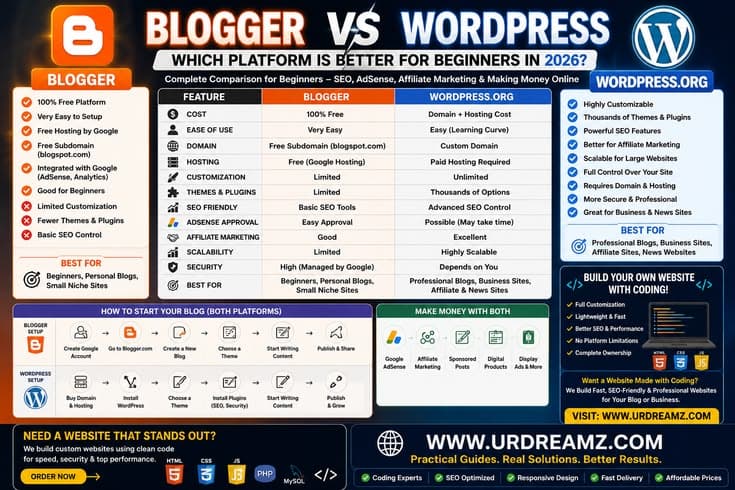
Blogger vs WordPress: Which Platform Is Better for Beginners in 2026?
If you want to start blogging and don't know whether to use Blogger or WordPress — this guide is just for you. In this article, you will learn what the difference is between both platforms, which one is better for your goals, and along with that, you will also get a complete beginner roadmap — from domain name to full-time income. After reading this guide, you won't need to ask anyone else.
What is Blogging? A Simple Answer for Beginners
Blogging means regularly writing and publishing articles on a website. These articles can be on any topic — health, beauty, cooking, technology, fashion, sports, or anything else you are interested in. When people search for something on Google, they need a blog that answers their question. You can write that blog.
Blogging is not just a hobby. Done the right way, blogging can become a serious income source. There are thousands of bloggers in the world who are making lakhs of rupees just from writing articles — and you can do this too, if you choose the right platform and follow the right strategy.
First Question: Blogger or WordPress?
Whenever someone starts blogging, this is the first confusion. Both are good platforms, but both are for completely different purposes. One small wrong decision at the start can make the blogging journey difficult.
| Feature | Blogger (Blogspot) | WordPress (Self-Hosted) |
|---|---|---|
| Cost | 100% Free — hosting also, domain also (but with .blogspot.com extension) | Domain (Rs. 1,500–2,000/year) + Hosting (Rs. 800–2,500/month) required |
| Ownership | Google's platform — if Google shuts it down or policy is violated, blog can be deleted | You are the owner — no one can delete your content |
| Customization | Limited — only a few ready-made templates available | Limitless — create whatever you want with 60,000+ themes and plugins |
| SEO Power | Basic SEO tools — competing on Google rankings is difficult | Professional SEO plugins (Yoast, RankMath) make ranking on Google much easier |
| AdSense Approval | Possible but approval is difficult on .blogspot.com domain | With custom domain, AdSense approval is much easier |
| Monetization | Mainly only Google AdSense | AdSense + Affiliate Marketing + Digital Products + Sponsorships — everything |
| Ease of Use | Very easy — just need a Gmail account and blog is ready in 5 minutes | Requires some setup, but once learned, it feels quite simple |
| Scalability | Difficult to grow — doesn't look professional | Unlimited growth — from a small website to large e-commerce, everything is possible |
| Support | Google community forums — limited official support | Massive community + hosting company support + thousands of tutorials |
Why Choose Blogger?
Blogger is perfectly fine if you want to start with zero budget, you just want to write as a hobby, or you want to try blogging without spending any money. If your goal is just a personal diary or sharing family updates, then Blogger is perfect.
Why Choose WordPress?
WordPress is chosen by those who seriously want to earn income from blogging. Who want to build their brand. Who want to rank on Google. Who want to generate income through AdSense approval, affiliate marketing, and digital products. The vast majority of professional bloggers use WordPress — and there is a reason behind it.
Final Recommendation: If you just want to try — start with Blogger. But if your intention is to seriously make income through blogging — choose WordPress self-hosted. In this guide, we will cover both so you can decide according to your needs.
Pillar 1: How to Choose a Domain Name?
A domain name is the address where people find your blog — like google.com or youtube.com. This is your online identity. Choosing a good domain name is the first and most important step.
Core Rules for a Domain Name
- Keep it short and memorable: 15 characters or less. The shorter, the better.
- Easy to pronounce: If someone can't understand it by hearing, that domain is weak.
- Keep it related to your niche: If you write a health blog, having "health" or "wellness" in the domain is helpful.
- Prefer .com: .com extension is the most trusted. Visitors automatically type .com.
- Avoid numbers and hyphens: my-blog-2026.com is hard to read and write.
- Leave room for pivoting: If you're writing a "baking" blog now but might shift to "food" later — "FoodLoversPK.com" is a better choice than "BakingPak.com".
- Check social handles: The same name should also be available on Instagram, Facebook, and YouTube for a consistent brand.
Where to Get a Domain?
GoDaddy, Namecheap, or Hostinger are popular and reliable options for domain registration. If you get hosting from Hostinger or Bluehost, you get the first year domain free — which is a big advantage for beginners.
WordPress vs Blogger: Domain Perspective
On Blogger, you get yourblogname.blogspot.com for free — but this doesn't look professional and AdSense approval is also difficult. On WordPress, you add your own custom domain (yourblogname.com) which increases both trust and credibility.
Pillar 2: Blog Setup — How to Create a Blog on Blogger?
Blogger is Google's free blogging platform. If you have a Gmail account, your blog can go live in 5 minutes.
Step-by-Step Method to Create a Blog on Blogger
- Go to blogger.com and click "Create Your Blog".
- Sign in with your Google/Gmail account.
- Enter your Blog Title — this is your blog's name (can be changed later).
- Choose your Blog URL — for example: yourblogname.blogspot.com. Check if it's available, then Save.
- Enter your Display Name — this name will show on your articles.
- In the Dashboard, go to the "Theme" section and select your preferred template.
- Click "New Post" to write your first article and hit "Publish".
What Pages Are Important to Create on Blogger?
Just writing articles is not enough — you should also create some important pages:
- About Us: Who you are, what the blog is about, and what readers will get.
- Contact Us: Email or contact form so readers and brands can reach you.
- Privacy Policy: This page is mandatory for Google AdSense.
- Disclaimer: If you use affiliate links or sponsored content.
How to Create a Blog on WordPress?
Creating a WordPress self-hosted blog is a bit more involved but not very difficult:
- Get a hosting plan from Hostinger, Bluehost, or SiteGround — usually Rs. 1,000–2,500/month.
- Register a domain name (often free with hosting).
- From the hosting control panel, find the "WordPress Install" option and do a one-click install.
- Open the WordPress dashboard and go to "Appearance" to choose your theme.
- Create important pages: About, Contact, Privacy Policy.
- Write your first blog post and publish.
Best Hosting Options in Pakistan
For WordPress in Pakistan, Hostinger is the most popular and affordable option. Their plans start from Rs. 300–800/month and website speed is also good. Bluehost is officially recommended by WordPress.org — this is also a reliable choice. If you need better support and have a slightly higher budget, SiteGround uses Google Cloud infrastructure which provides excellent speed.
Pillar 3: SEO — Learn to Rank on Google
SEO means Search Engine Optimization — writing your blog in such a way that Google shows it higher in search results. Without SEO, no one can find your blog, no matter how good the content is.
Google Search Console Setup — Step by Step
- Go to search.google.com/search-console and click "Start Now".
- Sign in with your Google account.
- Click "Add Property" and enter your blog URL.
- For verification, choose the HTML tag option — copy that meta tag.
- In WordPress, paste this tag in your theme's header (or add it directly through Yoast/RankMath plugin).
- Click the Verify button.
- After verification, go to "Sitemaps" section and submit yourdomain.com/sitemap.xml.
Google Search Console tells you how your blog is ranking on Google, which keywords are bringing traffic, and if there are any technical issues. This tool is completely free and essential for every blogger.
How to Do Keyword Research?
Keyword research means finding out what people type on Google. If you use those words in your article, Google shows your article to those people.
- Target long-tail keywords: Instead of "hair growth tips", "hair growth tips for women in Pakistan" is more specific and easier to rank.
- Use free tools: Google Keyword Planner, Ubersuggest, and Answer The Public give good keyword data for free.
- Check People Also Ask: Type your topic on Google and look at the "People Also Ask" section below — this is a treasure trove of content ideas.
- Check competitors: Look at the top 5 results on Google for your topic and note their H2 headings — this becomes your article outline.
On-Page SEO Checklist
- Include the main keyword in the title within the first 60 characters.
- Write a meta description of 105–120 characters and include the keyword.
- Keep URL short and keyword-rich (yourblog.com/hair-growth-tips — good | yourblog.com/post?id=234 — bad).
- Use H1, H2, H3 headings properly in the article.
- Write Alt Text for images and compress file size.
- Give internal links to your other related blog posts.
- Keep articles around 1000–2000 words — Google likes detail.
- Keep paragraphs short (2–4 lines). Use bullet points.
- Check on mobile that the article is displaying properly.
Pillar 4: Content Writing — How to Write Articles That Rank and Are Also Enjoyable to Read?
Content is an article that completely answers the reader's question. Google ranks those articles that give the most value to the reader. That's why writing good content — is even more important than SEO techniques.
Structure of a Perfect Blog Article
- Headline: Catchy, keyword-rich, and clear. Use numbers — "7 Ways to..." or "Complete Guide to..." type titles get more clicks.
- Introduction (50–100 words): Get straight to the point. Tell the reader what they will learn in this article and how their problem will be solved.
- Body (with H2 and H3 headings): Divide your topic into logical sections. Each section should answer a specific question.
- Tables and Lists: Whenever comparing or explaining steps, use a table or numbered list. This makes it easier for the reader to scan.
- Conclusion: Summarize the core points and guide the reader to take a clear action.
Tips for Writing Content Faster
- Make an outline first, then write. Writing directly wastes time.
- Copy the H2 headings from competitors' top articles and create your outline from there.
- Use AI tools (ChatGPT, Claude) for the first draft, then add your own knowledge and style.
- Complete the first draft — edit later. Doing both together drops quality and speed.
- Use Grammarly or similar tools to check grammar errors.
How Many Articles to Write in a Week?
In the beginning, 1–2 quality articles per week is enough. Quality matters more than quantity for Google. Writing a 1500-word in-depth article that answers every question is better than a 500-word shallow article.
AI Tools That Increase Blogging Speed
- ChatGPT: Works in a conversational style — outlines, intros, rewrites — everything. The free version is also quite capable.
- Claude (Anthropic): Excellent for long-form content and in-depth writing.
- All in One SEO (AIOSEO): Works inside WordPress — generates content and optimizes SEO. Best choice for beginners.
- Writesonic: Pulls real-time web data — useful for current events and accurate stats.
- Jasper: Best for teams and agencies — maintains brand voice.
Pillar 5: How to Make Money from a Blog?
This is the section most people look for. There are several ways to earn from a blog — but one thing is common for all: you need readers first. Without traffic, monetization is not possible.
Method 1: Google AdSense
Google AdSense is the most popular and easiest monetization method for beginners. You put Google's ads on your blog — when a visitor sees or clicks those ads, you get paid.
Requirements for AdSense Approval
- Your age should be 18 years or older.
- Your blog should have at least 15–20 high-quality, original articles.
- You should have a custom domain (yourname.com — not .blogspot.com).
- About Us, Contact Us, and Privacy Policy pages are necessary.
- There should be no copyright material, adult content, or illegal information on the blog.
- The blog's design should be clean and mobile-friendly.
How to Apply for AdSense?
- Go to adsense.google.com and click "Get Started".
- Enter your blog URL and sign in with your Google account.
- Add the AdSense code to your website's header (in WordPress via plugin or manually).
- Wait for review — usually takes 1–4 weeks.
- Once approved, turn on "Auto Ads" — Google itself places ads in the best spots.
Method 2: Affiliate Marketing
In affiliate marketing, you recommend other companies' products on your blog. If a reader purchases through your link, you get a commission — without creating or selling any product yourself.
How to Start Affiliate Marketing?
- Find relevant products in your niche — ones you use yourself or can recommend.
- Join Amazon Associates (Amazon's affiliate program), ShareASale, or directly join a company's affiliate program.
- You'll get a unique tracking link — naturally include it in your articles.
- Write product reviews, comparison articles, and tutorials that include these links.
- Add a disclosure in every article: "This article contains affiliate links — if you purchase through them, I get a commission."
Method 3: Selling Digital Products
When your blog grows, you can convert your knowledge into products:
- E-books: Write a detailed guide on your niche in PDF and sell it.
- Online Courses: Create video tutorials or written courses.
- Templates and Worksheets: Canva templates, Excel sheets, or printables.
- Memberships: Monthly subscription for exclusive content.
Gumroad and Payhip are also accessible in Pakistan and you can easily sell digital products.
Method 4: Sponsored Posts
When your blog gets traffic, brands pay you to review or mention their products. Pakistani brands also give blog sponsorships — especially in health, beauty, food, and tech niches.
Realistic Timeline for Blog Income
| Time Period | Expected Stage | Income Estimate |
|---|---|---|
| Month 1–3 | Setup, writing content, learning SEO | Rs. 0 (invest, income will come later) |
| Month 4–6 | Starting to rank on Google, traffic coming | Rs. 1,000–5,000/month |
| Month 7–12 | AdSense approval, affiliate income starting | Rs. 5,000–20,000/month |
| Year 2 | Multiple income streams, consistent traffic | Rs. 50,000–1,50,000/month |
| Year 3+ | Full-time blogging, scaled income | Rs. 2,00,000+/month (if strategy is right) |
Pillar 6: Email Marketing — Reach Your Readers Directly
An email list is a blogger's most valuable asset. Social media algorithms can change, Google rankings can drop — but your email list is always yours. People who subscribe to your email are your most loyal readers.
How to Start Email Marketing?
- Choose a platform: MailerLite is best for beginners — free plan available and easy to use. Kit (formerly ConvertKit) gives advanced features.
- Create a signup form: Add signup forms on your blog's sidebar, at the end of articles, and in exit popups.
- Give a lead magnet: Give something useful to the reader — PDF guide, checklist, or template — in exchange for their email.
- Set up a welcome sequence: Send automatic emails immediately after subscription. First email: give the promised freebie. Second email: share best articles. Third email: introduce your blog and mission.
- Send regular newsletters: Send an email every week or two — new articles, useful tips, or product recommendations.
Core Rules of Email Marketing
- Always include a clear unsubscribe link — this is also a legal requirement.
- Avoid spam words: "Free money", "Click here now", "Urgent" — these emails go to spam folders.
- Test on mobile — 60% of emails are opened on phones.
- Give value first, sell later — if every email is just selling, people unsubscribe.
Pillar 7: Pinterest Traffic — Another Source of Free Traffic for Your Blog
Ranking on Google takes time — 6 months to 1 year. But Pinterest is a platform that can give traffic to new blogs quickly. Pinterest is actually a visual search engine — people don't just look at pictures there, they search for recipes, outfits, tips, and guides. And if your pin shows them something useful — they come to your blog.
Complete Method to Get Traffic from Pinterest
- Create a Pinterest Business Account: Not a personal account — with a Business account you get analytics and you can verify your website.
- Verify your website: Go to Pinterest account settings, add your blog URL, and complete verification. This shows your website name on pins, which increases credibility.
- Enable Rich Pins: This is a Pinterest feature that automatically shows your blog's title, description, and author on the pin — the pin looks more professional and gets more clicks.
- Create Vertical Pins: 2:3 ratio images perform best on Pinterest — meaning 1000 x 1500 pixels. Canva creates these for free. Definitely add the blog title text overlay on the pin.
- Write keyword-rich descriptions: Naturally include 3–5 relevant keywords in every pin's description. Don't write robot-like keywords — use natural language.
- Create multiple pins for one blog post: Make 3–5 different designs for the same article. Different color schemes, different titles. When one design goes viral, its variations also perform.
- Maintain consistency: Save 3–5 quality pins daily — 50 pins in one day and nothing for the rest — Pinterest doesn't like this. You can also schedule using the Tailwind app.
- Organize boards: Create separate boards according to your blog's topics. Also use keywords in board names.
What Results to Expect from Pinterest?
Pinterest requires patience — usually traffic starts coming consistently after 3–6 months. But once a pin goes viral, it can bring traffic for months or years. Unlike Google, old pins can also bring traffic on Pinterest because pins are "evergreen."
Build Niche Authority — Present Yourself as an Expert
Topical authority means that both Google and your readers recognize you as an expert on a specific topic. This happens when you cover a topic completely — not just one article, but write articles on every aspect of that topic.
How to Build Topical Authority?
- Create pillar content: Write one big main article that gives an overview of your niche — like "Complete Guide to Hair Growth."
- Write cluster articles: Write smaller specific articles related to the pillar article — "Best Hair Oils for Hair Growth," "Vitamins for Hair Growth," "Stress and Hair Loss."
- Do internal linking: Link all articles to each other. This signals to Google that you have comprehensive knowledge on this topic.
- Publish consistently: Keep publishing 1–2 articles per week. Writing once and forgetting doesn't work.
- Collaborate with others: Guest posts, joint ventures, and community engagement build authority quickly.
Scale Your Blog to Full-Time Income
Making full-time income from blogging is a realistic goal — but this doesn't mean it's easy. With the right strategy, consistency, and patience, it is absolutely possible. In Pakistan too, there are thousands of bloggers who are supporting their entire family through blogging.
The Math of Full-Time Income
| Monetization Method | Traffic Needed (Monthly) | Expected Income | Difficulty Level |
|---|---|---|---|
| Google AdSense | 50,000–150,000 pageviews | Rs. 15,000–60,000/month | Easy to start, hard to scale |
| Affiliate Marketing | 10,000–30,000 visitors | Rs. 20,000–1,00,000+/month | Medium — content quality matters |
| Digital Products | 3,000–10,000 visitors | Rs. 30,000–2,00,000+/month | Hard to create, but highest ROI |
| Sponsored Posts | 10,000+ visitors | Rs. 5,000–50,000/post | Easy once you have traffic |
Strategy for Scaling
- Don't rely on just one monetization method — combination gives the most income.
- Start building your email list from day one — this is your most reliable asset.
- Master one traffic source first (Google SEO or Pinterest) — then add another.
- When income starts coming, reinvest — better hosting, professional design, outsourcing.
- Create a content system — templates, editorial calendar, AI tools — to increase production speed.
Blogger vs WordPress: Final Verdict
| Your Goal | Best Platform | Reason |
|---|---|---|
| Start with zero budget | Blogger | 100% free — both domain and hosting |
| Just writing as a hobby | Blogger | Simple, fast, and no maintenance |
| Earn income from AdSense | WordPress | Custom domain makes approval easier, higher earnings |
| Rank on Google | WordPress | SEO plugins and full technical control |
| Affiliate marketing | WordPress | Unlimited plugins, better link management |
| Selling digital products | WordPress | WooCommerce and ecommerce integration possible |
| Long-term professional blog | WordPress | Ownership, scalability, and full control |
If you ask me directly — choose WordPress. The starting investment is a bit higher, but you are building a foundation that can last for years of work. Starting on Blogger is free, but if you have to move to WordPress later, migrating everything is difficult and SEO also resets.
Frequently Asked Questions (FAQ)
Can a blog on Blogger be approved for Google AdSense?
Yes, it's possible — but approval on a .blogspot.com domain is difficult. If you are using Blogger, first connect a custom domain (yourname.com), then apply. With a custom domain, AdSense approval is also possible on Blogger.
What is the minimum budget required to start a blog?
If you use Blogger — zero budget. If you choose WordPress self-hosted — domain costs Rs. 1,500–2,000/year and hosting costs Rs. 300–800/month to start. So total in the first year, a professional blog can be started in Rs. 5,000–12,000.
How long does it take to earn the first money from blogging?
Most bloggers get Google AdSense approval in 4–6 months (if they write consistent content). Affiliate income can start in 3–6 months. Full-time income takes 1–2 years of hard work. Haste fails any business — including this one.
Which earns more AdSense — Blogger or WordPress?
AdSense earnings don't depend on the platform, but on traffic and niche. However, because WordPress has better SEO tools, traffic comes more easily, so indirectly WordPress earnings can be higher.
Should I write my blog in English or Urdu for a Pakistani audience?
Both have potential. Writing in English gets a global audience and AdSense RPM (earnings per 1000 views) is higher. Writing in Urdu connects with the local audience and competition is also lower. Choose according to your strength.
Need blogging guidance or personalized help?
If you need help at any step in starting your blog or growing it — you can contact via WhatsApp at +923471936923. From niche selection to AdSense approval — guidance is available.
Start Today — Step by Step Action Plan
- Today: Decide your niche. Choose a topic you have genuine interest in and people also need information about.
- Tomorrow: Think of a domain name — short, memorable, and niche-relevant. Check if it's available.
- This week: Get hosting and install WordPress. Create About, Contact, Privacy Policy pages.
- This month: Write the first 5–10 high-quality articles. Each article should be at least 1000 words.
- First 3 months: Keep publishing content regularly. Set up Google Search Console. Create a Pinterest account.
- After 4–6 months: Apply for AdSense. Join affiliate programs. Start building your email list.
- Within a year: Activate multiple income streams. Keep scaling. Stay consistent.
Remember — blogging is a marathon, not a sprint. Those who work consistently for 1–2 years definitely see results. Those who give up in the first 3 months — never know how far they could have gone.