ChatGPT Explained: Features, Uses, Benefits, Limitations and the Future of AI Conversations in 2026
When OpenAI released ChatGPT on November 30, 2022, it changed the technology landscape overnight. Within two months, it reached 100 million monthly active users — the fastest any consumer application in history had ever achieved that milestone. By February 2026, that number had grown to 900 million weekly active users. What started as a text-based chatbot has evolved into one of the most powerful and widely used artificial intelligence platforms ever built.
But what exactly is ChatGPT? How does it work? What can it do for you — as a student, a business owner, a content creator, or a developer? And where is it headed in the future? This comprehensive guide answers every question you might have about ChatGPT in 2026, covering everything from its foundational technology to its best real-world uses, plans and pricing, memory system, limitations, and the exciting future of conversational AI.
What Is ChatGPT? A Clear, Simple Explanation
ChatGPT is an artificial intelligence chatbot developed by OpenAI, an AI research company founded in San Francisco. The name stands for Chat Generative Pre-trained Transformer. You interact with it using natural, conversational language — the same way you would text a friend or send a message on WhatsApp — and it responds with human-like text, summaries, code, translations, ideas, and analysis.
Unlike a traditional search engine, ChatGPT does not give you a list of links to visit. Instead, it reads your question, processes it using its trained intelligence, and generates a direct, original answer tailored specifically to what you asked. It is like having access to a highly educated, endlessly patient assistant who is available twenty-four hours a day, seven days a week, and never gets tired of your questions.
ChatGPT is built on a family of AI models called GPT — Generative Pre-trained Transformers. These are large language models trained on enormous quantities of text from books, articles, websites, code repositories, and other written sources. The current engine powering ChatGPT as of June 2026 is GPT-5.5, the latest and most capable model OpenAI has released to the public.
Who Created ChatGPT and When?
ChatGPT was created by OpenAI, an artificial intelligence research company. OpenAI was originally founded in 2015 as a non-profit by a group of technology leaders including Sam Altman, Greg Brockman, Ilya Sutskever, and others, with early backing from Elon Musk (who later departed from the board). The company is now structured as a capped-profit company led by CEO Sam Altman. ChatGPT was officially launched to the public on November 30, 2022, and its success accelerated what analysts now describe as the global AI boom.
| Category | Details |
|---|---|
| Developer | OpenAI (San Francisco, USA) |
| Initial Launch | November 30, 2022 |
| Latest Stable Release | May 21, 2026 |
| Current Engine | GPT-5.5 |
| Monthly Active Users | 900 million weekly active users (Feb 2026) |
| Supported Languages | 59 languages |
| Platform Type | Generative AI chatbot / Large Language Model |
| Access Points | Web browser, iOS app, Android app, Windows app, API |
| Pricing Model | Freemium (Free, Plus $20/mo, Pro $200/mo, Business, Enterprise) |
| Primary Use Cases | Writing, coding, research, education, business automation |
How Does ChatGPT Work? The Technology Explained Simply
Understanding how ChatGPT works does not require a computer science degree. At its core, the system uses a combination of three fundamental processes: pre-training on massive data, a specialized neural network architecture called the Transformer, and a training technique called Reinforcement Learning from Human Feedback (RLHF).
Step 1 — Pre-Training on Massive Data
Before ChatGPT ever speaks to a user, it goes through an intensive training process. The model reads and processes enormous quantities of text from the internet, books, academic papers, programming documentation, and other written sources. During this process, the neural network learns the statistical relationships between words — which words tend to follow which other words, how sentences are structured, how ideas connect across paragraphs, and how different topics relate to each other. It does not memorize individual facts the way a database does. Instead, it learns patterns in language so it can generate plausible, coherent text on virtually any topic.
Step 2 — The Transformer Architecture
The architectural backbone of ChatGPT is the Transformer neural network, first introduced by Google researchers in 2017. The critical innovation in Transformer models is a mechanism called self-attention, which allows the model to look at every word in your input simultaneously and calculate how much each word relates to every other word in context. This means that when you write "The bank by the river was steep," the model understands that "bank" refers to a riverbank rather than a financial institution because of the surrounding context. This ability to understand contextual relationships is what makes ChatGPT's responses feel intelligent and coherent rather than random.
Step 3 — Tokenization and Text Generation
When you type a message into ChatGPT, your text is first broken into smaller units called tokens. Tokens can be whole words, parts of words, or punctuation marks. For example, the word "chatting" might be split into two tokens: "chat" and "ting." These tokens are converted into numerical representations that the model can process mathematically. The model then calculates the probability of each possible next token given all the previous tokens in the conversation, and selects the most appropriate continuation. This process repeats token by token until the response is complete, which is why ChatGPT generates text progressively rather than all at once.
Step 4 — Reinforcement Learning from Human Feedback (RLHF)
Pre-training alone produces a model that can generate text, but not necessarily helpful, accurate, or safe text. To bridge this gap, OpenAI uses a technique called Reinforcement Learning from Human Feedback. Human trainers interact with the model, rate its responses for quality, accuracy, and safety, and use these ratings to fine-tune the model through a reward system. The model learns to generate responses that humans rate highly, which aligns its behavior with what users actually want — clear, helpful, honest, and safe answers.
| Step | Process | What Happens | Technical Term |
|---|---|---|---|
| 1 | You type a message | Your text is received by the system | User Prompt |
| 2 | Text is split into units | Words broken into numerical tokens | Tokenization |
| 3 | Context is analyzed | Transformer weighs relationships between all tokens | Self-Attention Mechanism |
| 4 | Probabilities are calculated | Model predicts the most appropriate next token | Next-Token Prediction |
| 5 | Response is generated | Tokens assembled into coherent text output | Autoregressive Generation |
| 6 | Safety filters applied | Content moderation classifiers review output | RLHF Alignment |
| 7 | Response delivered to you | Formatted text appears in the chat window | Output Rendering |
ChatGPT Plans and Pricing — Free vs Plus vs Pro vs Business
ChatGPT operates on a freemium model, meaning a free version is available to anyone, with premium tiers offering significantly expanded capabilities. Understanding which plan fits your needs is important for getting the most value from the platform.
The Free tier gives you access to GPT-5.5 with limited usage within five-hour windows. Message limits on the free tier are dynamic and may change based on system load and usage patterns. Despite the limitations, the free version is genuinely useful for everyday writing, learning, and research tasks.
ChatGPT Plus, priced at twenty US dollars per month, gives you up to 160 messages with GPT-5.5 every three hours, along with access to advanced reasoning models, voice mode, image generation, file uploads, and the Canvas collaborative workspace. This is the recommended plan for individual professionals, students, and content creators who use ChatGPT regularly.
ChatGPT Pro, launched in December 2024 at two hundred dollars per month, is designed for power users who need unlimited access to the most advanced reasoning capabilities, including the o3-pro reasoning model for complex logic, mathematics, and research-grade tasks.
ChatGPT Business is a self-serve plan for organizations that want a shared workspace for their teams, with administrative controls, team management features, and enterprise-grade data protection. ChatGPT Enterprise offers additional features for large corporations including dedicated infrastructure, custom data integrations, and compliance tools. ChatGPT Edu is a specialized version partnered with universities, offering students access to advanced models with higher message limits and privacy protections.
| Feature | Free | Plus ($20/mo) | Pro ($200/mo) | Business/Enterprise |
|---|---|---|---|---|
| GPT-5.5 Access | Limited (5-hr windows) | 160 msgs / 3 hrs | Unlimited | Custom limits |
| Advanced Reasoning (o3) | No | Limited | Full access | Full access |
| Voice Mode | No | Yes | Yes | Yes |
| Image Generation | No | Yes | Yes | Yes |
| File Uploads (PDF, Excel) | No | Yes (up to 512MB) | Yes | Yes |
| Canvas Workspace | No | Yes | Yes | Yes |
| Deep Research Feature | No | Limited | Yes | Yes |
| Memory (Cross-Chat) | No | Yes (~100 entries) | Yes | Yes (custom) |
| Custom GPTs | No | Yes | Yes | Yes |
| Data Privacy (Not for Training) | No | No | No | Yes |
| Best For | Casual use, learning | Daily professional use | Research and heavy use | Teams and enterprises |
The Best Features of ChatGPT in 2026 — Complete Breakdown
ChatGPT has evolved far beyond a simple question-and-answer interface. In 2026, it operates as a comprehensive AI platform with a wide range of specialized features designed for different types of tasks and users.
Canvas Workspace
Canvas is a dedicated collaborative editing environment that opens alongside the chat window. Instead of regenerating an entire response when you want a small change, Canvas lets you highlight specific sentences, paragraphs, or code blocks and ask the AI to make targeted edits, adjust the reading level, change the tone, or fix specific issues. Writers use it for long-form content editing; developers use it for iterative code refinement without losing the full context of their project.
Deep Research
Deep Research is an autonomous agent feature that allows ChatGPT to independently browse dozens of web sources, synthesize information, validate facts against multiple sources, and produce a comprehensive, fully cited research report. Unlike a standard web search that returns links, Deep Research actually reads the sources and constructs a coherent analysis. Each report includes clear citations so you can verify every claim. This feature takes between five and thirty minutes per report depending on the complexity of the topic.
Advanced Reasoning Models
ChatGPT now includes access to o3-pro, OpenAI's most powerful reasoning model. Unlike the standard conversational model which generates responses immediately, the reasoning model takes additional time to think through complex problems step by step before answering. This makes it dramatically more accurate on challenging mathematics, logical puzzles, scientific analysis, and multi-step coding problems where careful reasoning matters more than speed.
Advanced Voice Mode
Advanced Voice Mode transforms ChatGPT from a text application into a real-time spoken conversation partner. The AI can listen to your voice, understand your speech, and respond with natural, human-like audio in real time — including the ability to interrupt it, ask follow-up questions mid-response, and adjust its tone based on conversational cues. Users apply this feature for language practice, brainstorming while commuting, accessibility support, and hands-free task completion.
Memory System
The Memory feature allows ChatGPT to save key facts about you across all conversations. It might remember your profession, your preferred writing tone, the programming languages you use, your business name, or your learning goals. This eliminates the need to re-explain your context at the start of every new conversation. Users on the Plus plan can have approximately 100 memory entries saved at one time, managed through Settings under Personalization.
Custom GPTs
OpenAI allows users to build or access custom versions of ChatGPT called GPTs, available through the GPT Store which launched in January 2024 with over three million GPTs created by users. Each custom GPT can be configured with specific instructions, uploaded knowledge documents, and third-party app integrations to specialize it for particular tasks — such as a customer service agent for a specific company, a specialized coding assistant, a tutor for a particular subject, or a research tool trained on a specific domain.
Data Analysis and File Uploads
ChatGPT Plus and higher plans allow you to upload PDFs, Word documents, Excel spreadsheets, CSV files, images, and PowerPoint presentations. The AI reads and analyzes your uploaded content, extracting key information, generating summaries, answering specific questions about the content, building charts from data, running calculations, and identifying patterns across large datasets — all without requiring any technical knowledge from the user.
Image Generation
ChatGPT integrates directly with DALL-E, OpenAI's image generation model, allowing users to create, edit, and manipulate images directly within the chat interface. You can describe what you want, generate the image, then ask the AI to modify specific elements — remove an object, change the background color, add a person, or shift the artistic style — all through natural language commands.
ChatGPT Search
Launched between October and December 2024, ChatGPT Search allows the AI to search the web in real time to provide more accurate and current information beyond its training cutoff. This directly competes with traditional search engines like Google and Bing, offering the advantage of synthesized answers with citations rather than a list of links to browse manually.
| Feature | What It Does | Best For | Plan Required |
|---|---|---|---|
| Canvas Workspace | Collaborative writing and code editing environment | Writers, developers | Plus and above |
| Deep Research | Autonomous multi-source research reports with citations | Researchers, analysts | Plus (limited), Pro |
| Advanced Reasoning (o3) | Step-by-step thinking for complex problems | Scientists, coders, students | Plus (limited), Pro |
| Voice Mode | Real-time spoken AI conversations | Language learners, multitaskers | Plus and above |
| Memory | Remembers your preferences across all chats | Regular users, professionals | Plus and above |
| Custom GPTs | Specialized AI assistants for specific tasks | Businesses, educators | Plus and above |
| File Uploads | Reads and analyzes PDFs, Excel, images | Analysts, students, businesses | Plus and above |
| Image Generation | Creates and edits images via DALL-E | Designers, marketers, creators | Plus and above |
| ChatGPT Search | Real-time web search with synthesized answers | Researchers, journalists | Free (limited), Plus |
| ChatGPT Atlas Browser | AI-integrated browser with agentic web navigation | Power users, researchers | Standalone product |
ChatGPT for Students — How AI Is Transforming Education
Students at every level, from secondary school to doctoral programs, have adopted ChatGPT as a core part of their learning toolkit. Understanding how to use it responsibly and effectively is one of the most valuable skills a student can develop in 2026.
As a personal tutor, ChatGPT is available around the clock, never loses patience, and can explain the same concept from twenty different angles until the student genuinely understands it. A student struggling with calculus can ask ChatGPT to explain derivatives using a real-world analogy about car speeds, then ask follow-up questions without any hesitation or judgment. This kind of personalized, on-demand explanation was previously available only to students who could afford private tutors.
For research and essay planning, ChatGPT excels at helping students understand complex academic topics, generate structured outlines for essays and reports, identify the key arguments on different sides of a debate, and suggest relevant areas of research to explore. It is important to note that students should always verify the specific facts ChatGPT provides through authoritative sources, as the AI can occasionally generate plausible-sounding but incorrect information.
For language learning, ChatGPT acts as a practice conversation partner available in dozens of languages. Students can practice writing essays in a foreign language and receive immediate, detailed feedback on grammar, vocabulary, and style — the kind of feedback that would otherwise require a human language tutor.
Many universities have responded to the rise of ChatGPT by introducing ChatGPT Edu through institutional partnerships with OpenAI. This gives students access to enhanced AI capabilities with enterprise-level privacy protection, ensuring that academic work submitted to the AI is not used to train public models.
| Use Case | What Students Do | Benefit | Caution |
|---|---|---|---|
| Concept Explanation | Ask for simplified explanations of difficult topics | Personalized, on-demand tutoring | Verify with textbooks |
| Essay Outlining | Generate structured essay frameworks | Saves planning time | Write the content yourself |
| Exam Preparation | Request practice questions on specific topics | Active recall learning | Check answers independently |
| Research Summaries | Summarize long academic papers | Faster literature review | Always read the original |
| Language Practice | Write and receive feedback in target language | Accessible language tutoring | Supplement with human interaction |
| Math Problem Solving | Work through equations step by step | Understand the process not just the answer | Verify computation independently |
| Coding Assignments | Debug errors and understand code logic | Faster troubleshooting | Understand the code before submitting |
| Citation Formatting | Generate references in APA, MLA, or Chicago format | Time saving | Always verify citation accuracy |
ChatGPT for Business — Transforming How Companies Work
The adoption of ChatGPT in business settings has been one of the most significant productivity transformations in recent corporate history. Companies of all sizes, from solo freelancers to Fortune 500 enterprises, have integrated AI into their daily workflows in ways that were unimaginable just three years ago.
In marketing and sales, ChatGPT has become an indispensable creative partner. Marketing teams use it to generate social media content calendars, draft advertising copy in multiple tones and formats, personalize customer outreach emails at scale, conduct initial keyword research, and develop content strategies. What once required a dedicated copywriter working for several hours can now be drafted in minutes, freeing creative professionals to focus on strategy and refinement rather than first-draft production.
Customer support is another area where businesses have achieved dramatic efficiency gains. ChatGPT powers intelligent chatbots that can handle a significant portion of incoming customer queries — answering frequently asked questions, processing standard requests, and escalating complex issues to human agents. This reduces response times from hours to seconds and allows customer service teams to handle much higher volumes without proportional staffing increases.
In operations and administration, teams use ChatGPT to summarize meeting transcripts and extract action items, draft internal memos and policy documents, structure project proposals, analyze competitor information, and generate professional responses to complex business correspondence.
For data-driven businesses, ChatGPT's file analysis capabilities have created new accessibility to data insights. Business owners without data science training can upload sales spreadsheets and ask plain-language questions — "which product had the highest profit margin variance in Q1?" or "create a chart showing monthly revenue trends" — and receive immediate, actionable analysis.
| Department | Primary ChatGPT Uses | Time Saved | Key Benefit |
|---|---|---|---|
| Marketing | Ad copy, social content, email campaigns, SEO outlines | Very High | Scale content production without scaling team |
| Customer Support | FAQ responses, chatbot scripts, ticket summaries | Very High | Handle more queries with fewer staff |
| Sales | Personalized outreach, pitch decks, objection handling scripts | High | More personalized communication at scale |
| Operations | Meeting summaries, process documentation, policy drafts | High | Reduce administrative overhead |
| HR | Job descriptions, interview questions, onboarding materials | Medium-High | Consistent and faster recruitment content |
| Finance | Report summaries, data analysis, financial brief writing | Medium | Faster insights for non-technical teams |
| Product Development | User story writing, competitor analysis, feature ideation | Medium-High | Accelerate early-stage planning |
| Legal | Contract summaries, compliance research, document drafting (not legal advice) | Medium | Reduce time on routine document preparation |
Benefits of ChatGPT — Why Millions of People Use It Every Day
The rapid global adoption of ChatGPT is driven by concrete, measurable benefits that users experience in their daily work, study, and personal lives. Understanding these benefits helps you identify where ChatGPT can add the most value in your own situation.
The most fundamental benefit is speed. Tasks that previously took hours — writing a professional email, summarizing a twenty-page document, drafting the first version of a blog post, or finding the bug in a piece of code — can now be completed in seconds or minutes. This time compression does not just save effort; it fundamentally changes what is possible for individuals and small teams operating with limited resources.
Accessibility is another transformative benefit. Quality writing assistance, expert-level explanations, and sophisticated research support were previously available only to people who could afford professional services or who had access to expensive educational institutions. ChatGPT democratizes these capabilities, making them available to anyone with an internet connection regardless of their geographic location, economic background, or educational level.
The always-available nature of ChatGPT addresses a human limitation that no human assistant can match: it is available at three in the morning when you suddenly have an idea, during weekends when your colleagues are unavailable, and during holidays when offices are closed. This perpetual availability makes it particularly valuable for students preparing last-minute before exams, entrepreneurs working across time zones, and creators who experience inspiration at unpredictable hours.
For multilingual users, ChatGPT's language capabilities provide a powerful bridge across communication barriers. It can translate content, help non-native speakers improve their writing, explain idioms and cultural context, and serve as a practice partner for language learners — all within the same interface.
Limitations of ChatGPT — What It Cannot Do
Understanding the limitations of ChatGPT is just as important as understanding its capabilities. Using it effectively requires knowing where it excels and where its outputs require careful verification or should not be trusted without additional checking.
The most significant limitation is hallucination — the tendency to generate information that sounds completely plausible and is stated with full confidence but is factually incorrect or entirely fabricated. ChatGPT predicts text based on statistical patterns, not factual lookup. When it does not have reliable information about something in its training data, it may generate a convincing-sounding answer that is simply wrong. This makes fact-checking essential for any important factual claim the AI produces, particularly for dates, statistics, citations, and specific technical details.
The knowledge cutoff is another important limitation. GPT-5.5's training data has a specific cutoff date, meaning it does not have information about events, developments, or publications after that date unless it uses the ChatGPT Search feature to retrieve current information from the web. For topics that change rapidly — such as financial markets, current events, or the latest software versions — always verify that the information is current.
Context window limitations affect very long conversations. The context window is the maximum amount of text the AI can actively consider at one time. Once a conversation exceeds this limit, the AI begins to lose track of information from earlier in the conversation. For very long projects, this means periodically starting new conversations and providing a summary of the previous context to maintain continuity.
ChatGPT lacks true reasoning in the philosophical sense — it does not actually understand the world the way humans do. It processes patterns in text without any underlying model of physical reality, social dynamics, or causal relationships. This means it can struggle with tasks that require genuine common sense, understanding of physical constraints, or deep emotional intelligence. The advanced reasoning models (o3) partially address this for logical and mathematical problems, but the fundamental limitation remains.
| Limitation | What It Means | How to Manage It | Severity |
|---|---|---|---|
| Hallucinations | Generates confident but factually wrong information | Verify all important facts from authoritative sources | High |
| Knowledge Cutoff | No awareness of recent events past training date | Use ChatGPT Search or verify with current sources | Medium |
| Context Window Limits | Forgets earlier parts of very long conversations | Start new chats for new topics; paste summaries of previous context | Medium |
| No True Reasoning | Pattern prediction rather than genuine understanding | Use for structured tasks; apply human judgment to complex decisions | Medium |
| Math Errors | Can make arithmetic and logic errors without code tools | Use the code execution feature for precise calculations | Medium |
| Bias in Training Data | May reflect biases present in its training sources | Consider multiple perspectives; do not treat outputs as neutral | Medium |
| Data Privacy | Free and Plus conversations may be reviewed for training | Never input passwords, medical records, or sensitive personal data | High |
| Usage Limits | Message caps on all tiers (especially free) | Upgrade plan or manage usage strategically | Low-Medium |
| No Real-Time Awareness | Cannot browse internet without Search feature | Enable Search for current information needs | Low (manageable) |
| Cannot Replace Experts | Not a substitute for lawyers, doctors, or licensed professionals | Use for general information; always consult qualified professionals | High |
ChatGPT for Content Creation — Blogging, Marketing, and SEO
Content creators, bloggers, marketers, and SEO professionals have embraced ChatGPT as one of the most powerful additions to their workflows. The key to using it effectively for content creation is understanding that it works best as a collaborative partner in the creative process rather than a replacement for original thinking and expertise.
For bloggers, the most effective workflow begins with defining your article's purpose, audience, and key message before involving ChatGPT. Use the AI to generate a structural outline of headings and subheadings, then draft each section individually while prompting ChatGPT with the specific context of that section. Review and substantially rewrite each draft to inject your personal voice, unique insights, and real-world experience. Add your own examples, case studies, and opinions. Then use ChatGPT to help optimize the meta title, meta description, and internal linking suggestions.
For SEO applications, ChatGPT is particularly useful for keyword clustering — taking a large list of related keywords and organizing them into thematically coherent content groups based on search intent. It can also generate variations of meta titles and descriptions to A/B test, suggest FAQ sections based on common questions around a topic, create schema markup code for structured data, and analyze competitor content to identify gaps in your own coverage.
For marketing teams, ChatGPT accelerates the creation of ad copy, email campaign sequences, social media content calendars, landing page copy, product descriptions, and brand messaging frameworks. The most effective approach assigns ChatGPT the role of a senior copywriter with specific instructions about brand voice, target audience characteristics, key product benefits, and the emotional response you want to evoke — and then refines the output through iterative feedback prompts.
ChatGPT Memory — How It Remembers You
The Memory feature is one of ChatGPT's most practically useful but least understood capabilities. There are two distinct types of memory in the system, and confusing them leads to frustration.
Long-term memory refers to facts that ChatGPT saves about you persistently across all conversations. These are specific pieces of information you tell it explicitly — your profession, your writing style preferences, your business name, the programming language you prefer, your children's ages, or your dietary restrictions. Once saved, these memories are applied automatically in future conversations without you needing to re-explain them. Plus plan users can have approximately one hundred individual memory entries at a time. When the memory is full, ChatGPT stops saving new entries until older ones are deleted, which you can manage through Settings, then Personalization, then Manage Memories.
The context window is the other form of memory, but it is temporary and session-specific. Within a single conversation, ChatGPT holds the entire exchange in an active context window that it uses to maintain conversational coherence. The GPT-5.5 model supports context windows ranging from sixteen thousand to four hundred thousand tokens depending on the tier and model variant. Once a conversation grows longer than the context window, the model uses a sliding window approach, progressively dropping the oldest parts of the conversation from its active awareness while retaining the most recent exchanges.
For managing very long projects across multiple sessions, the recommended approach is to end each session by asking ChatGPT to generate a concise summary of everything discussed and all decisions made. Paste this summary at the beginning of the next session to restore context efficiently.
ChatGPT for Coding and Software Development
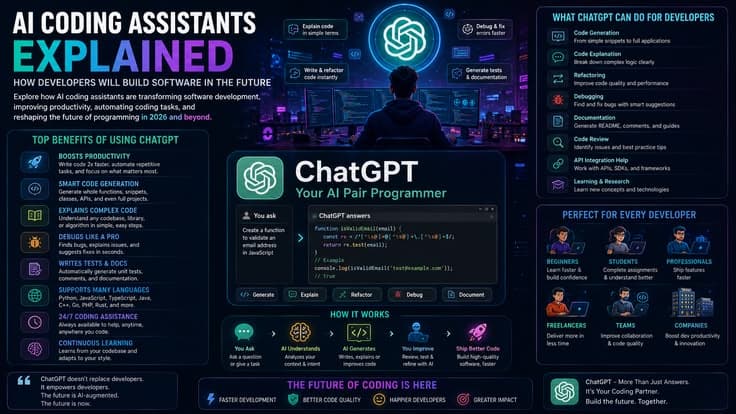
Developers and programming students have found ChatGPT to be one of the most powerful additions to their development workflow. It is particularly strong at generating boilerplate code, explaining unfamiliar code in plain language, debugging error messages, translating code from one programming language to another, and writing unit tests for existing functions.
The most effective approach for developers is to work with ChatGPT in focused, well-defined chunks rather than asking it to generate entire applications at once. Break your project into individual functions, components, or modules, and address each one with a specific, detailed prompt that includes the programming language, the frameworks or libraries you are using, the expected inputs and outputs, and any constraints or edge cases to handle.
For debugging, paste your error message and the relevant code section and ask ChatGPT to identify the specific problem and suggest a fix. For unfamiliar codebases, paste a section of code and ask it to explain what each part does in plain English. For learning, ask ChatGPT to explain not just the fix but the reason the bug occurred and the underlying concept that would prevent similar bugs in the future.
The critical limitation to remember is that ChatGPT can generate code that looks syntactically correct but contains logical errors, uses non-existent library methods (hallucinated APIs), or introduces security vulnerabilities. Always review AI-generated code carefully before deploying it, test it thoroughly, and never paste code from any source — human or AI — into a production environment without understanding exactly what it does.
The Future of ChatGPT and Conversational AI
The evolution of ChatGPT from a text chatbot to what it is today — a multimodal, agentic AI platform — has happened in less than four years. The trajectory of development suggests that the changes coming in the next four years will be even more profound.
The most significant near-term shift is from assistant to agent. The current model requires you to prompt it for every task. The emerging model allows ChatGPT to accept high-level goals — "plan our quarterly marketing campaign," "manage my email inbox according to these priorities," or "research and book the best flight options for this trip" — and autonomously execute the necessary steps to complete those goals, including browsing the web, filling out forms, sending messages, and interacting with other software on your behalf. ChatGPT Atlas, the AI-integrated browser launched in October 2025 with its agentic mode, is an early implementation of this direction.
Multimodal depth will continue to expand. Current capabilities allow ChatGPT to process text, images, audio, and files. Future versions are expected to handle video in real time, participate in live video calls as an active participant, and interact with physical environments through connected devices and robotics.
Personalization will become significantly deeper. Current memory systems save approximately one hundred discrete facts. Future systems are expected to build comprehensive, dynamic models of individual users — their communication styles, decision-making patterns, professional goals, and personal preferences — and proactively surface relevant insights and suggestions without being prompted.
The integration of specialized agents working in coordinated teams is another major direction. Rather than a single AI model handling all tasks, future architectures will deploy multiple specialized agents — one for research, one for writing, one for scheduling, one for financial analysis — coordinated by an orchestrator that routes each subtask to the most capable agent and assembles the results.
| Development | What It Means | Expected Timeline | Impact Level |
|---|---|---|---|
| Full Agentic Mode | AI completes multi-step tasks autonomously without prompting | 2026–2027 | Very High |
| Deep Personalization | AI builds comprehensive model of individual user preferences | 2026–2028 | High |
| Real-Time Video Processing | Participate in live video calls and analyze live footage | 2026–2027 | High |
| Multi-Agent Orchestration | Teams of specialized AI agents working in coordination | 2027–2029 | Very High |
| Physical World Integration | AI connected to robotics and smart devices | 2028–2030 | High |
| On-Device AI Models | Smaller models running privately on personal devices | 2026–2027 | Medium-High |
| Proactive Intelligence | AI surfaces insights before you ask, based on your patterns | 2027–2029 | Very High |
| Artificial General Intelligence | AI that matches human-level performance across all domains | Unknown — OpenAI estimates 2025–2030 range | Transformative |
ChatGPT vs Google — Are They the Same Thing?
One of the most common questions new users have is how ChatGPT differs from Google Search. They look similar on the surface — you type a question and get an answer — but they work in fundamentally different ways and serve different purposes.
Google Search is an information retrieval system. When you search Google, it crawls and indexes billions of web pages, then ranks and returns the most relevant pages matching your search terms. You receive a list of links with brief previews and must visit those pages to read the actual information. Google excels at finding the most authoritative current source for factual queries.
ChatGPT is a text generation system. When you type a question, it does not search a database or retrieve stored pages. Instead, it generates an original response based on patterns learned during training. It synthesizes information rather than retrieving it, producing a direct answer that does not require you to visit multiple sources. ChatGPT is better suited for tasks that require synthesis, explanation, creative generation, code writing, or nuanced analysis rather than pure factual lookup of current information.
In practice, the two tools complement each other rather than replacing each other. Google is better when you need the most current factual information about specific, verifiable topics — news, prices, business hours, recent events. ChatGPT is better when you need explanations, writing assistance, code help, creative generation, or comprehensive analysis of a topic you already know the basics of. The addition of ChatGPT Search has blurred this distinction by giving ChatGPT real-time web access, but the fundamental difference in approach — retrieval versus generation — remains.
| Task Type | Better Tool | Why |
|---|---|---|
| Finding current news and events | Real-time indexing of new content | |
| Checking business hours or prices | Direct link to source website | |
| Explaining a complex concept simply | ChatGPT | Synthesizes and personalizes explanations |
| Writing an email or document | ChatGPT | Generation and creative writing capability |
| Debugging code | ChatGPT | Analyzes code logic and explains errors |
| Finding the best product for your needs | ChatGPT + Google | ChatGPT for analysis, Google for current prices |
| Learning a new subject from scratch | ChatGPT | Adapts explanations to your knowledge level |
| Research with citations | ChatGPT Deep Research | Multi-source synthesis with citation links |
| Translating a document | ChatGPT | Nuanced, context-aware translation |
| Fact-checking a specific claim | Google + ChatGPT | Use both to cross-verify important claims |
Frequently Asked Questions About ChatGPT
Is ChatGPT free to use?
Yes, ChatGPT has a free tier that gives you access to GPT-5.5 with usage limits within five-hour windows. The free version is genuinely useful for everyday writing, learning, and research tasks. Premium plans starting at twenty dollars per month provide significantly higher limits and access to advanced features.
Who made ChatGPT?
ChatGPT was created by OpenAI, an artificial intelligence research company based in San Francisco. OpenAI was founded in 2015 and is currently led by CEO Sam Altman. ChatGPT launched publicly on November 30, 2022.
What is the difference between ChatGPT and GPT?
GPT refers to the underlying AI model family — the neural network architecture and training methodology. ChatGPT is the consumer product that uses GPT models as its engine. It is the same relationship as between an engine and a car: GPT is the engine, ChatGPT is the finished product built around it for users to interact with.
Can ChatGPT remember previous conversations?
ChatGPT Plus and higher plans have a Memory feature that saves key facts about you across conversations. However, within a single conversation, it remembers everything discussed in that session. Between separate conversations without memory enabled, it starts fresh with no recollection of previous discussions.
Is ChatGPT safe for children and students?
ChatGPT has content moderation filters that prevent the generation of harmful, violent, or inappropriate content. However, parents and educators should be aware that AI tools are not infallible, and some oversight of student use is recommended. Many schools are developing specific policies around appropriate use of AI in academic work to maintain the integrity of learning.
Will ChatGPT replace human jobs?
ChatGPT will automate certain repetitive and routine tasks that currently require human labor, but it is unlikely to replace human jobs in a wholesale sense. More accurately, it is transforming job roles — automating the routine portions of work and elevating the human contributions that require judgment, creativity, emotional intelligence, and relationship management. Workers who learn to use AI tools effectively alongside their human skills will be more productive and more valuable than those who do not.
| Category | Key Benefits | Key Limitations |
|---|---|---|
| Accuracy | Accurate on well-established topics in its training data | Can hallucinate incorrect facts confidently |
| Speed | Generates responses in seconds for most tasks | Deep Research and reasoning models take minutes |
| Availability | Available 24/7 from any device with internet | Usage limits on free and Plus plans during peak times |
| Versatility | Handles writing, coding, analysis, translation, and more | Specialized professional tasks need expert verification |
| Personalization | Memory system adapts to your preferences over time | Memory capped at ~100 entries on Plus |
| Privacy | Enterprise plans protect business data | Free and Plus conversations may be used for training |
| Education | Acts as a personalized on-demand tutor | Can enable academic dishonesty if misused |
| Cost | Free tier genuinely useful for basic tasks | Best features require paid subscriptions |
| Language | Supports 59 languages with strong multilingual performance | Quality varies by language — best in English |
| Future Potential | Rapidly evolving toward agentic, proactive AI | Current agentic features are still early-stage |
Getting Started With ChatGPT — A Simple First-Timer's Guide
If you are using ChatGPT for the first time, the setup process takes just a few minutes. Visit chatgpt.com in any web browser, or download the ChatGPT mobile app for iOS or Android. Click Sign Up and create an account using your email address or through your existing Google, Apple, or Microsoft account. Once logged in, you will see a main chat window with a text input area at the bottom.
Your first step is to type or speak a clear, specific instruction — called a prompt. The most common beginner mistake is being too vague. Instead of typing "help me write something," try "Write a professional email to my manager asking for a one-week extension on the project deadline because I am waiting on data from the client. Keep it under 150 words and maintain a respectful tone." The more specific and contextual your prompt, the more tailored and useful the response will be.
If the first response is not quite what you wanted, you do not need to start over. Simply add a follow-up message explaining what to change — "Make it more formal," "Add a specific mention of the data dependency," or "Shorten it by half." ChatGPT remembers the entire conversation and will refine its output based on your feedback.
As you grow more comfortable, experiment with assigning roles: "Act as an experienced financial advisor and explain the pros and cons of ETF investing in simple terms." Or provide structured constraints: "Explain quantum computing in exactly three paragraphs, using only vocabulary that a fifteen-year-old would know." The AI responds remarkably well to clear personas, constraints, and output specifications.
Conclusion — Why ChatGPT Matters in 2026 and Beyond
ChatGPT represents a genuine technological inflection point — a tool that meaningfully expands what individuals and organizations can accomplish with the time and resources they have. It is not magic, and it is not infallible. It hallucinates, it has knowledge gaps, it requires verification, and it works best when used as a collaborative partner rather than an autonomous oracle.
But within those boundaries, it provides something genuinely unprecedented: on-demand access to a highly capable writing partner, research assistant, coding collaborator, tutor, and creative brainstorming partner that is available to anyone with an internet connection. The students who learn to use it skillfully will learn more efficiently. The professionals who integrate it into their workflows will accomplish more in less time. The businesses that deploy it thoughtfully will deliver faster, more consistent outputs to their customers.
The question for 2026 is no longer whether to use AI tools like ChatGPT — it is how to use them well. Understanding what they can do, what they cannot do, how to prompt them effectively, and how to verify and refine their outputs is quickly becoming one of the most valuable practical skills anyone can develop. This guide is the starting point for that understanding.