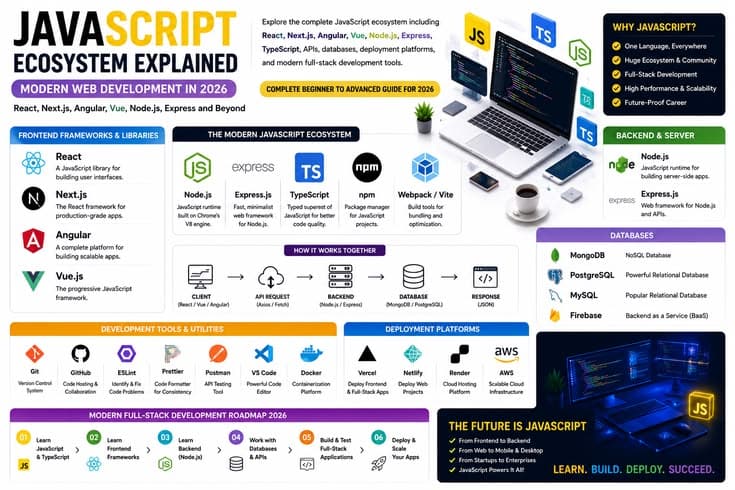
JavaScript Ecosystem Explained: React, Next.js, Angular, Vue, Node.js, Express and Modern Web Development in 2026
JavaScript is the most widely used programming language in the world today. Not just in the browser — on servers, in mobile apps, desktop applications, and even AI tools. In this complete guide, we will understand the entire JavaScript ecosystem — from basics to full-stack development, from frameworks to databases and deployment.
What Is JavaScript? — Language of the Web
JavaScript is a lightweight, interpreted programming language originally created to run inside web browsers. HTML provides the structure of any web page, CSS handles its design and styling, and JavaScript makes the page interactive and dynamic. When you click a button and something changes without the page reloading — that is JavaScript at work.
JavaScript's biggest feature is that it is a client-side script — meaning it runs directly in the user's browser and can work without repeatedly requesting data from the server. Additionally, it supports asynchronous processing, which means the screen does not freeze while fetching data in the background.
In 2009, Node.js arrived and took JavaScript from the browser to the server. Since then, JavaScript has entered mobile development, desktop apps, APIs, and machine learning. By 2026, JavaScript has evolved from the language of the web to the language of everything.
| Technology | What It Does | Example | Role on Website |
|---|---|---|---|
| HTML | Defines page structure and content | Headings, paragraphs, images, links | Skeleton — body's framework |
| CSS | Design, colors, layout and responsiveness | Font size, background color, flex layout | Clothing — appearance and style |
| JavaScript | Logic, interactivity and dynamic behavior | Form validation, popups, live search | Brain — power to think and react |
JavaScript Core Features
JavaScript is an interpreted language — meaning code runs directly without needing compilation. It is dynamically typed, meaning a variable's type is determined at runtime. Asynchronous programming happens through Promises and async/await. And it is event-driven — it reacts to user actions.
Thinking JavaScript is limited to the browser is a mistake. Node.js took it to the server, React Native to mobile, Electron to desktop, and TensorFlow.js to machine learning. This is its greatest strength: one language, everywhere.
JavaScript Libraries vs Frameworks — What's the Difference?
Most people learning JavaScript face confusion about the difference between a library and a framework. This is a fundamental concept to understand before diving into the ecosystem.
A library is a collection of ready-made code that you call whenever you want. You are in control. A framework is different — the framework calls your code and you must follow a specific structure. This concept is called "Inversion of Control."
A simple example: a library is a hammer you pick up when needed. A framework is a construction company that tells you where to place pillars and doors — the structure is already defined.
| Aspect | Library | Framework |
|---|---|---|
| Control | You call the library | The framework calls your code |
| Structure | You decide the architecture | Framework structure is pre-defined |
| Flexibility | More flexible, use anytime | Less flexible, must follow rules |
| Scope | For a specific task | Full application environment |
| Examples | React (technically), Lodash, D3.js, jQuery | Angular, Next.js, NestJS, Vue (technically) |
| Learning Curve | Comparatively easier | More to learn |
Popular JavaScript Libraries
Some important libraries developers regularly use include: Lodash for data manipulation — performing advanced operations on arrays, objects and strings. D3.js for data visualization — transforming datasets into interactive charts and graphs. Chart.js is a lightweight option for simple pie, bar and line charts. Three.js is used for 3D graphics in the browser. GSAP (GreenSock) is the industry standard for complex animations and scroll effects.
What Is React.js? — Meta's UI Library
React was created by Meta (formerly Facebook) and open-sourced in 2013. Technically it is a UI library — handling only the user interface layer. But due to its ecosystem, it effectively works like a framework. React is the most widely used frontend technology in the world — enterprise React usage is roughly 78 percent in 2026.
React's core idea is components. Every UI element is a component — button, header, form, or an entire page. These components are reusable — write once, use repeatedly. Components are written in JSX, which is HTML-like syntax inside JavaScript.
React Core Concepts
State management is React's heart. The useState hook lets you store data inside a component. When state changes, React automatically updates only the part that changed — the entire page does not reload. This is possible because of the Virtual DOM — React calculates changes in the background and only applies necessary updates.
Props are how parent components pass data to child components. The useEffect hook handles side effects — API calls, subscriptions, or any browser interaction. In React's 2026 version, the React Compiler automatically handles optimizations that previously required manual useMemo and useCallback.
React Ecosystem
React alone only builds UI. For routing, you need React Router. For global state, Redux Toolkit or Zustand. For API calls, TanStack Query (React Query). And for production-ready apps, the Next.js meta-framework is used. This is both React's flexibility and its initial confusion — you have to choose your own stack.
| Feature | React (Meta) | Angular (Google) | Vue.js (Community) |
|---|---|---|---|
| Core Type | UI Library | Full MVC Framework | Progressive Framework |
| Primary Language | JavaScript / JSX | TypeScript (Strict) | JavaScript or TypeScript |
| Data Binding | One-way | Two-way | Two-way + One-way |
| Learning Curve | Moderate | Steep | Easy to Smooth |
| Job Market 2026 | Highest demand | Strong in enterprise | Moderate |
| Routing | Third-party (React Router) | Built-in Angular Router | Official Vue Router |
| State Management | Redux, Zustand (external) | Built-in (Services) | Pinia or Vuex |
| Best For | Startups, SPAs, job market | Large enterprise apps | Rapid development, small teams |
Angular and Vue.js — Key Concepts of Both
Angular — Google's Enterprise Framework
Angular was developed by Google and is a "batteries-included" framework. This means everything is built-in — routing, form handling, HTTP client, state management — no need to install anything externally. It strictly depends on TypeScript, which is a mandatory requirement, not optional.
Angular's architecture is structured and opinionated. Dependency injection, decorators, modules — these concepts make Angular enterprise-grade. It is perfect for large teams because a consistent codebase is maintained. In 2026, Angular 21 made zoneless change detection default, bringing significant performance improvements.
Vue.js — Developer Favorite
Vue.js is called a "progressive framework" because it can be gradually adopted. Start with a simple script tag, or build a full enterprise application — Vue fits both. Its template syntax is HTML-first, making it easy to read and write.
Vue 3's Composition API is similar to React hooks but more organized. In Vue 3.5, memory usage dropped by 56 percent due to a major performance improvement. Pinia (official state management) and Vue Router are its two officially supported libraries that complete the ecosystem.
Next.js — React's Full-Stack Meta-Framework
To understand Next.js, first understand that React only builds UI — in the browser. Next.js is a complete framework built on top of React that provides rendering, routing, optimization, and backend capabilities. React is the engine, Next.js is the entire car with the engine installed.
Next.js was created by Vercel and in 2026 it has become the default standard for production React development. Companies like Netflix, TikTok, Nike, and Apple use Next.js. It has 78 percent market share in enterprise React framework usage.
React vs Next.js: Key Differences
In React, rendering happens in the browser — Client Side Rendering (CSR). When a user visits, the server sends a blank HTML file and a large JavaScript bundle. The browser runs JavaScript and only then does the page appear. This is bad for SEO and initial load is slow.
In Next.js, pages are pre-rendered on the server — users receive already-built HTML. Search engines can easily read it. Initial load is 40 to 60 percent faster compared to pure React. Next.js also provides built-in routing — creating app/about/page.js automatically creates the /about URL, no need to install React Router.
| Feature | Pure React (Vite/CRA) | Next.js Framework | Node.js Runtime |
|---|---|---|---|
| Type | UI Library | Full-stack Meta-Framework | JavaScript Runtime Environment |
| Rendering | Only Client-Side (CSR) | SSR, SSG, ISR, CSR — hybrid | No rendering (raw data/JSON) |
| Routing | React Router (manual setup) | Built-in file-based routing | Manual setup with Express |
| SEO Performance | Poor — empty HTML shell | Excellent — server-rendered HTML | N/A (backend only) |
| Backend Capability | No — separate server needed | Built-in API routes + Server Actions | Full backend control |
| Best Use Case | Private dashboards, internal tools | Public websites, e-commerce, SaaS | Real-time APIs, microservices |
Next.js App Router — 2026 Standard
In Next.js, the App Router is based on the file system. app/page.tsx is the root page, app/about/page.tsx creates the /about URL, app/blog/[slug]/page.tsx is for dynamic blog posts. layout.tsx files are for shared layouts. loading.tsx is for automatic loading states.
React Server Components are Next.js's most important feature. By default, all components run on the server — meaning zero JavaScript ships to the browser for these components. You can access databases directly from server components. For client components, add the "use client" directive — needed when using onClick, useState, or browser APIs.
Next.js vs Node.js — Understanding the Comparison
Comparing Node.js and Next.js directly is incorrect. Node.js is a runtime environment — the engine on which Next.js itself runs. Node.js gives you complete backend control: filesystem access, database drivers, HTTP servers, everything. Next.js is a complete car that uses the Node.js engine. For real-time chat servers, microservices, or heavy compute, use Node.js directly. For public-facing web apps and SEO-critical sites, Next.js is the right choice. Many enterprise architectures use both together — Next.js handles the frontend while dedicated Node.js servers handle heavy backend operations.
Node.js and Express.js — JavaScript Backend
Node.js arrived in 2009 and took JavaScript from the browser to the server. Its core is Google Chrome's V8 engine, which compiles JavaScript to machine code. Node.js is asynchronous and non-blocking — meaning while one request is being processed, the server does not stop other requests; everything runs in parallel.
This makes Node.js perfect for real-time applications: chat applications, live notifications, streaming platforms, gaming servers. The npm registry is the world's largest software registry with millions of packages available.
Express.js — Minimalist Backend Framework
Express.js is a lightweight web framework based on Node.js. It is considered the de-facto standard for building backend APIs. It is unopinionated — no strict rules, you design your own architecture. Define routes, add middleware, and send HTTP responses. This simplicity is its strength and the reason many developers use it as a baseline.
| Framework | Philosophy | Best For | TypeScript Support | Learning Curve |
|---|---|---|---|---|
| Express.js | Minimalist, unopinionated | Simple APIs, learning, flexibility | Manual setup | Easy |
| NestJS | Structured, Angular-inspired | Enterprise backends, large teams | Native support | Steep |
| Fastify | Speed-first, low overhead | High-performance APIs | Good support | Moderate |
| Hono | Edge-first, ultra lightweight | Edge/serverless functions | Native TypeScript | Easy |
TypeScript — JavaScript's Type-Safe Version
TypeScript was created by Microsoft as a strongly typed, syntactic superset of JavaScript. This means TypeScript is JavaScript with an extra layer — type annotations. TypeScript code compiles to plain JavaScript that can run in any browser or Node.js environment.
By 2026, TypeScript has gone from an optional tool to an industry standard. Most major open source projects are in TypeScript. Angular has made it mandatory. Next.js recommends TypeScript by default. According to GitHub data, TypeScript usage has overtaken plain JavaScript in major repositories.
TypeScript Core Benefits
Static type checking means bugs are caught at compile time before reaching production. IDE tooling — autocomplete, instant refactoring, inline documentation — dramatically improves developer experience. Self-documenting code — function signatures themselves tell you what data is expected. Full-stack type sharing — the same type definitions can be shared between frontend and backend.
| Aspect | JavaScript | TypeScript |
|---|---|---|
| Typing System | Dynamic — type determined at runtime | Static — type checked at compile time |
| Error Detection | At runtime — bug appears in production | At compile time — detected early |
| IDE Support | Basic autocomplete | Full IntelliSense, auto-import, refactoring |
| Code Readability | Types have to be guessed | Types are written explicitly |
| Learning Required | Basic | Additional type syntax to learn |
| Large Projects | Difficult to maintain | Refactoring and scaling much easier |
| Framework Support | Works in all frameworks | Mandatory in Angular, recommended in Next.js |
Databases — MongoDB, PostgreSQL and ORMs
Every full-stack application stores data — users, posts, orders, everything. A database is the system that organizes and retrieves this data. In the JavaScript ecosystem, there are two major categories: SQL (relational) databases like PostgreSQL and MySQL, and NoSQL databases like MongoDB.
MongoDB — The Core of MERN Stack
MongoDB is a NoSQL document database that stores data in JSON-like format. This means if your application is in JavaScript, the data format matches — consistent data structure from backend to frontend. The schema is flexible — each document can have different fields. This is the M in the MERN stack (MongoDB, Express, React, Node).
MongoDB Atlas is the cloud-hosted version that is perfect for beginners — create an account, set up a database with a few clicks, and get a connection string. Use it with Mongoose ORM for a structured way to interact with MongoDB in Node.js.
PostgreSQL — Production-Grade Relational Database
PostgreSQL is a powerful open-source relational database best for structured data. Financial applications, e-commerce orders, user relationships — wherever data integrity is critical, PostgreSQL is the preferred choice. ACID compliance guarantees that transactions either complete fully or not at all.
In 2026, PostgreSQL with Prisma and Drizzle ORMs has become very popular in full-stack JavaScript apps. The Next.js + Prisma + PostgreSQL combination is a common stack for production SaaS applications.
| Feature | MongoDB | PostgreSQL | MySQL |
|---|---|---|---|
| Type | NoSQL (Document-based) | SQL (Relational) | SQL (Relational) |
| Data Format | JSON-like documents | Tables and rows | Tables and rows |
| Schema | Flexible — dynamic schema | Fixed — strict schema | Fixed — strict schema |
| Best For | Rapidly changing data, MERN apps | Complex queries, financial data | Traditional web apps, WordPress |
| Scaling | Horizontal scaling easy | Vertical + horizontal | Mainly vertical |
| JavaScript Integration | Native JSON — perfect match | Excellent with Prisma/Drizzle | Good with ORMs |
Prisma and Drizzle ORM
An ORM (Object-Relational Mapper) lets you interact with your database using JavaScript objects instead of writing SQL. Prisma is the most popular ORM for Next.js applications in 2026. Define your schema, generate it, and then make type-safe database calls. Drizzle ORM is its lightweight alternative that gives more control and takes a performance-first approach.
MERN, MEAN and MEVN Stack — Full Stack Comparison
Full-stack development means building both the frontend and backend yourself. The JavaScript ecosystem has some famous technology combinations called "stacks." The three most popular are MERN, MEAN, and MEVN.
| Component | MERN Stack | MEAN Stack | MEVN Stack |
|---|---|---|---|
| Database | MongoDB | MongoDB | MongoDB |
| Backend | Express.js + Node.js | Express.js + Node.js | Express.js + Node.js |
| Frontend | React | Angular | Vue.js |
| Language | JavaScript / JSX | TypeScript (mandatory) | JavaScript / TypeScript |
| Learning Curve | Moderate | Steep | Easy to Moderate |
| Job Market | Highest demand | Strong in enterprise | Moderate |
| Best For | Startups, SPAs, modern apps | Large enterprise systems | Rapid development teams |
The MERN stack is the most learned and used stack as of today. MEAN is preferred by large teams because of Angular's strict structure. MEVN is a good option for smaller teams or beginners because of Vue's simplicity.
API Development — REST, GraphQL and tRPC
APIs (Application Programming Interfaces) are how the frontend and backend communicate. When you open a weather app, the frontend makes an API call, the backend sends data, and you see the weather — all of this happens because of APIs.
REST API — Industry Standard
REST (Representational State Transfer) is the most common API design pattern. It uses HTTP methods on specific URLs (endpoints): GET to retrieve data, POST to create new data, PUT to update, and DELETE to remove. REST is simple, stateless, and widely understood. Most beginners start with REST and it has been used in production for decades.
GraphQL — Flexible Query Language
GraphQL was created by Facebook. In REST, you get whatever data the endpoint provides. In GraphQL, you define exactly what data you want — no more, no less. Related data from multiple sources can be fetched in a single request. GraphQL is useful in complex applications and mobile apps where bandwidth is precious.
tRPC — Type-Safe APIs
tRPC is built for TypeScript projects — especially with Next.js. No need to define schemas or create REST endpoints. TypeScript types themselves are the API contract. The frontend automatically uses backend types — no code generation needed. The T3 Stack (Next.js + TypeScript + Tailwind + tRPC + Prisma) is a popular choice for full-stack TypeScript development in 2026.
| Aspect | REST API | GraphQL | tRPC |
|---|---|---|---|
| Learning Curve | Easy — widely understood | Moderate — new query language | Easy if you know TypeScript |
| Data Fetching | Fixed data per endpoint | Exactly what you request | Type-safe function calls |
| Over-fetching Problem | Common — extra data is received | No — only requested data | Controlled by developer |
| Type Safety | Manual or via Swagger | Schema-based types | Automatic end-to-end TypeScript |
| Best Stack | Any backend, any frontend | Complex data relationships | Next.js + TypeScript projects |
JavaScript Learning Roadmap — Beginner to Pro
The JavaScript ecosystem is so large that new developers often get confused about where to start. Here is a clear, phased roadmap that is relevant in 2026.
Phase 1: Core JavaScript Basics (2-3 Weeks)
Start practicing in the browser console or VS Code. Create variables with let and const — never use var. Learn data types: String, Number, Boolean, null, undefined. Learn arithmetic, comparison and logical operators. Conditionals: if, else if, else. Loops: for, while. Declare and call functions. This is the foundation — if this is weak, frameworks will be very difficult later.
Phase 2: DOM Manipulation and Events (2 Weeks)
Learn how JavaScript interacts with HTML. Select elements with querySelector. Change content with innerHTML and textContent. Handle user clicks, form submissions, and keyboard input with addEventListener. Store simple data in the browser with localStorage. At the end of this phase, build a Todo List or Calculator app.
Phase 3: Modern JavaScript ES6+ (2-3 Weeks)
Learn to write arrow functions. Destructuring — extracting values from arrays and objects. Using the spread operator (...). Template literals (backtick strings). Array methods: map(), filter(), reduce() — these are heavily used in React. JSON.parse() and JSON.stringify() for data formatting.
Phase 4: Async JavaScript and APIs (2 Weeks)
Learn what Promises are and how they work. Clean asynchronous code with async/await syntax. Fetch data from real APIs using the Fetch API. Error handling with try/catch. In this phase, build a Weather App that fetches data from a real API.
Phase 5: React and Ecosystem (4-6 Weeks)
Learn React components, JSX, props, and state. Deeply understand useState and useEffect hooks. Create multi-page feel with React Router. Data fetching with TanStack Query. Styling with Tailwind CSS. While learning, build a simple multi-page React app.
Phase 6: Backend and Full-Stack (4-6 Weeks)
Build APIs with Node.js and Express. Connect to MongoDB or PostgreSQL databases. Implement authentication with JWT tokens for login/signup. Make React full-stack with Next.js. Interact with your database using Prisma ORM. Deploy on Vercel or Railway.
| Phase | Topics | Duration | Practice Project |
|---|---|---|---|
| Phase 1: JS Basics | Variables, loops, functions, conditionals | 2 to 3 weeks | Console calculator |
| Phase 2: DOM + Events | querySelector, addEventListener, localStorage | 2 weeks | Todo List app |
| Phase 3: Modern JS (ES6+) | Arrow functions, destructuring, array methods | 2 to 3 weeks | Array manipulation challenges |
| Phase 4: Async JS + APIs | Promises, async/await, Fetch API | 2 weeks | Weather App with API |
| Phase 5: React Ecosystem | Components, hooks, routing, state | 4 to 6 weeks | Multi-page React app |
| Phase 6: Full-Stack | Node.js, Express, MongoDB/PostgreSQL, Next.js | 4 to 6 weeks | Full-stack blog with auth |
Deployment — Vercel, Netlify, Railway and Render
You've written the code, built the app — now it's time to make it live on the internet. In 2026, deployment has become much easier. Previously, server setup, nginx configuration, and SSL certificate installation were all manual. Now, a Next.js app goes live with one click on Vercel.
Vercel — Next.js Natural Home
Vercel is the company that created Next.js. Therefore, deploying Next.js on Vercel provides the smoothest experience. Connect your GitHub repository, add environment variables, and deploy. Every git push triggers automatic deployment. The free tier is sufficient for personal projects. Edge functions, image optimization, and analytics are built-in.
Railway and Render — Backend Deployment
Railway and Render are popular choices for Node.js/Express backends, databases, and full applications. They are as easy as Heroku but with better free tiers. You can host PostgreSQL databases directly on Railway. Environment variables are managed securely. Netlify is perfect for static sites and React SPAs — with fast CDN delivery worldwide.
| Platform | Best For | Free Tier | Database Support | Ease of Use |
|---|---|---|---|---|
| Vercel | Next.js, React, frontend | Generous — personal projects | Via integrations | Very Easy |
| Netlify | Static sites, React SPA | Good free tier | Limited native | Very Easy |
| Railway | Full apps, Node.js backends | Limited credits | PostgreSQL, MongoDB native | Easy |
| Render | Node.js, Python backends | Free with limits | PostgreSQL native | Easy |
| AWS | Enterprise scale | Free tier 12 months | RDS, DynamoDB | Complex |
The Future of JavaScript — 2026 and Beyond
JavaScript is not just surviving but dominating. According to Upwork's 2026 data, JavaScript is the most demanded skill on the web and this trend continues. But the language and ecosystem are also evolving — some major trends will become more visible in 2027 and 2028.
TypeScript Full Takeover
In professional environments, the distinction between JavaScript and TypeScript is fading. GitHub Octoverse data shows that TypeScript usage has overtaken plain JavaScript in major repositories. The ECMAScript TC39 committee is actively working on proposals to add native type annotations directly to JavaScript — meaning the TypeScript compile step will no longer be needed in the future.
Integration with WebAssembly
WebAssembly (Wasm) is not replacing JavaScript — it is a force multiplier. Write performance-critical operations in Rust, Go, or C++, compile them, and they run at near-native speed in the browser. JavaScript orchestrates them — handling UI and application logic. Graphics rendering, video processing, encryption — all of these can be dramatically faster with Wasm.
AI Integration and Client-Side ML
Libraries like TensorFlow.js and Brain.js let you run machine learning models directly in the browser — no server needed. WebGPU gives browser access to the GPU. This is also good for data privacy because user data does not go to the server. JavaScript is becoming the frontend layer for AI applications.
Edge Computing and Serverless Dominance
Applications are increasingly being built on the serverless model — AWS Lambda, Vercel Edge Functions, Cloudflare Workers. Code is deployed to edge locations close to users, reducing latency, and eliminating the need to maintain infrastructure. JavaScript is perfectly suited for this model due to its lightweight and fast startup nature.
| Area | Current State (2026) | Expected 2028 |
|---|---|---|
| TypeScript Adoption | Industry standard in enterprise | Native browser type support proposals |
| React Ecosystem | Server Components stable, React Compiler | Compiler handles all optimization auto |
| WebAssembly | Used in performance-critical tasks | Mainstream — most apps use Wasm modules |
| AI Integration | TensorFlow.js, basic client ML | AI-native frameworks, local LLM in browser |
| Edge Computing | Growing adoption | Default deployment model |
| Alternative Runtimes | Deno and Bun growing | Three-way competition with Node.js |
Conclusion: Where to Start in the JavaScript Ecosystem
The JavaScript ecosystem is very large, but that does not mean it is overwhelming if you take a structured approach. Do not try to learn everything at once — that is a direct path to tutorial hell. One thing, then another, then another — this is the way to mastery.
If you are a complete beginner: first strengthen your JavaScript basics — variables, functions, loops, DOM, async. Then move to React. Then Node.js and Express. Then go full-stack with Next.js. Build a real project at every phase — calculator, todo app, weather app, blog with auth — this is what matters in interviews, not just theoretical knowledge.
If you are an intermediate developer looking to advance your career: learn TypeScript properly, master Next.js App Router and Server Components, use PostgreSQL + Prisma in production projects, and deploy on Vercel. This is the standard stack of 2026 and this is what the market is demanding.
JavaScript in 2026 is not just alive but thriving. In every new trend — AI, edge computing, WebAssembly — JavaScript has a central role. Learning this language is as valuable an investment in 2026 as it was 5 years ago — perhaps even more.