AI Coding Assistants Explained: How Developers Will Build Software in the Future
The way software is built is changing faster than at any other point in the history of computing. A developer sitting at a keyboard in 2026 works in a fundamentally different environment than one working just three years ago. AI coding assistants have moved from novelty to necessity — and understanding how they work, which ones to use, and how to build a career around them is now one of the most important things any programmer, student, or technology professional can know.
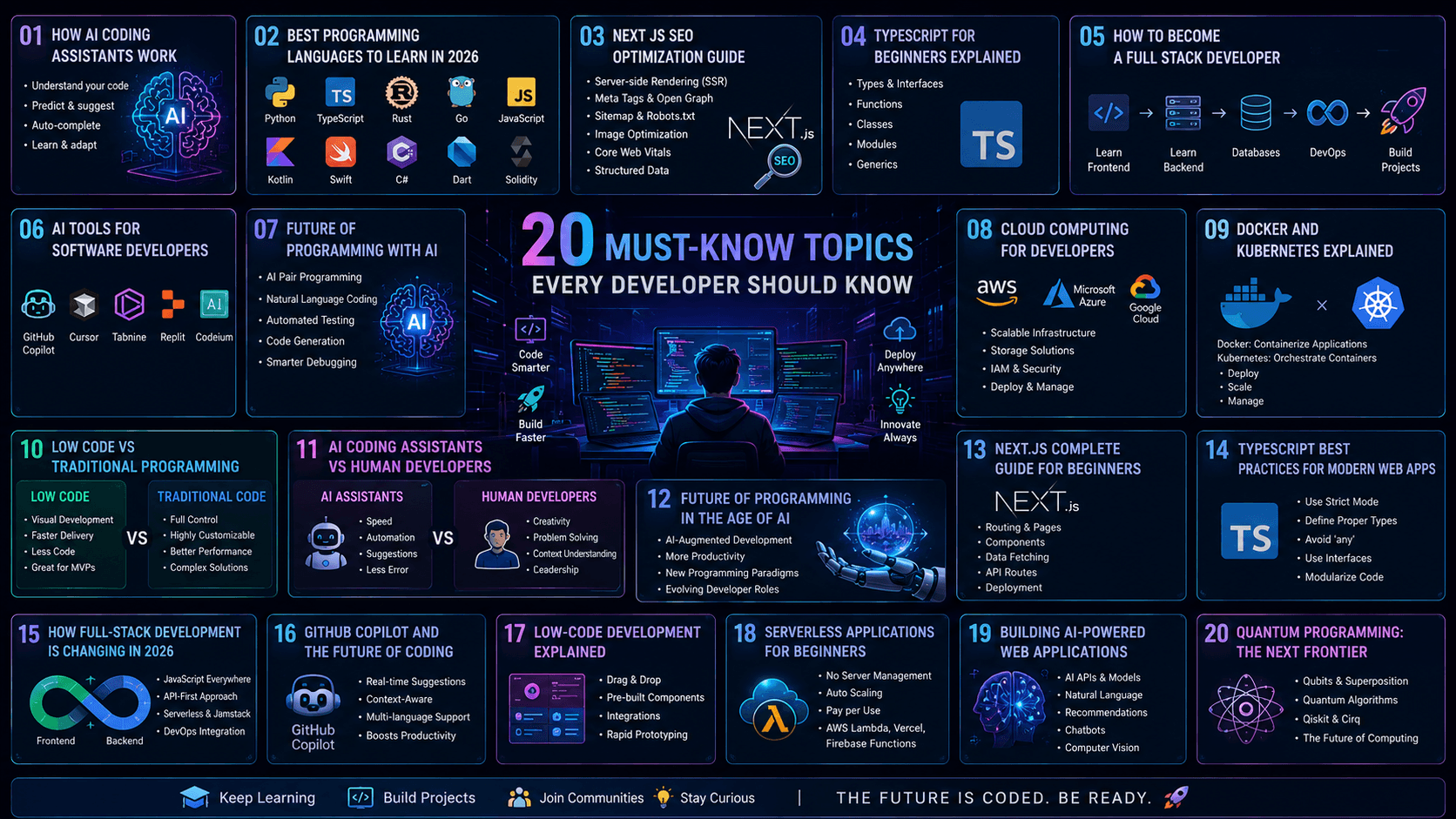
In this comprehensive guide we cover everything: how AI coding assistants work under the hood, the best programming languages to learn in 2026, how Next.js handles SEO, TypeScript for beginners, the full-stack developer roadmap, the 17 best AI tools for developers, cloud computing basics, Docker and Kubernetes explained, low-code versus traditional development, GitHub Copilot and the future of coding, and how to build AI-powered web applications from scratch.
What Is an AI Coding Assistant and How Does It Work?
An AI coding assistant is a software tool powered by large language models (LLMs) trained on vast quantities of source code, documentation, and technical writing. It acts as an intelligent pair programmer — analyzing your project context, interpreting your intent in natural language or partial code, and generating, completing, refactoring, or debugging code in real time.
The mechanics behind these tools can be broken into four core phases that happen within milliseconds every time you invoke them.
Phase 1: Context Gathering
Before suggesting anything, the AI needs to understand where it is and what you are trying to build. It gathers context by examining the active file you are working in — particularly the lines immediately before and after your cursor position. It also scans the directory structure, file names, imports, and framework signatures to understand what stack you are using. The most advanced tools, such as Cursor and Windsurf, go beyond a single file by using Retrieval-Augmented Generation (RAG) — searching your entire codebase for relevant classes, functions, type definitions, and variable names.
Phase 2: Prompt Processing and Intent Interpretation
Once the AI has gathered its context and received your natural language instruction or partial code input, it encodes this information and runs it through its underlying neural network. Rather than matching keywords rigidly, the model interprets the intent behind what you are trying to accomplish. If you write a comment saying // fetch all users from the API and sort by date, the AI understands the full logical operation and generates the corresponding asynchronous function, complete with error handling, in your preferred language and style.
Phase 3: Code Generation
The model generates output probabilistically — predicting the most logically consistent next characters, lines, or entire blocks of code. It formats the output to match your existing codebase conventions, naming patterns, and indentation style. For experienced developers, this means that even edge-case logic generation feels tailored rather than generic.
Phase 4: Integration via IDE
These models integrate directly into your workflow through extensions or native features in editors like Visual Studio Code, JetBrains IDEs, and Neovim. This enables inline autocomplete (suggestions appearing as you type), inline chat (highlight a function and ask the AI to refactor or explain it), and terminal access in the most advanced agentic tools — where the AI writes code, executes it, reads the output, and automatically attempts to fix any errors in a continuous loop without human intervention.
| Feature | AI Coding Assistant | AI Coding Agent |
|---|---|---|
| Role | Smart pair programmer / autocomplete | Autonomous developer / architect |
| Autonomy Level | Low — requires step-by-step guidance | High — works independently toward a goal |
| Workflow | You ask, it generates, you integrate | You give a goal, it writes, tests, and fixes itself |
| Codebase Awareness | Current file or limited context | Full repository indexing via RAG |
| Terminal Access | No | Yes — executes and reads output |
| Best For | Day-to-day speed and autocomplete | Complex multi-file features and refactoring |
| Examples | GitHub Copilot, Gemini Code Assist | Cursor Agent, Windsurf, Cline, Claude Code |
The 17 Best AI Tools for Software Developers in 2026
The AI developer tools landscape has exploded in sophistication. Here is a comprehensive overview of the 17 most impactful tools every developer should know in 2026.
| # | Tool | Primary Function | Best For | Free Tier? |
|---|---|---|---|---|
| 1 | Tabnine | AI code completion | Inline autocomplete in any language | Yes |
| 2 | Snyk | Code analysis and security scanning | Finding vulnerabilities in code and dependencies | Yes (limited) |
| 3 | PolyCoder | Open-source code generation | Developers who want a self-hosted LLM for code | Yes (open source) |
| 4 | Otter.ai | Meeting transcription and notes | Converting developer standups and sprint planning into searchable notes | Yes (limited) |
| 5 | Rewind.ai | AI-powered documentation and memory | Recording what you worked on for documentation and context recall | Paid |
| 6 | Hugging Face | NLP models and AI model hosting | Using and deploying open-source LLMs and ML models | Yes |
| 7 | Figstack | Code understanding and explanation | Explaining unfamiliar or legacy code in plain English | Yes (limited) |
| 8 | Codepeer.ai | Website and code generation | Rapid prototyping of web interfaces from prompts | Yes (limited) |
| 9 | Stepsize AI | Code debugging and technical debt tracking | Identifying and prioritizing bugs across large codebases | Yes (limited) |
| 10 | Mutable.ai | High-quality code generation | Auto-generating and transforming code with quality controls | Paid |
| 11 | Cursor | AI-first code editor | Full codebase-aware generation, refactoring, and multi-file edits | Yes (free tier) |
| 12 | Codium AI (Qodo) | Test-writing assistance | Automatically generating unit tests for existing functions | Yes |
| 13 | Grit.io | Code migration | Automating large-scale language or framework upgrades | Paid |
| 14 | GitHub Copilot | AI pair programming | Industry-standard inline code completion and in-editor chat | Yes (free tier) |
| 15 | Windsurf | Agentic AI IDE | Autonomous development workflows with terminal and screenshot analysis | Yes (limited) |
| 16 | Cline | Autonomous coding agent (VS Code) | Full dev cycles including file edits, terminal commands, and MCP integration | Yes (open source) |
| 17 | Claude Code | CLI repository-level AI assistant | Navigating, editing, and fixing errors across entire codebases from terminal | Paid (API usage) |
Best Programming Languages to Learn in 2026
Choosing the right programming language is one of the most consequential decisions a developer or student can make. In 2026, the landscape is shaped by two dominant forces: the AI revolution (which has massively elevated Python and TypeScript) and the continued web dominance of JavaScript. Here is a complete breakdown of where each language stands and who should learn it.
Python — The AI and Data Science King
Python holds the number one position on the TIOBE Index, the PYPL Index, and the IEEE Spectrum rankings as of June 2026. Its dominance is driven by its role as the foundational language for AI, machine learning, data science, and automation. Frameworks like PyTorch, TensorFlow, and LangChain are all Python-first. Its readable, English-like syntax also makes it the most widely taught introductory language globally. If you want to work in AI, data, or automation — Python is non-negotiable.
JavaScript — The Web's Universal Language
JavaScript powers the client-side interactivity of approximately 99% of all websites. According to the Stack Overflow Developer Survey, it is the most commonly used language with nearly 66–69% of all developers writing it actively. Through Node.js, it also runs on the backend, and through React Native and Expo, it powers cross-platform mobile apps. JavaScript is the most versatile language for web developers.
TypeScript — The Modern Web Standard
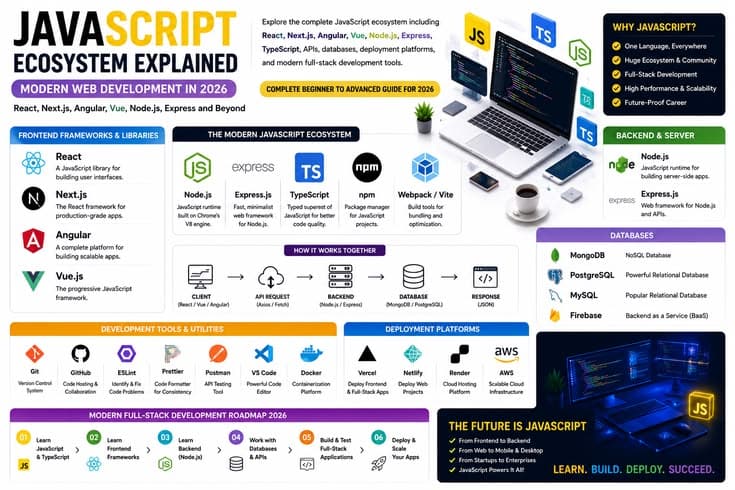
TypeScript is a statically typed superset of JavaScript developed by Microsoft. It adds a type system on top of JavaScript that catches errors at development time before your code ever runs in a browser, dramatically reducing bugs in large-scale applications. TypeScript has become the default choice for any serious frontend or full-stack web project using React, Next.js, or Node.js.
Go (Golang) — The Cloud Infrastructure Language
Go is the language powering modern cloud infrastructure, microservices, and high-performance backend systems. Built by Google, it offers fast compilation, built-in concurrency primitives, and extremely efficient memory usage. Companies like Uber, Dropbox, and Docker itself are built in Go.
Rust — The Safety and Speed Champion
Rust consistently wins the title of the most admired programming language in developer surveys. It offers C++-level speed with strict compile-time memory safety guarantees that prevent entire categories of bugs. It commands the highest salary ceiling in the industry and is increasingly used for WebAssembly, systems programming, and cloud infrastructure.
SQL — The Evergreen Data Skill
SQL is not a general-purpose programming language, but it remains one of the most requested skills in every backend and data engineering job listing. Understanding how to query, design, and optimize relational databases is a foundational skill that no AI tool has made obsolete.
| Language | Best For | Difficulty | Job Market | AI Relevance | TIOBE Rank (2026) |
|---|---|---|---|---|---|
| Python | AI, ML, Data Science, Automation | Beginner-friendly | Extremely High | #1 — Core AI language | #1 |
| JavaScript | Web Frontend, Full Stack | Beginner-friendly | Highest overall | High — AI web apps | #6 |
| TypeScript | Modern Web, React, Next.js | Intermediate | Very High | High — AI SaaS products | Top 10 |
| Go | Cloud, Microservices, Backend APIs | Intermediate | High | Medium — AI infrastructure | Top 15 |
| Rust | Systems, WebAssembly, Infrastructure | Hard | Growing fast | Medium — AI systems layer | Top 20 |
| Kotlin | Android Mobile Development | Intermediate | High | Medium | Top 20 |
| SQL | Databases, Data Engineering | Beginner-friendly | Very High | High — AI data pipelines | Always relevant |
| Java | Enterprise Backend, Android | Intermediate | Very High | Medium | #3 |
TypeScript for Beginners — A Complete Introduction
TypeScript is one of the most important languages for any web developer to learn in 2026. It is an open-source programming language developed by Microsoft that acts as a strict, statically typed layer on top of JavaScript. All valid JavaScript is valid TypeScript — but TypeScript adds powerful features that catch bugs before your code ever runs.
The Core Problem TypeScript Solves
JavaScript is loosely typed, meaning a variable can change its data type at any point during execution. This frequently causes hidden bugs that only appear at runtime — when users are already experiencing them. TypeScript adds a compile-time type checker that highlights these errors instantly inside your code editor, before you ever run the application.
Key TypeScript Concepts for Beginners
Type Annotations let you explicitly declare what kind of data a variable or function parameter can hold. For example: let username: string = "Alice"; — if you try to assign a number to this variable later, TypeScript immediately flags it as an error.
Type Inference means TypeScript is smart enough to guess the type from the initial value. If you write let score = 100;, TypeScript automatically infers that score is a number and will error if you try to assign a string to it later.
Union Types allow a variable to hold more than one type using the pipe symbol: let accountId: number | string; — this is useful for real-world scenarios where IDs might come as either numbers or formatted strings.
Interfaces define blueprints for objects, ensuring all required fields are present and correctly typed: interface UserProfile { id: number; email: string; isAdmin: boolean; }
Generic Types allow you to write reusable functions and classes that work with any type while still enforcing type safety.
Setting Up TypeScript
Install Node.js, then run npm install typescript -g in your terminal. Create a file with a .ts extension, write your TypeScript code, and compile it with tsc filename.ts. This generates a standard .js file that any browser or Node.js server can execute. For projects, run tsc --init to generate a tsconfig.json configuration file, then use tsc --watch for automatic recompilation on every file save.
Next.js SEO Optimization — Complete Guide for 2026
Next.js has become the dominant framework for building SEO-optimized React applications because it renders HTML on the server before sending it to the browser. This means search engine crawlers can read your content immediately without executing JavaScript first — a critical advantage over traditional client-side React applications.
Why SSR Beats CSR for SEO
With Server-Side Rendering (SSR), the server sends fully rendered HTML to the browser. Search engine crawlers can instantly read, understand, and index all content without needing to execute JavaScript. With Client-Side Rendering (CSR), the server sends a blank HTML canvas and a JavaScript bundle. Search bots must parse, download, and execute the JS before they can see any content — a process that drains crawl budget, delays indexing, and harms rankings. SSR also significantly improves Core Web Vitals scores — particularly Largest Contentful Paint (LCP) — which directly impacts Google search rankings.
Rendering Strategy Selection
Static Site Generation (SSG) builds HTML at build time and is ideal for blogs, documentation, and marketing pages. It produces the fastest possible load times because pages are pre-generated and served from a CDN. Server-Side Rendering (SSR) renders HTML on every incoming request, making it suitable for dynamic, real-time data like news feeds, dashboards, or personalized user pages. Incremental Static Regeneration (ISR) combines the best of both — pre-generating static pages while updating them in the background at configurable intervals, ideal for large e-commerce catalogues or news sites.
The Next.js Metadata API
Instead of manually constructing HTML head tags, Next.js provides a built-in Metadata API for static and dynamic metadata generation. Export a metadata object from any layout or page file for static metadata, or export a generateMetadata async function to fetch dynamic data and return page-specific titles and descriptions based on route parameters.
Sitemap and Robots File Generation
Next.js supports file-based conventions for automatically generating crawling assets. Create a sitemap.ts file in your app root that returns a MetadataRoute.Sitemap array with all your URLs and last-modified dates. Create a robots.ts file to specify which paths crawlers are authorized to scan. Both files are automatically compiled and served at the correct standard paths.
Core Web Vitals Optimization
Use the next/image component for all images — it automatically prevents Cumulative Layout Shift (CLS) by requiring explicit width and height attributes, and it serves modern WebP or AVIF formats on demand. Use next/font to host typography files alongside your build assets, eliminating the text shifting that occurs when external font files load. Use next/link for all internal navigation — it renders native anchor tags that crawlers can follow without JavaScript execution.
JSON-LD Structured Data for AI Search
With the rise of AI-powered search (Generative Engine Optimization or GEO), injecting structured JSON-LD schema markup into your pages helps both Google Rich Snippets and AI search models understand your content's purpose, author, date, and topic relationships. Inject JSON-LD inside a script tag with type application/ld+json and use dangerouslySetInnerHTML in React to render it server-side.
| SEO Area | Next.js Feature | What It Fixes | Priority |
|---|---|---|---|
| Rendering Strategy | SSG / SSR / ISR | Crawlability and indexing speed | Critical |
| Page Metadata | Metadata API (App Router) | Title, description, canonical URLs | Critical |
| Sitemap | sitemap.ts file convention | Crawler discovery of all pages | High |
| Robots File | robots.ts file convention | Control what crawlers can access | High |
| Image Optimization | next/image component | CLS prevention, WebP conversion | High |
| Font Optimization | next/font component | Eliminates layout shift from fonts | Medium |
| Internal Links | next/link component | Native anchor tags for crawlers | Medium |
| Structured Data | JSON-LD in page components | Rich results and AI search parsing | High |
| Core Web Vitals | All of the above combined | Google ranking signal performance | Critical |
| Dynamic Metadata | generateMetadata function | Per-page SEO for dynamic routes | High |
How to Become a Full Stack Developer — 2026 Roadmap
A full stack developer is someone who can build both the frontend interface that users see and the backend logic, databases, and APIs that power it. In 2026, with AI tools accelerating every layer of development, the role has expanded to include AI integration, cloud deployment, and prompt engineering. Here is the complete roadmap from absolute beginner to job-ready full stack developer.
Step 1: Frontend Foundations
Start with HTML to define the structure of web pages, CSS to style layouts and typography, and JavaScript to add interactivity and dynamic behavior. These three technologies form the foundation that everything else is built on. Do not skip this step even if you have access to AI tools — understanding fundamentals is essential for debugging AI-generated code and making architectural decisions.
Step 2: Frontend Frameworks
Once comfortable with vanilla JavaScript, learn React — the most widely adopted frontend framework, used by Facebook, Netflix, Airbnb, and thousands of companies globally. Then learn Next.js, the React framework that adds server-side rendering, routing, API routes, and SEO optimization out of the box. Add Tailwind CSS for rapid UI development using utility classes.
Step 3: Backend Development
Learn Node.js to run JavaScript on the server, then Express.js to build REST APIs. Alternatively, Python with FastAPI or Django is an excellent backend choice, especially if you plan to integrate AI models. Learn how to build endpoints, handle authentication with JWT tokens, and connect your backend to a database.
Step 4: Databases
Learn SQL with PostgreSQL for relational data with structured schemas and complex query requirements. Learn MongoDB for document-based NoSQL data that is more flexible and easier to scale horizontally. Understand concepts like indexing, query optimization, and database design principles.
Step 5: DevOps and Deployment
Learn Git and GitHub for version control and collaboration. Learn how to deploy applications to cloud platforms like Vercel (ideal for Next.js), Railway, Render, or AWS. Understand CI/CD pipelines that automatically test and deploy your code on every push. Learn the basics of Docker for containerizing applications.
Step 6: AI Integration Skills
In 2026, full stack developers are expected to know how to integrate AI APIs — OpenAI, Anthropic Claude, Google Gemini — into their applications. Learn how to build AI-powered features like chat interfaces, content generation, search, and recommendation systems using these APIs and RAG architectures.
Step 7: Build a Portfolio
Employers look at what you can build. Start with a personal blog built in Next.js, then progress to a full-stack app with authentication and a database (a task manager, expense tracker, or e-commerce MVP), and finally an AI-powered application that demonstrates your ability to integrate LLMs into production software. Host all code on GitHub and deploy every project live.
Cloud Computing for Developers — What You Need to Know
Cloud computing provides developers with on-demand access to virtual servers, databases, storage, and deployment tools via the internet, eliminating the need to own or manage physical hardware. Instead of buying servers, you rent computing resources from a cloud provider and pay only for what you use.
The Three Cloud Service Models
IaaS (Infrastructure as a Service) gives you raw virtual compute, storage, and networking — you manage the operating system and everything above it. AWS EC2 is the classic example. PaaS (Platform as a Service) gives you an environment to deploy your application code — the platform handles the underlying infrastructure, scaling, and runtime. Heroku and Railway are examples. SaaS (Software as a Service) is fully functional software delivered over the web — Gmail, Salesforce, and Shopify are SaaS products.
The Three Major Cloud Providers
Amazon Web Services (AWS) is the market leader with the broadest set of services, the largest global infrastructure, and the strongest enterprise adoption. AWS certifications are highly valued in the job market. Microsoft Azure is deeply integrated with enterprise Windows environments, Active Directory, and the .NET ecosystem — the preferred choice for large corporations already invested in Microsoft products. Google Cloud Platform (GCP) offers the strongest capabilities in data analytics, machine learning, and Kubernetes — the platform where Google runs its own AI infrastructure.
Essential Cloud Skills for Developers
Learn containerization with Docker to package your applications so they run consistently everywhere. Learn Kubernetes for orchestrating those containers at scale across multiple servers. Understand serverless computing — writing functions that run without managing servers, using AWS Lambda, Google Cloud Functions, or Vercel Edge Functions. Learn how to set up CI/CD pipelines using GitHub Actions to automate testing and deployment workflows.
Docker and Kubernetes Explained Simply
Docker and Kubernetes are the two most important container technologies in modern software development — but they serve different purposes and work together rather than competing with each other.
What Is Docker?
Docker is a platform that packages your application and all its dependencies — libraries, runtime, environment variables, configuration files — into a single lightweight unit called a container. This solves the classic "it works on my machine" problem: a Docker container runs identically on any machine anywhere, from a local laptop to a production cloud server. You write a Dockerfile describing how to build the environment, which creates a Docker Image (a read-only blueprint), which you then run as a Docker Container (a live instance).
What Is Kubernetes?
Kubernetes (abbreviated K8s) is a container orchestration platform that manages large numbers of Docker containers across clusters of multiple machines. While Docker is excellent for running containers on a single machine, real production systems run hundreds or thousands of containers across dozens of servers. Kubernetes connects those servers into a unified cluster, automatically scheduling containers across them, restarting any that crash, scaling up additional instances when traffic increases, and routing network traffic to healthy containers.
How They Work Together
The workflow in a professional pipeline is: first a developer uses Docker to build a container image of their application. That image is pushed to a container registry like Docker Hub or AWS ECR. Kubernetes then pulls that image and deploys it across the cluster, keeping it alive, load-balanced, and automatically scaled based on real traffic.
| Feature | Docker | Kubernetes |
|---|---|---|
| Primary Role | Packages and isolates applications into containers | Orchestrates and scales containers across servers |
| Scope | Single machine | Cluster of multiple machines |
| Scaling | Manual or limited | Automatic based on traffic and resource usage |
| Self-Healing | Manual restart required if container crashes | Automatically recreates crashed containers |
| Load Balancing | Not built-in | Built-in traffic distribution across pods |
| Learning Curve | Beginner to intermediate | Intermediate to advanced |
| Use When | Packaging apps, local development | Running apps at production scale |
| Learn First? | Yes — learn Docker before Kubernetes | After mastering Docker concepts |
Low-Code vs Traditional Development — What Is the Difference?
Low-code development platforms allow users to build applications using visual drag-and-drop interfaces, pre-built templates, and configuration rather than hand-written code. Traditional development requires professional engineers writing every line of code from scratch in a programming language. Both approaches have clear use cases, and understanding when to use each is an important skill for any technology professional in 2026.
| Factor | Low-Code Development | Traditional Development |
|---|---|---|
| Speed | Very fast — days or weeks | Slow — months or years |
| Technical Skill Required | Minimal — accessible to non-developers | High — requires professional engineers |
| Customization | Limited by platform features and templates | Unlimited — complete control over everything |
| Cost | Lower upfront cost | Higher initial investment |
| Scalability | Limited — struggles with complex requirements | Infinite — built for any scale |
| Code Ownership | Platform controls your code and data | Full ownership of source code |
| Security Control | Dependent on platform's security model | Full control over security implementation |
| Best Use Case | Internal tools, MVPs, prototypes | Production SaaS, enterprise systems, AI platforms |
| Examples of Platforms | OutSystems, Power Apps, Bubble, Lovable | React + Next.js, Django, Spring Boot |
Generative AI is transforming both approaches simultaneously. AI tools like Lovable.dev, Bolt.new, and v0 by Vercel are blurring the line between no-code platforms and traditional development — allowing developers and non-developers alike to generate production-ready code from plain language descriptions. The future is likely a spectrum rather than a binary choice.
GitHub Copilot and the Future of Coding
GitHub Copilot, powered by OpenAI's Codex model, was the tool that sparked the AI coding revolution when it launched in 2021. By 2026, it has matured into a comprehensive AI development platform that goes far beyond simple autocomplete — it now includes multi-file editing, test generation, pull request summaries, and a deeply integrated chat interface available directly inside Visual Studio Code and JetBrains IDEs.
What GitHub Copilot Does
Copilot analyzes your active file, surrounding code context, and natural language comments to suggest the next line, the next function, or entire blocks of code as you type. It is particularly strong at generating boilerplate code, unit tests, API mappers, configuration files, and SQL queries. Its deep integration with GitHub repositories means it understands your project structure better than standalone web chatbots.
The Productivity Impact
Studies and internal GitHub research show that developers using Copilot complete coding tasks significantly faster than those without it — with some estimates showing 55% faster task completion on familiar patterns. For routine work like generating CRUD operations, writing TypeScript interfaces, creating test files, and setting up API endpoints, the productivity gains are dramatic. The real bottleneck in modern development has shifted: generating code is no longer the limiting step. Code review, architectural validation, and managing the sheer volume of AI-generated changes are now the primary challenges.
Best Practices for Using GitHub Copilot
Treat Copilot's output exactly as you would a junior developer's pull request — always review and understand the code before committing it. Never blindly accept suggestions in security-sensitive areas like authentication, authorization, or data handling. Use Copilot to handle the low-level syntax so you can direct your mental energy toward high-level architecture and system design decisions. Focus on writing clear, descriptive comments before inviting Copilot to generate the implementation — the quality of your prompt directly determines the quality of the output.
Building AI-Powered Web Applications — How to Get Started
Building an AI-powered web application in 2026 is dramatically more accessible than it was just two years ago. There are now two clear paths: no-code AI builders that generate full-stack applications from a text description, and developer-led approaches using AI coding assistants to accelerate traditional code writing.
Path 1: No-Code AI App Builders
Lovable.dev generates working full-stack web apps including authentication, databases, and APIs from conversational prompts. Bolt.new is optimized for launching high-performance pages and prototypes directly in the browser. Replit Agent automatically sets up databases, backend servers, and frontends from a single prompt with one-click deployment. v0 by Vercel is specifically optimized for generating React and Next.js frontend interfaces. These tools are ideal for validating ideas quickly, building MVPs, and creating internal tools without tying up engineering resources.
Path 2: Developer-Led AI-Assisted Building
For developers who want full ownership of their codebase, use AI coding assistants to accelerate the traditional development workflow. Define the application scope clearly before writing any code. Use Cursor or Claude Code to generate the base architecture, component structure, and boilerplate. Connect to AI model providers — OpenAI, Anthropic Claude, or Google Gemini — via their REST APIs. Use Firebase or Supabase for user authentication and database management without managing backend infrastructure. Deploy on Vercel, Railway, or AWS with automated CI/CD pipelines.
Core Architecture of Every AI Web App
Every robust AI application shares a few fundamental architectural components regardless of the technology stack. User authentication and data storage handle account management and securely separating each user's data. A backend API layer communicates between the frontend and the AI model provider, handles prompt engineering, manages conversation history, and enforces usage limits. AI model integration connects to the LLM via API, sends structured prompts with user context, and returns formatted responses. A frontend interface displays the AI's responses, handles user input, and manages loading and error states gracefully.
| Factor | No-Code AI Builder | Developer-Led with AI Assistants |
|---|---|---|
| Speed | Hours to a working prototype | Days to weeks for full feature set |
| Code Ownership | Platform controls the code | Full ownership of every line |
| Customization | Limited by platform capabilities | Unlimited |
| Scalability | Moderate — depends on platform | Unlimited with proper architecture |
| Technical Skill Required | Minimal — just clear thinking | Intermediate to advanced |
| Best For | MVPs, idea validation, internal tools | Production SaaS, AI startups, complex apps |
| Cost | Platform subscription fee | API costs plus developer time |
| Example Tools | Lovable, Bolt.new, Replit Agent, v0 | Cursor, Claude Code, GitHub Copilot |
Will AI Replace Programmers? The Real Answer
This is the question every developer, student, and technology professional is asking. The honest, evidence-based answer based on 2026 research and industry trends is: AI will not replace programmers — but it will replace programmers who do not use AI.
McKinsey estimates that generative AI could automate 20–30% of developer activities and unlock major productivity gains across the software development lifecycle. Research from SoftTeco published in June 2026 suggests that by 2030, AI is likely to absorb 20–30% of routine implementation work, particularly affecting junior developers whose role consists primarily of small changes, boilerplate code, and predictable tickets.
What AI cannot do is far more important: it cannot understand a company's specific business context, legacy constraints, and unique requirements without human guidance. It cannot negotiate project scope with non-technical stakeholders. It cannot make architectural decisions that account for five-year technology strategy. It cannot take responsibility for security vulnerabilities it introduces. It cannot empathize with users or translate ambiguous human goals into precise technical specifications.
The developers who will thrive are those who combine strong fundamentals with AI fluency — who can direct AI tools effectively, review and debug AI-generated code critically, design systems architecturally, and focus their creativity on solving high-level problems that no AI can yet approach autonomously.
| Task | AI Capability | Human Still Required? |
|---|---|---|
| Writing boilerplate and CRUD code | Excellent | For review only |
| Generating unit tests | Very Good | For edge case validation |
| Debugging compile errors | Good | For complex logic bugs |
| Refactoring existing code | Good (with context) | For architectural decisions |
| System architecture design | Suggestions only | Yes — always |
| Understanding business requirements | Limited | Yes — always |
| Security and vulnerability management | Can introduce new flaws | Yes — critical |
| Cross-team communication | None | Yes — always |
| Prompt engineering and AI direction | Cannot prompt itself effectively | Yes — the new core skill |
| Creative problem solving | Combinatorial only | Yes — for novel solutions |
The Future of Programming — Key Skills Every Developer Needs Now
The transition happening in software development is not a replacement event — it is an elevation event. Developers are being elevated from manual code writers to system architects, AI directors, and product engineers. The developers who adapt will be more productive, more creative, and more valuable than any previous generation of programmers. Those who resist will face increasing pressure as the tasks they specialize in become automated.
The most important skills to develop for the AI era of programming are system design and architecture — understanding how components connect and scale. AI literacy — knowing how to prompt effectively, debug hallucinations, manage context windows, and evaluate AI-generated code critically. Security thinking — because AI tools introduce new categories of vulnerabilities. Communication skills — translating between human business goals and machine-executable specifications. And deep fundamentals — because you cannot direct or debug an AI effectively if you do not understand what correct code actually looks like.
The era of programming where typing syntax was the primary value a developer provided is ending. The era where developers create entire systems by directing, verifying, and architecting AI-generated components is beginning. The programmers who master both sides of this transition — the human judgment and the AI capability — will define the next generation of the software industry.
Frequently Asked Questions About AI Coding and Programming in 2026
How do AI coding assistants work?
AI coding assistants use large language models trained on vast quantities of source code. They gather context from your active file and project structure, interpret your intent from natural language or partial code, and generate completions or suggestions probabilistically based on what the most logical next code sequence would be.
Which programming language should I learn first in 2026?
Python if you want to work in AI, data science, or automation. JavaScript if you want to build websites and web applications. Both are beginner-friendly and have massive job markets. TypeScript is the natural next step after JavaScript for any serious web developer.
Is Next.js good for SEO?
Yes — Next.js is one of the best frameworks for SEO because it renders HTML server-side, making content immediately crawlable by search engines. Its built-in Metadata API, automatic sitemap generation, image optimization, and Core Web Vitals improvements make it the recommended choice for any SEO-critical web application.
Will AI replace software developers by 2030?
AI is not expected to replace experienced software developers by 2030. It will automate 20–30% of routine junior-level tasks and shift the role of all developers toward architecture, system design, and AI direction. Developers who learn to work effectively with AI tools will significantly outperform and outpace those who do not.
Should I learn Docker before Kubernetes?
Yes — always learn Docker first. You need to understand how containers work, how to write Dockerfiles, and how to run containers locally before attempting to orchestrate them with Kubernetes. Docker is the foundation that Kubernetes is built on.
What is the difference between low-code and no-code?
Low-code platforms require some technical understanding and allow developers to write custom code when needed alongside visual interfaces. No-code platforms require zero coding and are entirely visual — designed for non-technical business users. Both categories are increasingly powered by AI that generates the underlying code automatically.