AI Video Creation Explained: How ChatGPT, Sora AI, ElevenLabs and AI Editors Are Transforming Content Creation in 2026
Content creation ka tareeqa bilkul badal gaya hai. Pehle ek professional video banane ke liye camera, studio, editor aur team chahiye hoti thi. Ab 2026 mein sirf ek idea aur sahi AI tools se aap poori duniya ke liye videos bana sakte hain. Is guide mein hum step by step dekhenge ke ChatGPT, Sora AI, ElevenLabs aur AI editing tools milkar kaise kaam karte hain.
AI Video Creation Kya Hai? Complete Introduction
AI video creation ek aisa process hai jisme artificial intelligence tools milkar script likhne se lekar final video export karne tak ka poora kaam karte hain. Pehle sirf bade production houses yeh kaam kar sakte the. Lekin ab ek akela creator ghar se baith kar professional quality videos bana sakta hai jo YouTube, Instagram Reels, TikTok Shorts aur business marketing ke liye perfect hoti hain.
2026 mein yeh process itna aasan ho gaya hai ke agar aap ek clear idea de sako, toh AI tools baqi sara kaam khud sambhal lete hain. Script AI likhta hai, visuals AI generate karta hai, voiceover AI deta hai, aur editing bhi AI automatically kar deta hai.
Iska matlab yeh nahi ke human creativity ki zaroorat khatam ho gayi. Balke ab creative energy sirf asal ideas, storytelling aur audience samajhne pe lagti hai. Baaki sab kuch tools handle karte hain.
| Process Step | Traditional Method | AI-Powered Method (2026) | Time Saved |
|---|---|---|---|
| Script Writing | 2 to 4 hours manually | 5 to 10 minutes with ChatGPT | 90% faster |
| Visual Production | Full camera shoot: 1 to 2 days | AI video generation: 30 to 60 minutes | 95% faster |
| Voiceover Recording | Studio booking + recording: 3 to 5 hours | ElevenLabs AI voice: 5 minutes | 98% faster |
| Video Editing | Professional editor: 8 to 12 hours | AI auto-editing: 30 minutes | 94% faster |
| Subtitles / Captions | Manual typing: 2 to 3 hours | Auto-captions: 2 minutes | 98% faster |
| Thumbnail Design | Graphic designer: 1 to 2 hours | AI thumbnail generator: 5 minutes | 95% faster |
Step 1: ChatGPT Se Script Likhna — Complete Guide
Kisi bhi video ka sabse important hissa uski script hoti hai. Acha visual bhi weak script ke saath kaam nahi karta. ChatGPT is kaam ke liye sabse powerful tool hai kyunke yeh na sirf script likhta hai balke audience psychology, hook writing, aur platform-specific formatting bhi samajhta hai.
YouTube Long-Form Script Kaise Likhwayein
YouTube ke liye ek achchi script mein strong hook pehle 5 seconds mein honi chahiye, kyunke agar viewer pehle 5 seconds mein ruk gaya toh video dekhega. ChatGPT se bolein ke "Write a 10-minute YouTube video script about [your topic] with a strong hook in the first 5 seconds, 3 main points, and a call-to-action at the end." Yeh prompt ChatGPT ko bilkul clear direction deta hai.
Shorts aur Reels ke liye Mini Scripts
Short-form content ke liye script alag hoti hai. Yahan sirf 30 seconds hote hain aur pehla second hi sab kuch decide karta hai. ChatGPT se 30-second viral script likhwate waqt zaroor bolein ke hook ek shocking statement ya question se shuru ho, middle mein ek main point ho, aur ending mein strong emotion ya surprise ho.
Scene-by-Scene Visual Prompts
Script likhwane ke baad ChatGPT se hi visual prompts bhi generate karwa lein. Yani script ka har paragraph ek alag scene describe karta ho. Yeh prompts baad mein Sora AI mein paste honge. Is tarah script aur visuals ek doosre ke saath perfectly match karte hain.
| Platform | Video Length | Script Style | Key ChatGPT Instruction |
|---|---|---|---|
| YouTube Long Form | 8 to 20 minutes | Educational, storytelling, detailed | Include strong hook, 3 to 5 main points, clear CTA |
| YouTube Shorts | 30 to 60 seconds | Fast-paced, shocking, emotional | Hook in first second, one main idea, surprise ending |
| Instagram Reels | 15 to 90 seconds | Trendy, visual, personality-driven | Conversational tone, relatable situation, clear message |
| TikTok | 15 to 60 seconds | Viral hooks, trending audio, raw feel | Start mid-action, use "POV" or trending phrase structure |
| Business Marketing Video | 60 to 180 seconds | Professional, problem-solution format | Identify pain point, present solution, social proof, CTA |
| AI Explainer / Tutorial | 3 to 8 minutes | Step by step, clear language | Beginner-friendly tone, numbered steps, examples included |
Step 2: Sora AI Se Video Generate Karna — Complete Tutorial
Sora OpenAI ka text-to-video model hai jo 2024 ke end mein public ke liye release hua. 2026 mein Sora 2 aur bhi advance ho gaya hai aur cinematic quality videos produce karta hai. Yeh tool un creators ke liye game changer hai jo bina camera ke professional videos banana chahte hain.
Sora Ko Access Karna
Sora ko access karne ke liye ChatGPT Plus ya Pro subscription chahiye. Ek baar login karne ke baad Sora ka option ChatGPT interface mein hi mil jata hai. Aap directly Sora.com par bhi ja sakte hain. Free tier mein limited generations milti hain, paid plan mein zyada.
Perfect Sora Prompt Kaise Likhein
Sora mein prompt likhne ka tareeqa bilkul alag hai regular chatbots se. Yahan aapko scene describe karna hota hai jaise ek filmmaker karta hai. Achcha Sora prompt mein subject kya hai, setting kahan hai, camera movement kaisi ho, lighting kaisi ho, aur overall mood kya ho — yeh sab hona chahiye. Misal ke taur par: "A young woman walking through a rainy Tokyo street at night, neon lights reflecting on wet pavement, slow cinematic push-in camera movement, moody atmospheric lighting, photorealistic style."
Aspect Ratio aur Length Settings
Sora mein video generate karne se pehle platform choose karein. YouTube ke liye 16:9, Instagram Reels aur TikTok ke liye 9:16 vertical format choose karein. Video length 5 seconds se 20 seconds tak set kar sakte hain. Longer clips ke liye multiple short clips generate karke baad mein editor mein join karein.
Character Consistency Ka Masla
Sora ki ek limitation yeh hai ke ek hi character ko alag alag scenes mein bilkul same rakhna mushkil hota hai. Is problem ka hal Sora ke "Character Reference" feature se hota hai jahan aap ek reference image upload karte hain aur Sora usi character ko alag scenes mein use karta hai.
| Feature | Sora AI (OpenAI) | Google Veo 3 | Luma AI Dream Machine | Kling AI | RunwayML |
|---|---|---|---|---|---|
| Video Quality | Excellent, cinematic | Excellent, highly realistic | Very Good | Very Good | Good |
| Max Video Length | Up to 120 seconds | Up to 60 seconds | Up to 120 seconds | Up to 180 seconds | Up to 40 seconds |
| Text to Video | Yes | Yes | Yes | Yes | Yes |
| Image to Video | Yes | Yes | Yes | Yes | Yes |
| Character Consistency | Good (with reference) | Very Good | Average | Good | Average |
| Best Use Case | Storytelling, cinematic | Realistic scenes, ads | Creative videos | Long-form, detailed | B-roll, editing |
| Pricing (2026) | ChatGPT Plus/Pro included | Google One AI Plan | Free + paid tiers | Free + paid tiers | Subscription based |
Step 3: ElevenLabs Se Professional Voiceover Banana
Video bane ke baad sabse important cheez voiceover hai. Pehle yeh kaam ya toh khud record karna padta tha ya kisi voice artist ko hire karna padta tha. ElevenLabs ne yeh sab badal diya hai. Yeh platform itni realistic AI voices generate karta hai ke sunne wala fark nahi kar sakta ke yeh human hai ya AI.
ElevenLabs Par Kaun Kaun Si Voices Available Hain
ElevenLabs par 100 se zyada pre-made voices hain. Inme male, female, old, young, American accent, British accent, aur bhi bohot sari options hain. Har voice ka apna ek character hota hai. Kuch voices storytelling ke liye behtar hain, kuch educational content ke liye, aur kuch marketing videos ke liye. Free account mein limited minutes milte hain, paid plan mein unlimited use hota hai.
Apni Khud Ki Voice Clone Karna
ElevenLabs ka sabse powerful feature Voice Cloning hai. Agar aap apni voice clone karna chahte hain toh sirf 1 minute ki clean audio recording upload karni hoti hai. AI aapki voice ko copy kar leta hai aur phir jo bhi text doge wohi aapki voice mein bol dega. Yeh feature creators ke liye perfect hai jo apni identity maintain karna chahte hain lekin recording ki jhanjhat nahi chahte.
Voiceover Ko Video Ke Saath Sync Karna
ElevenLabs se MP3 ya WAV file download karo aur phir CapCut, Adobe Premiere ya VEED mein import karo. Wahan voiceover ko video timeline ke saath align karo. Zyada tar modern AI editors automatically voiceover ke saath visuals sync kar dete hain.
| Feature | ElevenLabs | Murf AI | PlayHT | Speechify | Adobe Podcast |
|---|---|---|---|---|---|
| Voice Realism | Best in class | Very Good | Very Good | Good | Good |
| Voice Cloning | Yes (1 min audio) | Yes (limited) | Yes | No | No |
| Languages Supported | 29+ languages | 20+ languages | 142+ languages | 30+ languages | English focus |
| Emotions in Voice | Excellent | Good | Good | Average | Basic |
| Best For | YouTube, Storytelling, Ads | Business, Corporate | Multilingual content | Podcasts, reading | Audio cleanup |
| Free Plan | 10,000 chars/month | 10 min/month | 12,500 words/month | Limited | Free audio enhance |
Step 4: AI Editing Tools Se Final Video Banana
Script tayar, video generate, voiceover ready — ab aata hai editing ka time. AI editing tools ne yeh kaam bhi itna aasan kar diya hai ke ek beginner bhi professional-looking final video bana sakta hai. Ye tools automatically clips ko sequence karte hain, transitions lagate hain, captions add karte hain aur music sync karte hain.
CapCut — Best Free AI Editor
CapCut mobile aur desktop dono par free mein available hai. Iska Auto Captions feature sirf ek click mein poore video ke subtitles bana deta hai. Templates ki library bohot badi hai. Trending effects aur transitions direct app mein milte hain. Short-form content ke liye CapCut sabse zyada use hone wala tool hai worldwide.
InVideo AI — Best All-in-One Tool
InVideo AI ka sabse bada advantage yeh hai ke aap sirf ek prompt type karo aur yeh poora video bana deta hai — script, voiceover, stock footage, transitions, aur captions sab kuch. Beginners ke liye yeh sabse asan rasta hai. ChatGPT plugin bhi available hai InVideo ka jise "Video AI by InVideo" kehte hain.
VEED.io — Best For Captions aur Quick Edits
VEED.io online hai, koi software install nahi karna. Upload karo, auto captions lagao, logo add karo, aur export karo. Interface bohot simple hai. YouTube Shorts aur Reels ke liye quick turnaround chahiye ho toh VEED perfect hai.
Adobe Premiere Pro — Best For Advanced Editing
Agar aap professional level editing chahte hain toh Adobe Premiere Pro ke AI features 2026 mein kaafi advance ho gaye hain. Generative Extend feature se clip ko AI se lengthen kar sakte hain. Auto Reframe automatically video ko alag platforms ke liye crop karta hai. Yeh tool paid hai lekin quality ke mamle mein sabse upar hai.
| Tool | Best For | Platform | Free Plan | Ease of Use | Standout Feature |
|---|---|---|---|---|---|
| CapCut | Reels, Shorts, TikTok | Mobile + Desktop | Yes, fully free | Very Easy | Auto Captions, trending templates |
| InVideo AI | Full video from prompt | Web + ChatGPT plugin | Limited plan | Very Easy | One-prompt full video creation |
| VEED.io | Quick edits, captions | Web-based | Yes, with watermark | Easy | Fastest subtitle generation |
| Canva Video | Social media, branding | Web + Mobile | Yes, generous | Very Easy | Magic Design for Reels |
| Adobe Premiere Pro | Professional videos | Desktop | No (paid only) | Advanced | Generative Extend, Auto Reframe |
| Runway ML | B-roll, cinematic effects | Web-based | Limited plan | Medium | Image to video, video upscaling |
| Topaz Video AI | Upscaling AI clips to 4K | Desktop | Trial only | Medium | Best video upscaling quality |
Faceless YouTube Channel Kaise Banayein AI Se — Complete Strategy
Faceless YouTube channel ka matlab hai ke aap kabhi camera ke saamne nahi aate. Aapka chehra nahi dikhta. Puri channel AI-generated visuals, AI voiceover aur AI-edited videos par chalti hai. Yeh model un logon ke liye perfect hai jo camera shy hain, privacy chahte hain, ya sirf scale par content banana chahte hain.
Best Niches for Faceless AI Channels
Har niche faceless channel ke liye equally achchi nahi hoti. Kuch categories mein faceless AI videos bohot well perform karte hain: history aur mysteries, motivational stories, finance aur business tips, AI aur technology news, horror stories, science facts, aur animal documentaries. In niches mein viewers already visuals ke saath content expect karte hain, isliye face camera par nahi hona issue nahi hota.
YouTube Monetization Rules for AI Content
Yeh bohot important point hai. YouTube 2025 mein apni policies update kar chuka hai. Sirf AI-generated videos jo koi original value add nahi karte — jaise copy-paste scripts, robotic voices, aur stock footage — inhe monetize nahi kiya ja sakta. YouTube Partner Program join karne ke liye 1,000 subscribers aur 4,000 watch hours chahiye. Lekin AI content ke liye additionally "original commentary, storytelling, ya creative editing" ki bhi zaroorat hai. Matlab AI tools use karo lekin apna creative angle zaroor rakhho.
| Niche | AI Video Suitability | Average CPM (Ad Revenue) | Monetization Difficulty | Competition Level |
|---|---|---|---|---|
| History & Mysteries | Excellent | $3 to $8 per 1000 views | Medium | High |
| Finance & Investing | Very Good | $8 to $25 per 1000 views | Medium-High | High |
| AI & Technology News | Excellent | $5 to $15 per 1000 views | Medium | Medium |
| Motivational Stories | Very Good | $2 to $6 per 1000 views | Low-Medium | Very High |
| Science & Space Facts | Excellent | $4 to $10 per 1000 views | Medium | Medium |
| Horror Stories / Creepypasta | Good | $2 to $5 per 1000 views | Low | High |
| Business Case Studies | Very Good | $10 to $30 per 1000 views | High | Medium |
AI Se Instagram Reels aur TikTok Videos Banana — Step by Step
Short-form content aaj ki duniya ka sabse powerful marketing tool hai. Instagram Reels, YouTube Shorts aur TikTok par daily billions views generate hote hain. AI ne is game ko completely badal diya hai. Ab ek reel banana ka poora process sirf 15 to 20 minutes ka hai.
Step 1: Hook Generate Karna ChatGPT Se
Har viral reel ek strong hook se shuru hoti hai — pehla 1 second. ChatGPT se 10 alag alag hooks generate karwao apne topic ke liye. Phir best wala choose karo. Achcha hook ya toh ek shocking statement hota hai, ya ek aise question se shuru hota hai jo viewer ko rok le.
Step 2: Visual Content Generate Karna
Script ke baad Sora AI, Kling AI ya Canva mein visuals generate karo. Reels ke liye hamesha 9:16 vertical format use karo. Ek 30-second reel ke liye 3 to 5 short clips sufficient hain. Har clip 5 to 8 seconds ki honi chahiye.
Step 3: AI Voiceover Add Karna
ElevenLabs ya CapCut ke built-in AI voice feature se voiceover generate karo. Reels ke liye energy level high rakhein voice mein. Slow ya boring voiceover se viewers skip kar dete hain.
Step 4: Captions aur Music Sync Karna
CapCut ya VEED mein auto captions lagao. Bold, colorful captions Reels ki performance dramatically improve karte hain kyunke zyada tar log videos bina sound ke dekhte hain. Phir trending music add karo. CapCut mein trending sounds ki list directly available hoti hai.
| Tool | Best For | Free Available | Watermark on Free | Key Feature |
|---|---|---|---|---|
| CapCut | Editing, captions, trending effects | Yes | Removable | Auto captions, trending templates |
| InVideo AI | Full reel from text prompt | Limited | Yes on free | One-click reel creation |
| Canva | Branded reels, business content | Yes | No | Magic Design, Beat Sync |
| VEED.io | Quick edits, subtitle burn-in | Yes | Yes on free | Fastest subtitle generation |
| HeyGen | AI avatar reels, talking head | Trial only | Yes on trial | Realistic AI avatars |
| Viggle AI | Photo animation, viral dance videos | Yes | Yes on free | Animate any photo into motion |
Business aur Marketing Videos AI Se Kaise Banayein
AI video creation sirf entertainment ya YouTube channels ke liye nahi hai. Businesses ke liye AI ne marketing video production ka cost 90 percent tak kum kar diya hai. Pehle ek 60-second product ad banana mein lakhs ka kharch aata tha. Ab wahi kaam AI tools se chanda hazaaron mein ho jata hai.
Product Demo Videos
HeyGen ya Synthesia jaise tools mein AI avatar use karke product demo videos bana sakte hain. Avatar aapke product ke baare mein baat karta hai, screen recordings dikha sakta hai, aur professional suit mein present karta hai. Yeh videos e-commerce stores, landing pages aur social media ads ke liye perfect hain.
Explainer Videos
Kisi bhi complicated concept ko simple animated explainer video mein convert kar sakte hain. ChatGPT se simple script likhwao, InVideo ya Synthesia mein paste karo, aur AI automatically animated explainer bana deta hai. Yeh SaaS companies, educational platforms aur NGOs ke liye bohot useful hai.
Social Media Ad Videos
Facebook aur Instagram ads ke liye short punchy videos chahiye hoti hain. Sora se cinematic b-roll generate karo, ElevenLabs se professional voiceover add karo, aur CapCut mein logo aur CTA text overlay karo. Complete ad video 30 to 60 minutes mein ready.
| Video Type | Business Use | Recommended AI Tools | Average Production Time | Estimated Cost Saved vs Traditional |
|---|---|---|---|---|
| Product Demo Video | E-commerce, SaaS, D2C brands | HeyGen + ElevenLabs + CapCut | 1 to 2 hours | 80 to 90% saved |
| Animated Explainer | Startups, tech companies, NGOs | InVideo AI + ChatGPT | 30 to 60 minutes | 85 to 95% saved |
| Social Media Ad | Facebook Ads, Instagram Ads | Sora + ElevenLabs + VEED | 30 to 45 minutes | 75 to 90% saved |
| Corporate Training Video | HR, onboarding, compliance | Synthesia + ChatGPT script | 2 to 4 hours | 70 to 85% saved |
| Testimonial-Style Video | Trust building, conversions | HeyGen avatar + script | 1 to 3 hours | 80% saved |
| YouTube Channel Trailer | Brand awareness, subscriber growth | Sora + InVideo + ElevenLabs | 2 to 3 hours | 90% saved |
Complete AI Video Workflow: Start to Finish — Step by Step
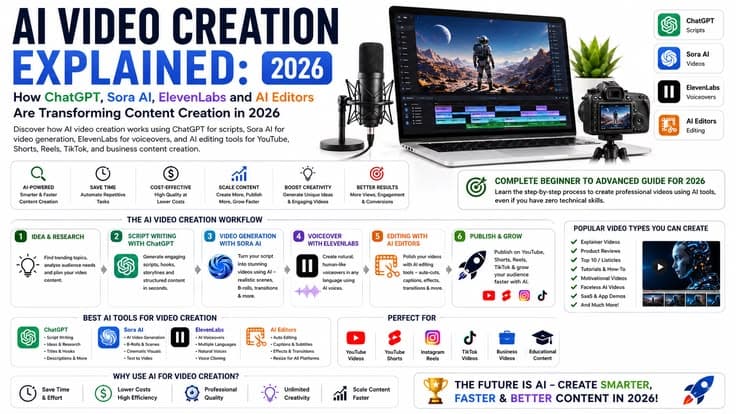
Ab tak hum ne har tool alag alag dekha. Ab inhe ek complete workflow mein milate hain. Yeh 6-step process follow karke aap kisi bhi type ki video bana sakte hain — YouTube, Reels, TikTok, ya business marketing.
Phase 1: Idea aur Script
ChatGPT mein jaao aur apne topic ke baare mein detailed prompt type karo. Platform specify karo. Audience specify karo. Tone specify karo. Script generate karwao. Phir ChatGPT se hi scene-wise visual prompts bhi generate karwao. Yahan se saari cheezon ka base tayar ho jata hai.
Phase 2: Visual Reference Board
Pehle directly video generate karna galti hoti hai. Pehle LTX Studio ya Midjourney mein static reference images banao. Character kaise dikhega, background kya hogi, color palette kya hogi — yeh sab images mein define karo. Phir yeh images Sora mein reference ke taur par use karo. Isse consistency aati hai.
Phase 3: Video Generation
Sora ya Kling mein visual prompts paste karo. Reference images upload karo. Settings adjust karo. Clips generate karo. Ek baar mein puri video generate karne ki koshish mat karo. Har scene alag generate karo aur quality check karo. Waste clips dobara generate karo.
Phase 4: Voiceover Production
Script ElevenLabs mein paste karo. Best voice choose karo content type ke mutabiq. Generate karo. Audio file download karo. Agar voiceover mein koi word galat pronounce hua toh ElevenLabs mein manually pronunciation fix kar sakte hain.
Phase 5: Editing aur Assembly
CapCut, VEED, ya Adobe Premiere mein naya project kholo. Sab generated clips import karo. Voiceover import karo. Timeline mein arrange karo. Auto captions generate karo. Music add karo. Transitions lagao. Logo aur watermark add karo. Color grading karo. Export karo platform-specific settings mein.
Phase 6: Publishing aur Distribution
Manual publishing thaka deta hai. n8n ya Make.com jaise automation tools se publishing automate kar sakte hain. Ek video ek baar upload karo aur automation tool automatically YouTube, Instagram, TikTok — sab par post kar deta hai. VidIQ se YouTube SEO optimize karo — title, description, tags, aur thumbnail sab kuch.
| Phase | Activity | Primary Tool | Alternative Tool | Time Required |
|---|---|---|---|---|
| Phase 1 | Script + Visual Prompts | ChatGPT | Claude AI | 10 to 20 minutes |
| Phase 2 | Visual Reference Board | Midjourney | LTX Studio, Leonardo.ai | 15 to 30 minutes |
| Phase 3 | Video Clip Generation | Sora AI | Kling AI, Luma Dream Machine | 30 to 60 minutes |
| Phase 4 | Voiceover Production | ElevenLabs | Murf AI, PlayHT | 10 to 15 minutes |
| Phase 5 | Editing + Assembly + Captions | CapCut or Adobe Premiere | VEED.io, Canva | 30 to 60 minutes |
| Phase 6 | Publishing + SEO + Distribution | VidIQ + n8n automation | TubeBuddy + Make.com | 15 to 30 minutes |
AI Video Content Se Paise Kaise Kamayein — Monetization Strategies
AI video creation mein invest karne ka real faida tab hota hai jab content income generate kare. Multiple monetization models available hain AI video creators ke liye. Sirf YouTube AdSense par depend karna 2026 mein samajhdari nahi hai — diversified income strategy zyada stable aur zyada profitable hai.
YouTube Partner Program (YPP)
1,000 subscribers aur 4,000 watch hours puri karne ke baad YPP ke liye apply kar sakte hain. Ad revenue views per CPM rate par depend karta hai. Finance aur business niches mein CPM sabse zyada hota hai. AI content ko monetize karne ke liye original creative value add karna zaroori hai — warna YouTube demonetize kar deta hai.
Affiliate Marketing
AI tools, software, online courses aur products ka review karo aur affiliate links description mein rakho. Har sale par commission milta hai. AI tools ki affiliate programs mein commissions bohot achche hote hain kyunke yeh subscription-based products hain.
AI Video Agency Banana
Agar aap khud AI videos bana sakte hain toh businesses ke liye bhi bana sakte hain. Ek 60-second marketing video ke liye clients $200 se $1000 tak dene ko tayar hain. Local restaurants, clinics, salons, e-commerce stores — sab ko marketing videos chahiye hain. Yeh service sell karo Fiverr, Upwork, ya seedha clients ko.
| Monetization Method | Potential Monthly Income | Time to First Income | Required Audience Size | Difficulty Level |
|---|---|---|---|---|
| YouTube AdSense (YPP) | $100 to $5,000+ | 3 to 6 months | 1,000 subscribers minimum | Medium (takes time) |
| Affiliate Marketing | $200 to $3,000+ | 1 to 3 months | Even small audience works | Low-Medium |
| AI Video Agency / Freelancing | $500 to $10,000+ | Immediate (first client) | No audience needed | Low (skill-based) |
| Digital Products (Courses/Presets) | $300 to $5,000+ | 1 to 2 months | Small engaged audience | Medium |
| Brand Sponsorships | $500 to $10,000+ | 6 to 12 months | 10,000+ subscribers ideally | High (needs credibility) |
| Stock AI Video Selling | $50 to $500 | Immediate after upload | No audience needed | Very Low |
AI Video Creation Ka Future: 2026 aur Aage Kya Hoga
AI video technology ka evolution ek explosive curve par hai. Jis cheez ko aaj advance samjha ja raha hai woh agle saal average ban jayegi. Yahan kuch major trends hain jo AI video creation ko 2027 aur 2028 mein reshape karenge.
Real-Time AI Video Generation
Abhi video generate karne mein kuch minutes lagte hain. Agle 1 to 2 saalon mein real-time video generation possible hoga. Matlab aap type karte jaoge aur video usi waqt generate hoti chali jayegi. Yeh live streaming aur interactive content ke liye revolutionary hoga.
AI Avatars Jo Bilkul Real Lagein
HeyGen aur Synthesia ke avatars abhi bhi thoda uncanny valley effect dete hain — lagbhag real lekin completely real nahi. 2027 tak yeh avatars itne realistic ho jayenge ke koi fark nahi kar payega. Yeh marketing, education aur entertainment ke liye doors khol dega.
Fully Automated AI Video Channels
Abhi bhi human input chahiye — prompt type karna, quality check karna, final publish karna. Future mein fully automated pipelines hongi jahan AI khud trending topics dhundega, script likhega, video banayega, SEO optimize karega aur publish karega. Human ka kaam sirf strategy aur monetization management hoga.
| Capability | Current State (2026) | Near Future (2027-2028) | Long-Term Vision (2030+) |
|---|---|---|---|
| Video Generation Speed | Minutes per clip | Seconds per clip | Real-time generation |
| Character Consistency | Good with reference images | Excellent, automatic | Perfect across all scenes |
| Avatar Realism | Very good, minor uncanny feel | Indistinguishable from real | Fully photorealistic |
| Automation Level | Semi-automated, needs prompts | Mostly automated workflows | Fully autonomous content |
| Multi-Language Support | Good dubbing tools available | Perfect sync dubbing | Real-time translation video |
| Cost Per Video | $2 to $20 per video | $0.50 to $5 per video | Near zero marginal cost |
Conclusion: AI Video Creation Mein Abhi Shuru Karein
AI video creation ab kisi expert ka haq nahi raha. 2026 mein yeh technology itni accessible ho gayi hai ke koi bhi — student ho, freelancer ho, business owner ho, ya content creator — ise use kar sakta hai.
ChatGPT scripts likhta hai, Sora AI visuals banata hai, ElevenLabs professional voiceover deta hai, aur CapCut ya VEED editing karta hai. In char tools ka combination ek aise pipeline banata hai jo pehle poori production team ka kaam akele karta tha.
Sabse badi galti jo naye creators karte hain woh yeh hai ke tools ki value samjhne ki jagah tools seekhne mein hi atak jate hain. Sach yeh hai ke tools simple hain — seedha start karo. Pehla video perfect nahi hoga, lekin woh aapki learning hogi. Doosra behtar hoga. Teesra aur behtar. Yahi sach mein mastery ka rasta hai.
AI video creation sirf content banana nahi hai — yeh ek business model hai, ek creative outlet hai, aur ek powerful skill hai jo 2026 aur aage bhi demand mein rahegi. Aaj ki investment kal ki opportunity hai.